If you need a desktop that can keep multiple apps, browser tabs, and work tools moving at once, the right spec mix matters more than flashy branding. The best desktop computers for multitasking balance a capable processor, enough RAM, and fast storage.
Below, you’ll find a focused roundup of 10 options for home offices, business use, and heavier productivity setups, with choices that favor speed, stability, and practical value.
Best 10 Desktop Computers for Multitasking Picks for 2026
AI Productivity Tower

- Core Ultra 7 with built-in AI features
- Supports up to four FHD or two 4K displays
- 32GB DDR5 RAM and easy tool-less upgrades
Best For: Users who want a secure, multi-monitor tower for productivity
Business Multitasker

- Ryzen 7 8700G with 8 cores and 16 threads
- 32GB DDR5 RAM plus 1TB SSD
- Windows 11 Pro with Wi-Fi 6 and Bluetooth
Best For: Professionals who need a responsive, business-ready desktop
Expandable Everyday Tower

- 13th Gen Core i5-13400 with 10 cores
- 16GB RAM and 512GB PCIe Gen 4 SSD
- Wi-Fi 6E, Bluetooth 5.3, and Windows 11 Pro
Best For: Everyday users who want a solid, upgradeable work tower
Budget Refurbished Workhorse

- Core i5-8500 with Windows 11 Pro
- 1TB SSD and built-in Wi-Fi/Bluetooth
- Renewed desktop with full-sized keyboard
Best For: Shoppers who want a lower-cost refurbished desktop for everyday use
Best for Easy Setup
HP ProDesk 600 G6 SFF 16GB/512GB

- 6-core Intel Core i5 for everyday office work
- 16GB DDR4 RAM and 512GB NVMe SSD
- Supports multiple displays with dedicated graphics
Best For: Office productivity and dual-monitor business setups
Renewed Performance Pick
Dell OptiPlex 7050 SFF i7/32GB/1TB

- Core i7-7700 with 32GB DDR4 RAM
- 1TB SSD for fast boot and roomy storage
- Dual-monitor support with HDMI and DisplayPort
Best For: Heavy office multitasking with renewed value
Compact Power Choice
ACEMAGIC M5 Mini PC Core 5 220H 24GB/512GB
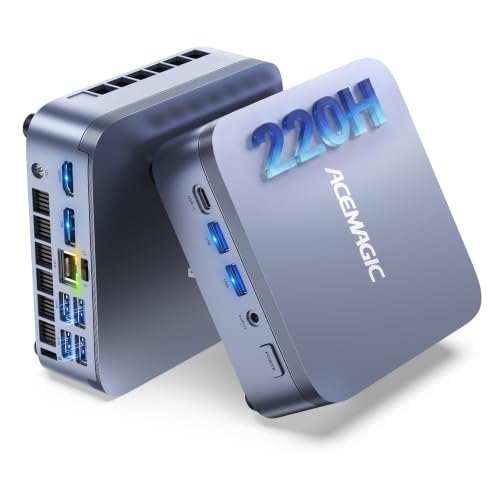
- 12-core Intel Core 5 220H for sustained multitasking
- 24GB LPDDR5 memory with dual SSD slots
- Triple-display output and WiFi 6 connectivity
Best For: Space-saving multitasking and professional desk setups
Budget-Friendly Small Office Pick
HP ProDesk 400 SFF for Everyday Multitasking

- 16GB DDR4 RAM for smoother daily multitasking
- 256GB PCIe SSD + 1TB HDD for speed and capacity
- Compact SFF design with dual 4K display support
Best For: Small offices and home users needing a compact, practical multitasking desktop
Refurbished Productivity Value
Dell OptiPlex 7060 for Smooth Multitasking

- 6-core i7-8700 handles everyday productivity well
- 32GB RAM and 512GB NVMe SSD boost responsiveness
- Dual DisplayPort outputs support two-monitor setups
Best For: Refurbished office and home productivity setups that need strong multitasking
Best Performance Upgrade
Dell OptiPlex 7070 for Heavy Multitasking

- 8-core i7-9700 delivers strong multitasking performance
- 32GB RAM and 1TB NVMe SSD keep work moving fast
- Wi-Fi 6E and dual DisplayPort support add flexibility
Best For: Power users who want the fastest multitasking performance here
AI Productivity Tower – Dell Core Ultra 7 Desktop
If you’re comparing desktop computers for multitasking, this Dell tower stands out for its Intel Core Ultra 7 processor and 32GB of DDR5 memory. It is built for business, education, and multimedia use, with support for multiple monitors so you can spread work across several windows without constantly switching tabs.
Best For: Professionals and home users who want a secure, upgrade-friendly desktop for heavy everyday multitasking.
Pros:
- Intel Core Ultra 7 processor with built-in AI features for productivity-focused workloads
- Supports up to four FHD monitors or two 4K displays for expanded workspace
- 32GB DDR5 RAM and SSD storage help keep apps responsive
- Tool-less entry and a removable side panel make upgrades easier
Cons:
- Integrated graphics are best suited for productivity rather than demanding gaming or creative work
- Windows 11 Home is less business-focused than Pro editions
- No fingerprint reader is listed for biometric security
This is a practical choice if your priority is smooth multitasking, monitor flexibility, and easy maintenance in a modern tower design. It also adds business-friendly touches like TPM security and onsite support.
Business Multitasker – HP Ryzen 7 Pro Tower
For desktop computers for multitasking, this HP OmniDesk is built around a Ryzen 7 8700G processor, 32GB of DDR5 memory, and a 1TB SSD. It is positioned for professionals, with Windows 11 Pro, Wi-Fi 6, Bluetooth, and a wide spread of front and rear ports for everyday work setups.
Best For: Office users and professionals who need fast responsiveness, strong connectivity, and business-ready Windows features.
Pros:
- Ryzen 7 8700G offers 8 cores and 16 threads for smooth multitasking
- 32GB DDR5 memory and 1TB SSD support quick loading and storage room
- Windows 11 Pro adds security and management tools for business use
- Wi-Fi 6, Bluetooth, and many USB ports improve connectivity
Cons:
- Integrated graphics are not aimed at high-end gaming or content creation
- The unit has been opened for upgrade purposes, which may matter to some buyers
- Warranty details differ between upgraded parts and original components
Overall, this HP is a strong fit if you want a dependable work tower with generous memory and storage. Its mix of productivity hardware and business-oriented software makes it easy to recommend for daily multitasking.
Expandable Everyday Tower – Acer Core i5 Desktop
This Acer Aspire tower is a practical pick among desktop computers for multitasking if you want solid everyday performance without overcomplicating the setup. Its 13th Gen Intel Core i5-13400 processor, 16GB of DDR4 memory, and PCIe Gen 4 SSD are aimed at smooth business, everyday, and multimedia use.
Best For: Buyers who want a capable, easy-to-expand desktop for general work and home multitasking.
Pros:
- 13th Gen Intel Core i5-13400 provides 10-core performance for everyday workloads
- 16GB DDR4 RAM and PCIe Gen 4 SSD keep the system responsive
- Windows 11 Pro adds business-friendly security and management features
- Wi-Fi 6E, Bluetooth 5.3, and multiple video outputs improve flexibility
Cons:
- 16GB RAM is useful, but power users may want to upgrade to the 32GB maximum
- Integrated Intel UHD Graphics 730 is better for productivity than graphics-heavy work
- Storage is 512GB, which may feel limited for larger file libraries
In short, this Acer balances speed, expandability, and a straightforward feature set. It makes sense if you need a reliable multitasking desktop for office tasks, web work, and media use.
Budget Refurbished Workhorse – Dell Optiplex 3060
If you’re shopping for desktop computers for multitasking on a tighter budget, this renewed Dell Optiplex 3060 offers a straightforward work-first setup. It pairs an Intel Core i5-8500 processor with 32GB of DDR4 cache memory and a 1TB SSD, plus built-in Wi-Fi and Bluetooth for easy home or office use.
Best For: Budget-minded buyers who want a refurbished desktop for everyday productivity and basic multitasking.
Pros:
- 32GB of installed DDR4 cache memory helps support smoother daily use
- 1TB SSD provides generous storage for files and programs
- Built-in Wi-Fi and Bluetooth simplify wireless connectivity
- Includes Windows 11 Pro and a full-sized keyboard with numeric keypad
Cons:
- Listed installed RAM is 8GB, which is lower than some multitasking-focused desktops
- Processor is an older Intel Core i5-8500 from 2018
- 90-day warranty is shorter than new desktop options
This Dell makes sense when price and storage matter more than cutting-edge hardware. It is best viewed as a practical renewed PC for light-to-moderate multitasking rather than a high-performance workstation.
Best for Easy Setup – HP ProDesk 600 G6 SFF 16GB/512GB
If you want desktop computers for multitasking in a business setting, the HP ProDesk 600 is built for steady day-to-day work. Its 6-core Intel Core i5, 16GB of DDR4 memory, and 512GB PCIe NVMe SSD should keep office apps, spreadsheets, and file-heavy tasks moving without unnecessary delays.
Best For: Business users who need a compact desktop for office productivity, dual-monitor workflows, and dependable everyday performance.
Pros:
- 6-core Intel Core i5 with up to 4.30GHz turbo for responsive productivity work
- 16GB DDR4 RAM helps smooth multitasking across business applications and data tasks
- 512GB NVMe SSD supports fast boot times and quick file access
- Dedicated GeForce graphics with HDMI, DVI-I, and VGA support for multiple monitors
Cons:
- Graphics hardware is entry-level rather than suited for demanding creative workloads
- Microtower design is compact, but still more visible than an ultra-small mini PC
Overall, this ProDesk is a practical pick if your priority is reliable office multitasking rather than high-end media or gaming performance. The included keyboard, mouse, WiFi adapter, and Windows 11 Pro make it ready for a workstation-style setup right away.
Renewed Performance Pick – Dell OptiPlex 7050 SFF i7/32GB/1TB
This Dell OptiPlex 7050 is a strong option among desktop computers for multitasking if you want more memory and storage headroom. With an Intel Core i7-7700, 32GB of DDR4 RAM, and a 1TB SSD, it is set up for heavy browser use, office workloads, and large files while still booting quickly.
Best For: Users who want a renewed small-form-factor desktop for demanding office work, large multitasking loads, and 4K monitor support.
Pros:
- Intel Core i7-7700 and 32GB DDR4 RAM for robust multitasking capacity
- 1TB SSD offers fast boot times plus generous storage space
- HDMI and DisplayPort output with dual-monitor support
- Includes WiFi, Bluetooth, keyboard, mouse, and Windows 11 Pro
Cons:
- Renewed condition may not appeal to buyers who want brand-new hardware
- 4-core processor is older than newer desktop CPUs
For buyers focused on value, this OptiPlex stands out by pairing a large SSD with plenty of RAM in a compact chassis. It is a sensible choice for multitaskers who want a proven business desktop with accessories included and certified renewal support.
Compact Power Choice – ACEMAGIC M5 Mini PC Core 5 220H 24GB/512GB
The ACEMAGIC M5 is aimed at desktop computers for multitasking where desk space matters as much as speed. Its Intel Core 5 220H, 24GB of LPDDR5 memory, and dual SSD support are designed for smooth handling of browser-heavy work, virtual machines, coding, and other concurrent workloads in a very small footprint.
Best For: Professionals who want a compact Windows 11 Pro mini PC for intensive multitasking, remote work, and tidy desk setups.
Pros:
- Intel Core 5 220H with 12-core/16-thread design for sustained productivity performance
- 24GB LPDDR5 memory supports responsive multitasking and heavy tab use
- Dual M.2 slots allow flexible SSD expansion up to 4TB total
- WiFi 6, Bluetooth 5.2, USB-C, HDMI, DP, and triple-display support
Cons:
- 24GB memory is factory-soldered and not upgradable
- Very compact design may be less serviceable than a traditional tower
This mini PC is the most space-efficient option in the group, but it still brings business-friendly features like Windows 11 Pro, VESA mounting, and rich connectivity. If you need a small machine that can stay busy all day without taking over your desk, it fits the brief well.
Budget-Friendly Small Office Pick – HP ProDesk 400 SFF for Everyday Multitasking
If you want desktop computers for multitasking without taking up much desk space, the HP ProDesk 400 SFF is a practical business-focused option. Its 16GB of DDR4 memory and mixed 1TB HDD plus 256GB PCIe SSD storage are aimed at keeping everyday work responsive, while the compact small-form-factor design helps it fit neatly in an office or home setup.
Best For: Small offices, home workstations, and users who want a compact Windows 11 Pro desktop for routine multitasking.
Pros:
- 16GB DDR4 RAM supports smoother multitasking and general responsiveness
- 256GB PCIe SSD helps with faster boot-ups and file access, with 1TB HDD for extra storage
- Dual 4K display support plus HDMI and DisplayPort make it flexible for dual-monitor work
- Compact SFF case and included wired keyboard/mouse simplify setup
Cons:
- Intel Celeron G5905 is a modest processor for heavier workloads
- HDD storage is slower than an all-SSD configuration for large file tasks
Overall, this HP model makes sense if your priority is a space-saving business desktop with enough memory and storage for day-to-day productivity. It is better suited to office tasks and web-based multitasking than demanding creative or compute-heavy work.
Refurbished Productivity Value – Dell OptiPlex 7060 for Smooth Multitasking
The Dell OptiPlex 7060 is a strong choice if you are comparing desktop computers for multitasking and want more processing headroom than entry-level business systems. Its 6-core Intel Core i7-8700, 32GB of RAM, and 512GB NVMe SSD are built for fast everyday productivity, while the small-form-factor case keeps it suitable for desks with limited space.
Best For: Office users, remote workers, and anyone who wants a refurbished multitasking desktop with solid speed and room to expand.
Pros:
- 6-core Core i7-8700 supports efficient multitasking and productivity workloads
- 32GB DDR4 RAM provides plenty of memory for heavy tabbing and office apps
- 512GB NVMe SSD improves boot speed and application loading
- Dual DisplayPort support and included wireless keyboard/mouse add convenience
Cons:
- Renewed unit with a 90-day limited warranty, so long-term coverage is limited
- Older 8th-gen platform may not appeal to buyers wanting the newest hardware
This OptiPlex is a balanced refurb pick for buyers who value RAM, SSD speed, and a proven business design. It is especially appealing for office workflows where reliability and multitasking matter more than cutting-edge specs.
Best Performance Upgrade – Dell OptiPlex 7070 for Heavy Multitasking
For shoppers focused on desktop computers for multitasking, the Dell OptiPlex 7070 stands out with its 8-core Intel Core i7-9700, 32GB of RAM, and 1TB NVMe SSD. That combination gives it the kind of headroom that suits busier workdays, faster app launches, and smoother switching between multiple tasks, all in a small form factor desktop.
Best For: Power users, office professionals, and multitaskers who want a fast renewed business desktop with plenty of memory and storage.
Pros:
- 8-core i7-9700 offers strong multitasking performance up to 4.7GHz
- 32GB DDR4 RAM helps keep multiple apps and browser tabs running smoothly
- 1TB NVMe SSD provides fast storage and generous capacity
- Wi-Fi 6E and dual DisplayPort support add modern connectivity flexibility
Cons:
- Renewed condition may not suit buyers who want a brand-new desktop
- Integrated graphics are fine for office use, but not ideal for graphics-heavy work
Among these three, this Dell is the most capable all-around multitasking option thanks to its newer 8-core processor and larger NVMe drive. It is a smart pick if you want a business desktop that feels more future-ready while still staying compact.
How We Picked These Desktop Computers for Multitasking
We prioritized systems that are well suited to real-world multitasking: strong CPU performance, at least 16GB of RAM, SSD-based storage, and connectivity that supports modern work setups. We also looked for models that offer a sensible path for long-term use, whether that means more memory, faster storage, or dual-display support.
Quick Comparison
For pure performance, the newer Intel Core Ultra, Ryzen 7, and Core i7-based models stand out for heavier multitasking and more demanding app switching. Midrange systems with 16GB RAM and SSD storage are usually enough for office work, school, video calls, and dozens of browser tabs. Mini PCs can save space, while SFF towers often give better upgrade flexibility.
Key Buying Factors for Desktop Computers for Multitasking
Processor
Choose a modern CPU with enough cores and threads for your workload. If you regularly run spreadsheets, cloud apps, meetings, and creative tools at the same time, a newer i7, Ryzen 7, or equivalent chip is a safer bet than an older entry-level processor.
Memory
RAM is one of the most important upgrades for multitasking. Sixteen gigabytes is a solid baseline for most buyers, but 32GB is preferable if you keep many tabs open, use virtual meetings heavily, or work with large files.
Storage
SSD storage makes a major difference in responsiveness. NVMe SSDs are fastest, but even a standard SSD is far better than a hard drive for boot times, app launches, and file access. If you need lots of local storage, make sure capacity is sufficient from the start.
Display and Connectivity
Dual-monitor support, Wi-Fi, Bluetooth, and USB-C or HDMI outputs can improve productivity a lot. These features help you build a cleaner setup and keep peripherals connected without adapters.
Who Should Buy Which Desktop Computers for Multitasking?
If you want the best overall multitasking performance, look for the newest, highest-spec towers in the list with 32GB RAM and fast SSDs. If you’re shopping for office or business use, a reliable ProDesk or OptiPlex with 16GB to 32GB RAM is often the best value. If space is limited, a mini PC can still handle everyday multitasking well, provided the processor and memory are strong enough.
For most buyers, the sweet spot is a desktop with a modern midrange or better processor, 16GB to 32GB of RAM, and SSD storage. That combination delivers the smooth, lag-free experience most multitaskers actually need.