Useful productivity gifts can make everyday work more comfortable, organized, or focused. This selection ranges from desk upgrades to tools for handling documents and ideas.
Productivity Gifts for Work, Study, and Creative Projects
1. INNOCN 34-Inch Ultrawide Monitor
A Wider View for Multitasking
INNOCN 34-Inch Ultrawide Monitor

- 34-inch 21:9 display provides room for side-by-side windows and editing timelines.
- Picture-in-picture and picture-by-picture modes can show two connected devices.
- Height and tilt adjustments help tailor the screen position.
Best For: Multitaskers, analysts, and creators who work across several windows
2. TRALT Ergonomic Mesh Office Chair
A Desk Seat Built for Long Sessions
TRALT Ergonomic Mesh Office Chair
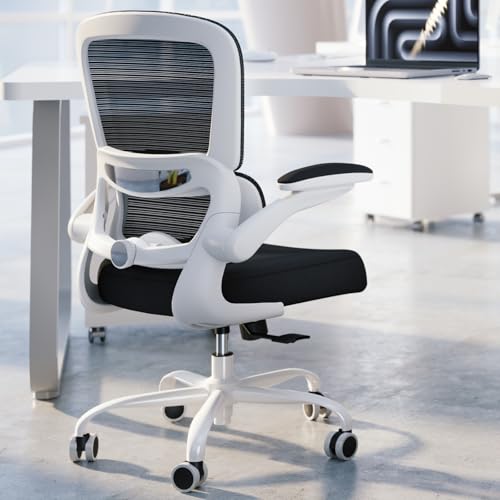
- Adjustable lumbar support lets the sitter change the support depth.
- Breathable mesh back and molded foam seat are designed for desk comfort.
- Seat height adjusts from 17.7 to 21.7 inches.
Best For: Remote workers and people who spend long hours at a desk
3. ErGear Electric Standing Desk, 48 x 24 Inches
A Flexible Sit-Stand Workstation
ErGear Electric Standing Desk, 48 x 24 Inches

- Electric adjustment moves the desk between 28.35 and 46.46 inches.
- Four memory presets save preferred desk heights.
- Steel frame and engineered wood top create a freestanding work surface.
Best For: Desk workers who want flexibility in their work setup
4. Acer 13-in-1 USB-C Docking Station
A Hub for a Laptop-Centered Desk
Acer 13-in-1 USB-C Docking Station

- Includes two HDMI ports, one DisplayPort, USB ports, Ethernet, and SD/TF readers.
- The included 110W adapter supplies up to 100W to a connected laptop through USB-C PD.
- Display support depends on the laptop; macOS supports mirroring rather than extended desktops across multiple displays.
Best For: Laptop users seeking a more connected desk setup, after checking device compatibility
5. X9 Performance Split Ergonomic Keyboard
6. Nulea M501 Wireless Trackball Mouse
Precise Control for a Compact Desk
Nulea M501 Wireless Trackball Mouse

- Thumb-operated trackball controls the cursor without moving the mouse across the desk.
- Connects to up to three devices by Bluetooth or USB receiver.
- Four DPI levels and six buttons provide cursor and navigation controls.
Best For: Desk workers who want trackball control in a small workspace
7. LED Desk Lamp with Wireless Charging
Light and Charging in One Spot
LED Desk Lamp with Wireless Charging

- Touch controls select 3000K, 4000K, or 5000K light and dim brightness.
- Adjustable tube directs light toward reading or desk work.
- Built-in 10W wireless charging supports compatible iPhone and Android phones.
Best For: People upgrading a home-office or study desk
8. Nelko P21 Bluetooth Label Maker
A Handy Tool for Desk Organization
Nelko P21 Bluetooth Label Maker

- Bluetooth connection pairs the label maker with iOS and Android phones through its app.
- App templates and icons support custom labels for supplies, folders, and storage.
- Prints monochrome text using thermal technology without ink or toner.
Best For: Organizers managing home-office, classroom, or small-business supplies
9. HP LaserJet Pro 3101sdw All-in-One Printer
A Practical Printer for Paperwork
HP LaserJet Pro 3101sdw All-in-One Printer

- Prints, copies, and scans black-and-white documents, with wireless printing support.
- Automatic two-sided printing and a 50-sheet document feeder help handle batches.
- The 250-sheet input tray supports regular document printing.
Best For: Students, home-office workers, and small teams that print regularly
10. Amazon Kindle Scribe 64GB
A Paper-Like Space for Notes

- 11-inch glare-free display has a front light and paper-like writing surface.
- Included pen works without charging and has an eraser and shortcut button.
- Built-in notebooks support handwritten notes, summaries, and document markups.
Best For: Readers and professionals who take notes in meetings or while studying
11. SanDisk 2TB Extreme Portable SSD
Portable Space for Large Files
SanDisk 2TB Extreme Portable SSD

- 2TB capacity stores work, study, and creative files on a portable drive.
- USB connectivity supports compatible desktops, laptops, and tablets.
- Includes password protection with 256-bit AES hardware encryption.
Best For: Photographers, students, and professionals who carry large files
12. Bose QuietComfort Wireless Headphones
A Quieter Listening Space
Bose QuietComfort Wireless Headphones

- Noise cancellation and Quiet and Aware modes give options for listening surroundings.
- Over-ear cushions and a padded band are designed for extended listening sessions.
- Bluetooth multipoint supports switching between connected devices.
Best For: People who want fewer audio distractions at work or during commutes
13. IPEVO V4K USB Document Camera
A Clear View for Demonstrations

- 8-megapixel camera captures images up to 3264 x 2448 pixels.
- Multi-jointed stand positions documents or objects under the camera.
- Works with Mac, PC, and Chromebook software for demonstrations or video meetings.
Best For: Teachers, tutors, and presenters who show documents or objects on video
14. Epson WorkForce ES-590W Document Scanner
A Faster Route from Paper to Files
Epson WorkForce ES-590W Document Scanner

- Scans both sides of documents in one pass at up to 45 pages per minute.
- 100-sheet automatic document feeder handles a stack of pages.
- Wi-Fi and USB connections support scanning from a computer or mobile device.
Best For: Home-office workers handling forms, receipts, and paper records
Choosing Productivity Gifts for This Recipient
Start with the task that regularly slows the recipient down. Someone switching between documents, research, and creative software may appreciate a larger display or a laptop dock. A writer or programmer may use a comfortable keyboard every day, while a person managing paper forms could benefit more from a document scanner. The strongest productivity Christmas gift ideas fit an existing routine instead of asking the recipient to adopt a complicated new one.
Consider the whole workstation before choosing a large item. A monitor can make room for more windows, but it needs desk space and compatible video connections. An adjustable desk can change between sitting and standing, though the room needs space for its 48-by-24-inch top. A chair is a personal fit: check seat dimensions and height range against the recipient’s desk and stature where possible. Smaller tools such as a trackball mouse, lamp, label maker, or headphones are easier to place and can solve a specific daily annoyance.
Match the Gift to Your Budget
For a modest gift, focus on useful accessories and small improvements: a desk lamp with wireless charging, a label maker, or a trackball mouse. These can make a workstation tidier or more convenient without requiring a room redesign. A keyboard is another personal but practical option for someone who types frequently.
Midrange gifts can address larger workflow needs. A portable SSD gives a mobile worker dedicated file storage, while a document camera can help a teacher or presenter show pages during online sessions. For regular paper handling, a scanner can reduce the effort of converting receipts and forms into digital records. A printer makes sense for someone who often needs physical copies. For larger purchases such as an ergonomic chair, standing desk, monitor, or headphones, think about which one would improve the most hours of the recipient’s week rather than judging by feature count alone.
Check Compatibility and Personalization
Before choosing electronics, confirm the recipient’s devices and setup. The Acer dock’s display capabilities depend on the connected laptop and graphics support; its multiple displays mirror on macOS rather than extending as separate desktops. Check for a compatible USB-C port and the display outputs needed. For the keyboard, confirm the preferred connection and operating system. The label maker pairs with iOS or Android phones through its app, but it does not connect to computers and has a stated incompatibility with Google Pixel phones running Android 14.
For storage, verify the recipient can connect a USB drive to their computer or tablet. With the Kindle Scribe, consider whether handwritten notes and reading on a dedicated device match their habits. A desk lamp’s wireless charging is useful only with a compatible phone. Larger furniture benefits from measuring first: check desk footprint, chair height, and available clearance. If personalization matters, choose based on color and workspace style where the listed product offers a clear option, while keeping the practical fit central.
Timing and Last-Minute Decisions
Plan earlier for gifts that require measurements, compatibility checks, or space: chairs, desks, monitors, docks, and printers. Those details are harder to resolve as Christmas approaches. For a late decision, choose something tied to a need you already know, such as a scanner for someone who regularly handles paperwork or headphones for a commuter who has mentioned noisy travel.
Avoid relying on delivery timing or assuming an item will work with an unverified device. If uncertain, a compact accessory with a clearly understood purpose can be a simpler choice. Productivity is personal: one recipient wants fewer cables, another wants paper notes, and someone else wants a better way to organize files. The most thoughtful gift is the one that makes a familiar workday easier to manage.