Duplicating USB drives one at a time is slow, repetitive, and difficult to manage at scale. The right standalone duplicator can copy, verify, and erase multiple drives simultaneously without requiring a computer.
We selected 10 USB duplicators for bulk copying with different port counts, transfer speeds, media support, and portability levels, making it easier to match your workflow and budget.
Best 10 USB Duplicators for Bulk Copying Picks for 2026
Best Overall Capacity

- 15 target ports for high-volume duplication
- Copy, compare, erase, and error-scan functions
- Standalone operation with LCD controls
Best For: IT teams managing frequent cloning and drive sanitization
Best Compact Workhorse

- Seven target ports for smaller batches
- Standalone bit-by-bit duplication
- Synchronous and asynchronous modes
Best For: Small teams making routine USB copies
Best Erase Flexibility

- 15 ports with broad USB media support
- Four copy and four erase modes
- Handles drives above 2 TB
Best For: Mixed-media copying and sanitization workflows
Best for Large Batches

- 31 target ports for maximum batch capacity
- Standalone bit-by-bit duplication
- Synchronous and asynchronous modes
Best For: High-volume business and production duplication
Best Touchscreen Choice
EZ Dupe SOHO Touch 1-to-10 USB Duplicator

- Duplicates up to 10 USB drives at once
- Touchscreen controls copying, comparison, formatting, and erasing
- Supports USB 2.0, 3.0, and 3.1 flash media
Best For: Repeat USB production workflows that benefit from touchscreen control
Best Compact 1-to-2 Model
BestDuplicator UB300 USB Duplicator

- Copies one USB drive to two targets without a computer
- Supports quick data copying and bit-for-bit cloning
- Includes media tests, verification tools, and erase functions
Best For: Portable, small-batch USB duplication and technician field work
Best High-Output Mini Model

- Copies to up to seven USB drives simultaneously
- Asynchronous copying supports staggered batch work
- Up to 45 MB per second with USB 1.0, 2.0, and 3.0 support
Best For: Compact, higher-volume USB duplication without a computer
Best Compact Eraser

- Copies or erases two USB drives standalone
- Supports file and sector-by-sector copying
- Includes overwrite and copy-verification modes
Best For: Technicians needing duplication and USB sanitizing in a compact unit.
Best Portable 4-Drive Pick

- Copies up to four drives simultaneously
- Listed speed reaches 2.5 GB per minute
- Asynchronous mode supports continuous swapping
Best For: Portable, small-batch USB duplication with flexible power options.
Best High-Capacity Batch Model
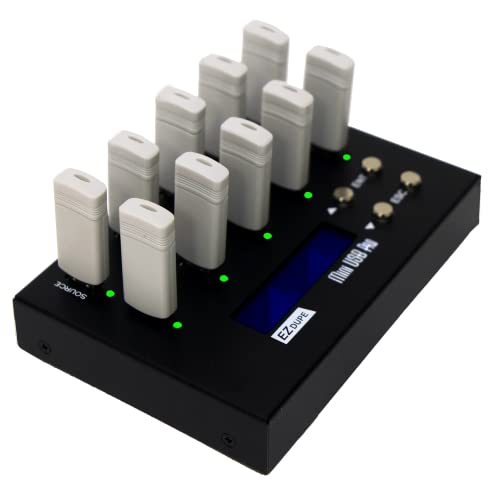
- Copies up to nine USB drives in one batch
- Offers quick and sector-by-sector copy modes
- Includes two erase functions for reuse
Best For: Larger USB duplication runs where nine simultaneous targets save handling time.
Best Overall Capacity – StarTech 1:15 USB Duplicator
For teams seeking usb duplicators for bulk copying, the StarTech 1:15 model combines 15 target ports with standalone operation, multiple copy modes, and drive-erasing tools. It supports USB 2.0 and 3.0 media and includes Copy & Compare verification.
Best For: IT technicians and teams that need to clone, verify, or sanitize up to 15 USB drives without a computer.
Pros:
- Copies to up to 15 USB drives simultaneously.
- Supports file, sector-by-sector, and multiple erase modes.
- LCD menu, error scanning, and Copy & Compare verification.
- Asynchronous copying uses 128 MB of internal memory.
Cons:
- System and file copy speed is listed at 1.5 GB per minute.
- Asynchronous mode is limited to source content under 128 MB.
- Some external USB devices may need their own power source.
This is a versatile choice when bulk duplication and secure drive disposal matter equally. Its verification and monitoring features add useful control for repeatable IT workflows.
Best Compact Workhorse – Systor 1:7 USB Duplicator
The Systor 1:7 is a straightforward option for usb duplicators for bulk copying when seven target drives are enough. It works without a computer or software, offers bit-by-bit duplication, and supports both synchronous and asynchronous modes.
Best For: Small businesses and technicians producing up to seven identical USB copies at a listed rate of up to 2 GB per minute.
Pros:
- Standalone design requires no computer or software.
- Supports bit-by-bit copying for source-drive duplication.
- Offers synchronous and asynchronous copy modes.
- Copy speed is specified to remain consistent as the load count increases.
Cons:
- Seven target ports provide less capacity than larger duplicators.
- Listed transfer speed is up to 33 MB per second.
- Its interface details specify USB 1.1, despite compatibility with USB 2.0 and 3.0 flash drives.
With a modest port count and simple operation, this Systor model suits routine duplication without the footprint of a larger production unit. The included support policy is also notable for ongoing technical assistance.
Best Erase Flexibility – EZ Dupe USB Cyclone
The EZ Dupe USB Cyclone is designed for usb duplicators for bulk copying where media variety and erase controls are priorities. Its 15 ports support USB 1.0 through 3.1 flash media and external HDDs or SSDs, with independent bandwidth design and speeds up to 45 MB per second per slot.
Best For: Businesses and multimedia users handling mixed USB media, large-capacity drives, and repeated copy or sanitization jobs.
Pros:
- Supports flash drives and external HDDs or SSDs up to 15 connected targets.
- Provides four copy modes and four erase modes, including DoD 3-pass and 7-pass.
- Supports capacities above 2 TB with no stated capacity limit.
- Can flag slow drives and includes one-touch copy, compare, erase, and format controls.
Cons:
- Listed transfer speed is up to 45 MB per second and depends on the USB drive.
- External hard drives may require compatible power support.
- Warranty coverage is listed as one year.
This model stands out for flexible media support and unusually broad copy and erase choices. It is a strong fit when a workflow includes more than standard flash-drive cloning.
Best for Large Batches – Systor 1:31 USB Duplicator
For the highest-volume usb duplicators for bulk copying in this roundup, the Systor 1:31 provides 31 target ports and standalone operation. It performs bit-by-bit duplication at speeds up to 2 GB per minute and supports synchronous and asynchronous copying.
Best For: Businesses and production environments that need to create very large batches of identical USB drives.
Pros:
- Supports up to 31 target USB drives at once.
- Requires no computer or software.
- Uses bit-by-bit source-drive duplication.
- Offers synchronous and asynchronous copy modes.
Cons:
- Its large port count may be excessive for occasional or small-batch work.
- Listed transfer speed is up to 33 MB per second.
- Product notes list a USB 1.1 hard-disk interface.
If throughput volume is the main consideration, the 31-port layout minimizes the number of duplication cycles. It favors dedicated production use over compactness or occasional personal copying.
Best Touchscreen Choice – EZ Dupe SOHO Touch 1-to-10 USB Duplicator
For buyers seeking usb duplicators for bulk copying, the EZ Dupe SOHO Touch offers a straightforward 1-to-10 setup with touchscreen controls. It supports USB 2.0, 3.0, and 3.1 flash media, making it a flexible option for recurring duplication, comparison, formatting, and erasure tasks.
Best For: Small businesses, technicians, and teams that want high-capacity USB duplication with an easy touchscreen workflow.
Pros:
- Copies up to 10 USB drives simultaneously.
- Touchscreen provides access to Copy, Compare, Format, and Erase functions.
- Supports all file formats, file sizes, and USB flash-drive capacities.
- Rated copy speed is up to 35 MB per second.
Cons:
- Its 3-pound construction is less portable than compact duplicators.
- Designed for USB flash media rather than a broad range of memory-card formats.
The SOHO Touch is a practical bulk-copying workstation when ease of operation and multiple target ports matter most. Its independent interface and verification tools also make it useful for repeat production and data-management routines.
Best Compact 1-to-2 Model – BestDuplicator UB300 USB Duplicator
The BestDuplicator UB300 is a compact standalone option for usb duplicators for bulk copying when two target drives per cycle are sufficient. It works without a computer and offers both data-only Quick Copy and bit-for-bit Whole Media Copy modes for USB 1.1 and 2.0 media.
Best For: Technicians, schools, and small offices that need portable two-drive duplication and basic media testing.
Pros:
- Copies one source USB drive to two targets simultaneously without a computer.
- Offers Quick Copy and Whole Media Copy modes.
- Includes capacity checking, device information, speed testing, and erase functions.
- Compact design weighs 6.72 ounces.
Cons:
- Handles only two target USB drives per cycle.
- Primarily designed for USB 1.1 and USB 2.0 media.
- Memory-card duplication requires a compatible USB card reader sold separately.
The UB300 favors portability and simple operation over high-volume throughput. Its LCD, navigation buttons, and per-port indicators are useful for field work or smaller duplication batches where standalone operation is important.
Best High-Output Mini Model – EZ Dupe Mini USB Plus MK III
For higher-output usb duplicators for bulk copying, the updated EZ Dupe Mini USB Plus MK III can copy one source to up to seven USB drives at the same time. It is a standalone unit with asynchronous copying, USB 1.0 through 3.0 support, and a listed maximum speed of 45 MB per second.
Best For: Users who need a compact, computer-free duplicator for repeated seven-drive USB batches.
Pros:
- Duplicates up to seven USB flash drives simultaneously.
- Asynchronous copying lets new drives begin without waiting for a full set to finish.
- Updated version claims 25% faster copying than the original, up to 2.5 GB per minute.
- Supports USB 1.0, 2.0, and 3.0 flash drives plus externally powered USB storage.
Cons:
- Actual speed depends on the read/write performance of the connected drives.
- External USB storage devices require their own power source.
- The supplied notes identify the compatible device as a desktop, so portability may be less convenient than its small size suggests.
The Mini USB Plus MK III is a strong middle ground for buyers who need more output than a two-port duplicator but do not want a larger 10-port system. Its asynchronous mode is especially helpful when batches finish at different times.
Best Compact Eraser – StarTech 1:2 USB Duplicator
For technicians seeking USB duplicators for bulk copying, the StarTech USBDUP12 is a compact standalone option that copies to two drives at up to 1.5 GB per minute. It also supports sector-by-sector duplication, file-based copying, drive erasure, and copy-and-compare verification without requiring a computer.
Best For: IT professionals and technicians who need two-drive copying plus USB sanitizing and verification features.
Pros:
- Copies or erases two USB drives without a computer.
- Supports USB 2.0 and 3.0 flash media and external USB storage.
- Offers quick erase, single-pass, and three-pass overwrite modes.
- LCD menu, activity indicators, error scanning, and copy-and-compare verification improve control.
Cons:
- Copies to only two target drives at a time.
- Asynchronous copying is limited to source content under 64 MB.
- Some external USB devices require their own power source.
The StarTech is a strong choice when data erasure and verification matter as much as duplication. Its two-port capacity is modest for larger production runs, but its standalone controls and overwrite options suit maintenance and deployment work.
Best Portable 4-Drive Pick – EZ Dupe Mini USB Plus MK II
The updated EZ Dupe Mini USB Plus MK II is a portable choice for USB duplicators for bulk copying, handling up to four flash drives simultaneously at a listed maximum of 2.5 GB per minute. Its standalone design, broad USB compatibility, and asynchronous mode help keep smaller copying batches moving without a computer.
Best For: Users who want a compact four-target duplicator for flash drives, with flexible power options.
Pros:
- Copies up to four USB flash drives at the same time.
- Updated model offers a listed 25% speed increase over the original version.
- Supports USB 1.0, 2.0, and 3.0 flash media and external USB storage.
- Asynchronous copying allows finished drives to be replaced while others continue copying.
Cons:
- Actual speed depends on the connected drives.
- External USB storage requires its own power source.
- It has fewer target ports than nine-drive duplicators.
This EZ Dupe balances portability and throughput well for small-to-medium copying jobs. The four-port layout is more productive than a two-port unit, while asynchronous operation can reduce idle time between batches.
Best High-Capacity Batch Model – EZ Dupe 1:9 USB Duplicator
For larger batches, the EZ Dupe MiniUSB Pro is one of the more productive USB duplicators for bulk copying, with capacity for up to nine USB drives at once. It supports quick copying of essential files, full sector-by-sector duplication, and two erase functions for reuse and data-sanitizing workflows.
Best For: Organizations that need to duplicate up to nine USB flash drives or compatible external USB devices in one batch.
Pros:
- Copies up to nine USB flash drives simultaneously.
- Supports USB 1.0, 2.0, and 3.0 media plus USB devices.
- Provides both quick file copying and whole-media sector-by-sector copying.
- Includes two erase functions and supports external USB-powered hard drives up to 2TB.
Cons:
- Listed copy speed is 2 GB per minute, slower than the updated four-drive model’s maximum.
- External hard drives must have their own power source.
- It is less compact than the portable Mini USB Plus MK II.
The MiniUSB Pro is the practical pick when minimizing per-batch handling matters more than portability. Its nine target ports and sector-level copy mode make it well suited to repeat deployments, while the erase functions add useful lifecycle flexibility.
How We Picked the Best USB Duplicators for Bulk Copying
We evaluated these USB Duplicators for Bulk Copying based on simultaneous target capacity, stated transfer speed, source compatibility, standalone operation, copying and erasing functions, interface usability, and portability. We also considered whether each model is better suited to occasional office use, production environments, field work, or higher-volume deployment.
Because advertised speeds can vary with source media, file size, and drive quality, treat throughput ratings as useful comparisons rather than guaranteed real-world results. A duplicator’s actual output is often limited by the slowest connected drive.
Quick Comparison
| Best For | What to Look For |
|---|---|
| Small offices and occasional jobs | 1:2 or 1:4 capacity, simple controls, compact design |
| Routine departmental batches | 1:7 to 1:10 capacity and standalone operation |
| Higher-volume production | 1:15 or 1:31 capacity, strong cooling, and efficient workflow controls |
| Drive recycling and security | Built-in erase or sanitization modes with clear status feedback |
| Portable or field deployment | Mini form factor, low setup complexity, and broad USB compatibility |
Key Buying Factors for USB Duplicators for Bulk Copying
Port Count and Workflow Speed
Choose capacity based on the number of finished drives you need per batch, not just the maximum advertised ports. A smaller unit may be more practical when jobs are irregular, while a 1:15 or 1:31 system can reduce handling during recurring production runs.
Copy Method and Source Compatibility
Check whether the unit performs whole-drive duplication, file-system-aware copying, or both. Whole-drive copying is useful for bootable media and exact replicas, but the target drives may need to match or exceed the source capacity. Confirm support for the USB generations and drive types in your inventory.
Speed, Verification, and Reliability
Higher stated transfer rates can shorten batches, but verification options are equally important when distributing installation media, training materials, or customer data. Look for clear progress indicators, independent port handling, and stable operation during long runs.
Erasing and Sanitization
If drives are reused, an integrated erase or sanitizer function can simplify asset turnover. Review the available erase modes and any compliance requirements before relying on a consumer-oriented duplicator for sensitive data.
Controls and Physical Design
LCD or touchscreen menus can make source selection, copying, comparison, and erasing easier for occasional operators. Also consider port spacing, power requirements, ventilation, and whether the enclosure is suitable for a permanent workstation or transport.
Who Should Buy Which USB Duplicators for Bulk Copying?
Choose a compact 1:2 or 1:4 model for occasional backups, classroom distribution, or small-office tasks. A 1:7 or 1:10 duplicator is a practical middle ground for IT departments, repair shops, and regular content distribution. For event production, software deployment, or large recurring batches, a 1:15 or 1:31 system can minimize loading and unloading. If your priority is drive reuse, select a model with dedicated erasing or sanitization controls. Finally, mobile technicians and field teams should favor mini standalone units that deliver the required port count without adding unnecessary bulk.