A reliable uninterruptible power supply can keep your workstation running through brief outages, protect sensitive electronics from power disturbances, and give you time to save work safely. The right model depends on your computer’s power draw, connected peripherals, runtime needs, and available space.
We selected 10 UPS battery backups for workstation setups, including compact units for home offices, sine-wave models for modern power supplies, and higher-capacity options for professional equipment.
Best 10 Ups Battery Backup for Workstation Picks for 2026
Best Pure-Sine Workstation Pick

- 1500VA/1000W pure sine wave output
- 12 outlets with six battery-backup outlets
- Color LCD, AVR, and USB-A/USB-C charging
Best For: Active PFC workstations needing pure sine wave power
Best Compact Office Option

- 390W capacity for lighter workstation loads
- Eight outlets, with four battery-backed
- Replaceable battery and status indicators
Best For: Small home-office setups and essential peripherals
Best Value 1500VA Model

- 1500VA/900W capacity with AVR
- 12 outlets and USB-A/USB-C charging
- Color LCD with three-year warranty
Best For: General workstations seeking capacity and monitoring
Best Premium Workstation Protection

- 1500VA/900W pure sine wave output
- AVR and six battery-backed outlets
- USB-C/A, replaceable battery, and data-line protection
Best For: High-end workstations and sensitive connected equipment
Rack-Ready Workstation Power

- 1500VA/900W capacity with eight outlets
- AVR and replaceable battery
- Rack-mount or tower installation
Best For: Rack-mounted workstations and small servers
High-Capacity Desktop Protection

- 1500VA/900W tower UPS
- Ten outlets with five battery-backed
- AVR and Active PFC compatibility
Best For: Home and office workstations with multiple peripherals
Compact Eco-Friendly Backup

- 850VA/510W compact UPS
- Six battery-backed and six surge-only outlets
- ECO mode manages peripheral power
Best For: Compact, lower-power workstation setups
Best Compact Pick
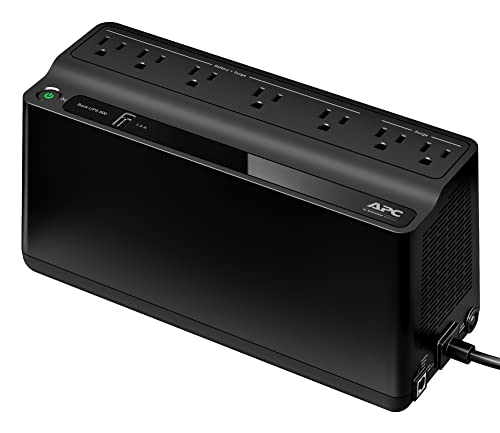
- 330W capacity for compact workstations
- 23 minutes at a 100W load
- Replaceable internal battery
Best For: Home-office workstations, routers, and NAS devices
Best Long-Life Upgrade
GOLDENMATE 1000VA/800W Lithium UPS

- 800W pure sine wave output
- LiFePO4 battery rated for 10+ years
- Eight battery-backed outlets
Best For: Workstations and network equipment needing higher capacity
Best Value Office Pick

- 360W standby backup capacity
- Eight outlets and two USB ports
- Three-year battery-inclusive warranty
Best For: Basic home-office workstations and routers
Best Pure-Sine Workstation Pick – CyberPower CP1500PFCLCD
For a workstation that uses an active PFC power supply, the CyberPower CP1500PFCLCD is a strong ups battery backup for workstation setups. Its 1500VA/1000W capacity, pure sine wave output, AVR, and detailed color display are designed for computers, workstations, networking equipment, and telecom devices.
Best For: Workstations with active PFC power supplies and users who want pure sine wave output, status monitoring, and generous outlet capacity.
Pros:
- 1500VA/1000W pure sine wave output supports active PFC and conventional power supplies
- 12 outlets, including six battery-backup outlets and six surge-only outlets
- Color LCD shows battery and power conditions and tilts up to 22 degrees
- AVR, two USB charging ports, a three-year battery-inclusive warranty, and a $500,000 connected-equipment guarantee
Cons:
- At 24.9 pounds, it is relatively heavy for a desktop UPS
- Its 14-inch depth may require meaningful desk or floor space
This is the most workstation-focused option in the group when compatibility with active PFC hardware is a priority. It also adds useful monitoring and protection features, though its larger form factor is worth planning for.
Best Compact Office Option – APC BE650G1
The APC BE650G1 is a practical ups battery backup for workstation users with modest power needs. Its 390W rating, eight outlets, and support for computers, routers, external drives, NAS devices, and other office electronics make it better suited to a smaller workstation or essential peripherals than a high-demand desktop setup.
Best For: Smaller home-office workstations, networking equipment, NAS devices, and essential electronics that do not approach the 390W limit.
Pros:
- Eight outlets provide four battery-backup/surge-protected and four surge-only connections
- Supports up to 22 minutes of runtime at a 100W load, according to the supplied notes
- User-replaceable battery and clear status indicators with mutable audible alerts
- Three-year warranty and $75,000 connected-equipment protection
Cons:
- Its 390W capacity is limited for power-hungry workstations
- Only four outlets receive battery backup
- Runtime varies substantially with the connected load
Choose this APC when affordability and a compact office footprint matter more than high wattage. Check your workstation’s combined power draw before buying, especially if it includes a powerful desktop, multiple monitors, or external storage.
Best Value 1500VA Model – CyberPower CP1500AVRLCD3
The CyberPower CP1500AVRLCD3 offers a balanced ups battery backup for workstation use, with 1500VA/900W capacity, simulated sine wave output, AVR, and a color LCD. It provides enough connections for a desktop, display, networking hardware, and peripherals while helping correct minor voltage fluctuations without switching to battery power.
Best For: General workstations and home-office systems that need 900W capacity, many outlets, AVR, and clear UPS status information.
Pros:
- 1500VA/900W capacity supports workstations, networking devices, and home entertainment equipment
- 12 outlets include six battery-backup/surge-protected and six surge-only outlets
- Color LCD provides immediate battery and power-condition information
- AVR, USB-A and USB-C charging, a three-year warranty, and a $500,000 connected-equipment guarantee
Cons:
- Uses simulated sine wave output rather than pure sine wave output
- Its 23.8-pound weight and mini-tower design take considerable space
- Supplied specifications list a three-minute runtime, so actual runtime depends on load
This model is a sensible middle ground for a conventional workstation that does not specifically require pure sine wave output. Its high outlet count and LCD make everyday management easy, while active-PFC users may prefer the pure-sine alternatives.
Best Premium Workstation Protection – APC BR1500MS2
The APC BR1500MS2 is a premium ups battery backup for workstation systems that benefit from pure sine wave output and additional connectivity protection. Its 1500VA/900W rating, AVR, replaceable battery, and USB-C/A charging make it well suited to demanding desktops, monitors, NAS devices, and high-end home-office equipment.
Best For: High-end workstations, modern PCs, NAS devices, and users who want pure sine wave output plus network and coax surge protection.
Pros:
- Pure sine wave output is designed for sensitive modern electronics
- 1500VA/900W capacity and six battery-backup outlets support a full workstation setup
- AVR corrects high or low voltage without switching to battery
- USB-C/A charging, user-replaceable battery, and Ethernet/coax surge protection add flexibility
Cons:
- Only six of the 10 outlets provide battery backup
- Its 27.6-pound tower design is substantial
- The supplied runtime specification varies by load, so published runtime figures should not be treated as universal
For a demanding workstation, this APC combines the most complete protection package here with pure sine wave output and a replaceable battery. It is a strong choice when connected data lines and sensitive equipment matter, provided the tower’s size and price fit the workspace.
Rack-Ready Workstation Power – Tripp Lite SMART1500LCD
For a workstation that needs substantial capacity and flexible installation, the Eaton Tripp Lite SMART1500LCD is a strong ups battery backup for workstation choice. Its 1500VA/900W rating, automatic voltage regulation, eight outlets, and rack-mount or tower configuration suit demanding desktop setups and related peripherals.
Best For: Rack-mounted workstations, small servers, network equipment, and users who want a replaceable battery and detailed LCD monitoring.
Pros:
- Provides 1500VA/900W capacity across eight outlets.
- AVR corrects brownouts and overvoltages without using battery power.
- Supports 2U rack mounting or vertical tower placement.
- Includes a rotatable LCD, replaceable battery, and three-year warranty.
Cons:
- Fans run continuously at approximately 50 dBA.
- Battery-mode output is modified sine wave.
- Listed runtime is four minutes.
This model is particularly practical when installation flexibility and serviceability matter more than silent operation. Verify your workstation’s power requirements and tolerance for modified sine-wave battery output before buying.
High-Capacity Desktop Protection – APC BX1500M
The APC BX1500M is a practical ups battery backup for workstation setups that need broad outlet coverage and stable voltage correction. With 1500VA/900W capacity, five battery-backed outlets, five surge-only outlets, and Active PFC compatibility, it can support a desktop workstation and its peripherals.
Best For: Home or office workstations with multiple peripherals, especially systems using Active PFC power supplies.
Pros:
- Offers 1500VA/900W capacity and ten protected outlets.
- AVR corrects brownouts and surges without draining the battery.
- Active PFC compatibility supports many modern gaming and workstation PCs.
- LCD shows runtime, load, battery level, and input voltage.
Cons:
- Only five outlets provide battery backup; the other five are surge-only.
- Replacement battery is sold separately.
- Battery charge time is listed as eight hours.
The BX1500M balances capacity, monitoring, and outlet count in a conventional tower design. It is a sensible fit for a feature-rich workstation, provided you connect essential equipment to the five battery-backup outlets.
Compact Eco-Friendly Backup – CyberPower EC850LCD
For a smaller desk setup, the CyberPower EC850LCD provides a compact ups battery backup for workstation use with 850VA/510W capacity. It combines six battery-backed outlets, six surge-only outlets, an LCD panel, and ECO outlets that can shut down connected peripherals when a computer sleeps or powers off.
Best For: Compact workstations and lower-power desktop setups that benefit from peripheral power management.
Pros:
- Provides 12 total outlets, including six with battery backup.
- ECO mode can reduce peripheral power usage automatically.
- Compact design and LCD panel suit space-conscious desks.
- Includes a three-year warranty covering the battery and a $100,000 equipment guarantee.
Cons:
- Lower 510W output may not suit high-power workstations.
- Listed runtime is two minutes.
- It is less suitable for setups needing the higher capacity of a 1500VA UPS.
The EC850LCD is best viewed as a compact protection and shutdown solution rather than a high-capacity workstation UPS. Check your equipment’s combined wattage carefully, particularly if the system includes a powerful processor or graphics card.
Best Compact Pick – APC BE600M1 600VA UPS
The APC BE600M1 is a practical ups battery backup for workstation setups that need dependable short-term power, surge protection, and a safe-shutdown window. It provides 330W of output, seven total outlets, and a USB charging port in a compact enclosure.
Best For: Home-office workstations, routers, NAS devices, and users who want a replaceable battery.
Pros:
- Five outlets provide battery backup and surge protection, while two additional outlets provide surge protection only.
- Offers up to 23 minutes of runtime at a 100W load.
- Built-in 1.5A USB port can charge a phone during an outage.
- Internal battery can be replaced without replacing the entire UPS.
Cons:
- 330W output is better suited to a modest workstation than a high-power desktop setup.
- Battery recharge time is listed at 10 hours.
Choose this APC model when compact size, straightforward outlet coverage, and long-term serviceability matter more than high power capacity.
Best Long-Life Upgrade – GOLDENMATE 1000VA/800W Lithium UPS
The GOLDENMATE 1000VA/800W model is a higher-capacity ups battery backup for workstation users who want pure sine wave output and a long-lasting LiFePO4 battery. Its eight protected outlets, LCD panel, and battery management system make it suited to more demanding desktop and network equipment.
Best For: Workstations, computers, network devices, and telecom equipment needing 800W of capacity and long battery service life.
Pros:
- 1000VA/800W pure sine wave output is designed for computers, workstations, and network equipment.
- LiFePO4 battery is rated for over 10 years and more than 5,000 charge cycles.
- All eight NEMA 5-15P outlets provide battery backup and surge protection.
- LCD status information and built-in battery management help monitor operating conditions.
Cons:
- The cooling fan can activate during heavy battery usage and operates below 50 dB.
- It is designed for standard 110V household power with a stated 90–140V AC input range.
This is the strongest capacity option in the group, especially attractive if a pure sine wave output and reduced long-term battery replacement needs justify a larger investment.
Best Value Office Pick – CyberPower ST625U 625VA UPS
The CyberPower ST625U is a compact ups battery backup for a basic workstation or home-office desk. It combines 360W of standby backup capacity with eight outlets, two USB charging ports, and a three-year warranty that includes the battery.
Best For: Home-office computers, broadband routers, gaming consoles, and other moderate-power electronics.
Pros:
- Four outlets provide battery backup and surge protection, with four additional surge-only outlets.
- Two USB charging ports share 2.1A for mobile devices.
- Compact 3.2-by-9.8-by-5.8-inch design fits easily on a desk.
- Includes a three-year warranty covering the battery and a connected-equipment guarantee.
Cons:
- Uses simulated sine wave output rather than pure sine wave output.
- Only four of the eight outlets provide battery backup.
- Listed runtime is two minutes, so it is primarily suited to short interruptions and shutdown time.
The ST625U is a sensible budget-friendly choice for everyday office equipment when you want multiple outlets and USB charging without moving to a larger UPS system.
How We Picked the Best Ups Battery Backup for Workstation Setups
We compared these UPS models by capacity, output type, runtime potential, outlet layout, power-management features, display and monitoring options, form factor, and intended use. We also considered whether each unit fits a basic desktop, a high-performance workstation, networking equipment, or a rack-mounted environment.
Because real runtime varies with load and battery condition, watt capacity is more useful than VA alone when matching a UPS to a computer. Models with pure sine-wave output are especially relevant for workstations with active power-factor-correction power supplies, while standby units may be sufficient for less demanding systems.
Quick Comparison
| Best For | What to Prioritize | Recommended Type |
|---|---|---|
| Basic office PC | Affordable backup and essential outlets | Compact standby or line-interactive UPS |
| Powerful workstation | Higher watt capacity and pure sine-wave output | Line-interactive pure sine-wave UPS |
| Workstation plus monitors and storage | More outlets, runtime, and USB monitoring | 1500VA-class UPS |
| Server or network rack | Rack compatibility and managed shutdown | Rack-mount UPS |
| Small desk or travel setup | Compact design and low idle consumption | Small standby or lithium UPS |
Key Buying Factors for a Ups Battery Backup for Workstation
Watt Capacity and Runtime
Add the power draw of your computer, monitors, external drives, router, and other equipment you want to keep online. Choose a UPS with extra capacity rather than operating near its maximum rating. More capacity generally provides longer runtime, but runtime still depends on the actual load.
Pure Sine-Wave Output
Pure sine-wave output is the safest choice for premium workstations, gaming PCs, professional editing systems, and computers with active PFC power supplies. It can provide cleaner compatibility during battery operation than simulated sine-wave output.
Outlets and Surge Protection
Check the number and arrangement of battery-backed outlets, not just the total outlet count. Some outlets may offer surge protection without battery support. Confirm that the UPS includes adequate protection for monitors, storage devices, networking gear, and accessories.
Monitoring and Shutdown Features
An LCD can show load, battery status, voltage, and estimated runtime at a glance. USB connectivity and automatic shutdown software are valuable if you need the workstation to save files and power down during a long outage.
Size, Noise, and Maintenance
Measure available desk or rack space and consider fan noise if the unit will sit beside your workstation. Batteries eventually need replacement, so review battery access, replacement availability, warranty coverage, and the manufacturer’s maintenance guidance.
Who Should Buy Which Ups Battery Backup for Workstation?
Choose a compact standby model for a basic home-office computer, router, or monitor where short backup periods and low cost matter most. A midrange line-interactive unit is a better fit for a typical workstation with multiple displays and peripherals. For a powerful desktop, professional graphics system, or equipment that is sensitive to power quality, select a higher-capacity pure sine-wave model. Rack-mounted UPS systems suit studios, labs, and small server rooms, while lithium models are appealing when reduced weight, compact sizing, or longer battery service life is important.