If you want cleaner solder joints and fewer missed defects, a soldering station with microscope can make a major difference. The right setup improves visibility, control, and comfort during fine-pitch repairs.
Below, we focus on the most practical options for electronics work, from compact bench-friendly units to larger HDMI microscope stations with stronger screens and better flexibility.
Best 10 Soldering Station with Microscope Picks for 2026
Best for Large Workspaces
Andonstar AD249S-Max Microscope & Soldering Station

- Extra-large station improves bench organization
- 3-lens system handles soldering, inspection, and slides
- 2160P HDMI video and recording support
Best For: Users who want a roomy all-in-one microscope and soldering setup for electronics repair.
Best for Micro Soldering Visibility

- 7-inch screen reduces eye and neck strain
- 12MP camera with 1080P viewing
- Stable metal stand with bright adjustable lights
Best For: Hobbyists and repair users who want a simple screen-based microscope for soldering and PCB inspection.
Best for All-in-One Repair Benches
Andonstar AD249S-M Plus Microscope Station

- 3-lens microscope for soldering, inspection, and detailed viewing
- HDMI and 2160P recording support bigger-screen use and documentation
- Helping hands, tool holder, and storage boxes improve bench organization
Best For: Repair hobbyists who want a versatile microscope station with built-in soldering workflow tools.
Best All-in-One Desktop Value
Andonstar AD409 Max HDMI Microscope

- 10.1-inch LCD for a comfortable desktop view
- 300X digital magnification for PCB inspection
- HDMI, USB, and Windows PC compatibility
Best For: Electronics hobbyists and repair users who want a versatile desktop microscope setup for soldering and inspection.
Best for Easy PC Viewing
5" LCD Digital Soldering Microscope

- 5-inch IPS display for easier close-up viewing
- Flexible stand for positioning over boards and small parts
- Plug-and-play PC mode with no extra software required
Best For: Hobbyists and repair users who want a simple microscope with built-in display and easy computer viewing.
Best for Side-View PCB Inspection
TOMLOV 3D Digital Microscope TM3K-3D
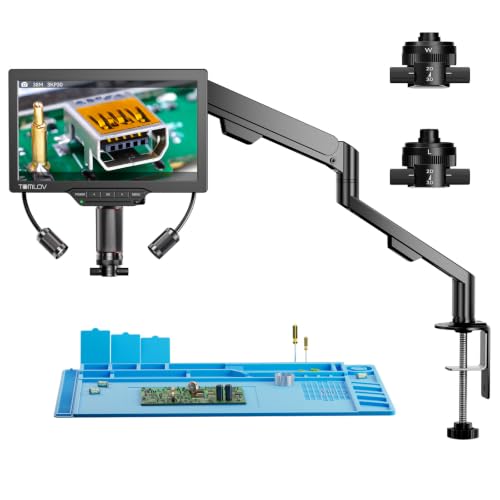
- 3D side-view imaging for angled PCB inspection
- Magnetic dual lenses for fast task switching
- 3K 7-inch IPS screen with flexible arm stand
Best For: Electronics repairers who need angled viewing for solder joints, microchips, and fine detail work.
Best for Electronics Repair
Andonstar AD210 10.1" Digital Microscope

- Large 10.1-inch IPS display with 1080P capture
- Long working distance and sturdy stand for soldering
- Includes 32GB card and slide kit for extra versatility
Best For: Electronics hobbyists who want a versatile bench microscope for soldering, coin viewing, and slide work.
Best All-in-One Workstation
LM249MS Plus 10.1" HDMI Microscope

- Integrated soldering accessories keep the bench organized.
- 3-lens system handles repair, inspection, and higher-magnification use.
- 10.1-inch screen with HDMI/USB output supports bigger viewing setups.
Best For: Electronics repair users who want one organized microscope workstation for soldering and inspection.
Best for Multi-Lens Work
Andonstar AD246S-M HDMI Digital Microscope

- Three interchangeable lenses for soldering, coins, and slides
- HDMI output with 2160P recording for easy viewing and capture
- Adjustable metal boom arm suits hot bench work and repair tasks
Best For: Repair techs and hobbyists who need one microscope for soldering, inspection, and general close-up work.
Best for Multi-Use Repair
Andonstar AD246S-M Plus 7'' HDMI Microscope

- Three-lens system for soldering, inspection, and slide work
- 2160P HDMI output for larger-screen viewing and recording
- Upgraded boom-arm station adds helping hands and storage
Best For: Repairers who want a versatile microscope station for soldering, inspection, and occasional high-magnification viewing.
Best for Large Workspaces – Andonstar AD249S-Max Microscope & Soldering Station
If you want a soldering station with microscope that feels built for real bench work, the Andonstar AD249S-Max stands out for its oversized workstation, helping hands, and flexible 3-lens optics. It is aimed at electronics repair, but it can also handle slides, coins, and other close-up inspection tasks.
Best For: Makers, repair technicians, and hobbyists who need a roomy all-in-one microscope and soldering setup for detailed bench work.
Pros:
- Oversized Max station gives you much more room for tools, boards, and parts
- Three interchangeable lenses cover soldering, general inspection, and slide viewing
- 2160P HDMI output plus recording is useful for bigger displays and documentation
- Helping hands and tool holder make repetitive repair work easier to manage
Cons:
- Large footprint may be too bulky for small desks
- Lens swapping and setup add some extra steps versus a simpler microscope
- Highest magnification is more suited to inspection than everyday soldering
Overall, this is a strong choice if your priority is workspace and versatility rather than portability. For buyers comparing a soldering station with microscope, the AD249S-Max is especially appealing when bench organization and larger projects matter most.
Best for Micro Soldering Visibility – TOMLOV DM9 7" LCD Microscope
If you want a soldering station with microscope support without jumping to a full inspection rig, the TOMLOV DM9 is a practical pick. The 7-inch screen, 12MP camera, and adjustable lighting make it easier to inspect joints, align components, and review PCB details on a larger display.
Best For: Hobbyists, students, and electronics repair users who need an affordable microscope for close-up soldering and board inspection.
Pros:
- 7-inch rotatable LCD reduces eye and neck strain during long bench sessions
- 12MP camera with 1080P output gives a clear view of solder joints and components
- 8 LED lights plus 2 gooseneck lights help illuminate dark work areas
- Metal base and stand add stability for micro soldering and PCB repair
Cons:
- Not a true stereo microscope, so depth perception is limited
- Max zoom is useful for inspection, but real-world clarity depends on working distance
- PC viewing may be limited compared with dedicated lab software setups
Overall, the DM9 is a solid value choice if you want a soldering station with microscope-style visibility for inspection and repair, especially when screen-based viewing and easy lighting matter more than advanced lab-grade optics.
Best for All-in-One Repair Benches – Andonstar AD249S-M Plus Microscope Station
If you want a soldering station with microscope that doubles as a bench organizer, the Andonstar AD249S-M Plus is built for hands-on electronics repair, inspection, and basic measurement. Its upgraded boom arm, helping hands, tool holder, and included storage make it a practical pick when you want one setup that can do more than just magnify.
Best For: Repair hobbyists and tech tinkerers who want a microscope station with useful soldering accessories and a cleaner workspace.
Pros:
- 3-lens design covers soldering, general inspection, and higher-magnification viewing
- HDMI output and 2160P recording are useful for larger screens and documentation
- Extended base, storage boxes, tool holder, and helping hands improve bench workflow
Cons:
- Not the most compact option for very small workspaces
- Highest magnification is better suited to static subjects than fast moving solder work
Overall, this soldering station with microscope stands out for blending visibility, accessories, and workspace organization in one package. If you want a repair-focused station that’s easier to live with day to day, it’s a strong all-in-one choice.
Best All-in-One Desktop Value – Andonstar AD409 Max HDMI Microscope
If you want a soldering station with microscope that pulls double duty for PCB work, inspection, and video viewing, the Andonstar AD409 Max is built around an integrated desktop setup. The 10.1-inch LCD, HDMI output, and 300X digital magnification make it easy to see joints, components, and fine defects without juggling extra gear.
Best For: Makers and electronics repair users who want a versatile all-in-one inspection setup for soldering, board work, and occasional PC-connected viewing.
Pros:
- Large 10.1-inch screen gives a roomy, easy-to-view work area.
- HDMI, USB, and Windows PC support add flexible connectivity.
- Useful for PCB soldering, inspection, and endoscope-style tasks.
Cons:
- Digital microscope setup is bulkier than a simple standalone scope.
- Not a true integrated soldering iron station in the classic sense.
For buyers comparing a soldering station with microscope options, this model stands out more for its all-in-one inspection versatility than for compactness. It makes the most sense if you value a large display and multiple viewing modes over a minimal bench footprint.
Best for Easy PC Viewing – 5" LCD Digital Soldering Microscope
If you want a soldering station with microscope-style inspection that makes close-up electronics work easier to see, this 5-inch LCD model is built for practical bench use. The flexible stand helps you position the camera over boards, coins, and small components, while the PC-view option gives you a bigger screen for detailed solder joints and repair work.
Best For: Hobbyists and repair users who want an easy-to-position microscope with a built-in display and simple computer viewing for soldering, inspection, and coin collecting.
Pros:
- 5-inch IPS screen reduces eye strain during long inspection sessions
- Flexible goose-neck stand makes it easier to aim at tight or awkward work areas
- Plug-and-play PC mode works with built-in Windows and Mac apps
- 8 LEDs help illuminate solder joints and other fine details
Cons:
- Not autofocus, so you must manually set distance and focus
- Micro SD card is required for saving photos and videos, but not included
- 1000X is digital magnification, so results depend on setup and working distance
This is a solid pick if you want a soldering station with microscope features that are straightforward to use rather than packed with advanced controls. It fits best in hobby and repair workflows where a built-in screen, flexible positioning, and easy PC viewing matter more than fully automated focusing.
Best for Side-View PCB Inspection – TOMLOV 3D Digital Microscope TM3K-3D
If you want a soldering station with microscope support that makes PCB work easier to see from more than one angle, this TOMLOV model stands out for its 3D side-view imaging and flexible setup. It’s designed for electronics repair, micro soldering, and detail-heavy inspection where a traditional top-down scope can feel limiting.
Best For: Repairers who need a screen-based microscope with side-view visibility for solder joints, microchips, and tight PCB work.
Pros:
- 3D side-view and 360° rotation help inspect solder joints from multiple angles
- Magnetic dual lenses switch quickly between close inspection and wider workspace views
- 7-inch IPS screen and 3K resolution reduce eye strain during long repair sessions
- Flexible arm stand makes positioning over a workbench easier
Cons:
- Not a true soldering iron station, so it’s an add-on inspection tool rather than the bench base itself
- Screen-based viewing may take some getting used to if you prefer eyepieces
- Feature-rich design may be more than casual hobbyists need
The TOMLOV TM3K-3D is a smart pick if your version of a soldering station with microscope means clearer inspection, better angles, and less eye fatigue. Its biggest advantage is the 3D side-view workflow, which can make PCB repair and micro soldering more precise than a basic digital microscope.
Best for Electronics Repair – Andonstar AD210 10.1" Digital Microscope
The Andonstar AD210 is a practical pick if you want a soldering station with microscope support that’s also useful for coins, slides, and general inspection. Its large 10.1-inch IPS display, adjustable stand, and long working distance make it easier to see solder joints and components without crowding your workspace.
Best For: Electronics hobbyists and repair users who want a versatile microscope for soldering, coin inspection, and basic lab work.
Pros:
- Large 10.1-inch IPS screen with clear 1080P viewing and capture
- Long working distance and sturdy stand help during soldering tasks
- Includes 32GB card plus slide kit for extra out-of-box versatility
- Useful for coins, electronics repair, and biological slides
Cons:
- Not a true all-in-one soldering station, just a microscope for bench use
- Bulky display and stand take up more desk space than compact models
For buyers comparing a soldering station with microscope features, the AD210 stands out for screen size, working distance, and flexibility rather than sheer portability. It’s a smart choice if you want one microscope that can handle repair work and still pull double duty for other close-up tasks.
Best All-in-One Workstation – LM249MS Plus 10.1" HDMI Microscope
If you want a soldering station with microscope that also helps keep the bench organized, the LM249MS Plus stands out with its integrated mat, helping hands, tool holder, and boom-arm stand. The 10.1-inch IPS screen, 3-lens system, and HDMI/USB output make it practical for electronics repair, inspection, and live viewing without needing a separate setup.
Best For: Electronics hobbyists and repair users who want an organized, multi-use microscope station for soldering, inspection, and shared viewing.
Pros:
- Integrated workstation accessories help reduce clutter on the bench.
- Three interchangeable lenses cover soldering, general inspection, and higher-magnification viewing.
- Large 10.1" screen plus HDMI/USB output makes it easy to use with monitors or PCs.
- 13-inch boom arm provides better reach and workspace clearance for repairs.
Cons:
- Bulkier than a basic tabletop microscope setup.
- Feature-rich design may be more than casual users need.
For buyers comparing a soldering station with microscope, this model is appealing because it combines viewing, holding, and workspace tools in one package. It is less about minimalism and more about giving repair work a more complete, bench-ready setup.
Best for Multi-Lens Work – Andonstar AD246S-M HDMI Digital Microscope
If you want a flexible soldering station with microscope support for repair work, the Andonstar AD246S-M is built around versatility. Its three interchangeable lenses, HDMI output, and pro boom arm make it useful for electronics repair, coin inspection, and other close-up tasks where a stable view matters.
Best For: Repair techs and hobbyists who need a multi-use microscope that can switch between soldering, inspection, and general magnification tasks.
Pros:
- Three-lens system covers soldering, coins, slides, and broader inspection work
- HDMI output and 2160P recording help with larger-screen viewing and documentation
- Adjustable metal boom arm is better suited to bench use near hot soldering jobs
- Windows-compatible measurement software adds useful PC-based analysis tools
Cons:
- Switching lenses requires manual changes, so it is less convenient than a fixed-lens setup
- The 7-inch screen is practical, but many users will still prefer an external monitor for detailed work
- More of an all-purpose microscope than a dedicated pro soldering camera system
This is a strong pick if you want a soldering station with microscope functionality that can also handle other precision tasks. The AD246S-M stands out for its multi-lens flexibility and bench-friendly boom arm, making it a smart fit for mixed-use workshop setups.
Best for Multi-Use Repair – Andonstar AD246S-M Plus 7'' HDMI Microscope
If you want a soldering station with microscope that can do more than basic PCB work, the Andonstar AD246S-M Plus is built for electronics repair, inspection, and general close-up viewing. Its 3-lens setup, HDMI output, and upgraded boom-arm station make it a flexible pick for hobbyists who need one tool for soldering, measuring, and detailed visual checks.
Best For: Repairers who want a versatile microscope station for soldering, inspection, and occasional high-magnification viewing on a larger display.
Pros:
- Three interchangeable lenses cover soldering, coins/objects, and slide-level magnification.
- HDMI support and 2160P recording make it easy to view and document work on a bigger screen.
- Upgraded boom-arm base adds helping hands, tool storage, and a larger work area.
Cons:
- More feature-rich than a simple soldering microscope, so it may be overkill for casual users.
- Lens swapping and setup add extra steps compared with fixed-lens models.
Overall, this is a strong soldering station with microscope for buyers who want one setup that can handle repair, teaching, and precision inspection without needing separate tools. The tradeoff is a bit more complexity, but the expanded workstation design makes it appealing if you value versatility.
How We Picked These Soldering Station with Microscope Options
We prioritized models that make real repair work easier: clear imaging, usable magnification, stable positioning, and features that support long sessions at the bench. We also looked for setups that are practical for phone repair, PCB inspection, hobby electronics, and mixed-use work where magnification needs to be fast and reliable.
Because a Soldering Station with Microscope is only useful if it stays comfortable and responsive, we favored stable stands, adjustable arms, decent display sizes, and recording or HDMI output where it adds value.
Quick Comparison
The best choice depends on your workspace and the type of repair you do most. Larger 10.1-inch LCD and HDMI systems are usually better for shared benches and long sessions. Smaller 5- to 7-inch units are often more compact and budget-friendly. If you need detailed inspection and documentation, look for stronger video output, better lens flexibility, and smooth focus control.
Key Buying Factors for a Soldering Station with Microscope
Display Size and Image Quality
A larger screen can reduce eye strain and make hand-eye coordination easier. Resolution matters too, especially for reading silkscreen, checking solder bridges, and inspecting tiny connectors. For most buyers, a clear 1080p or higher image is worth prioritizing.
Working Distance and Stand Stability
Make sure the lens leaves enough room for soldering tools, tweezers, and hot-air work. A stable boom arm or flexible stand helps keep the image steady while you move components underneath.
Magnification Range and Lens Options
Higher magnification is not automatically better. You need enough detail for inspection, but also a usable field of view. Multi-lens systems can be more versatile than a single fixed setup.
Lighting, Output, and Recording
Integrated LEDs help, but they should be even and adjustable rather than harsh. HDMI output is useful if you want a low-latency display. Recording can be helpful for training, troubleshooting, or documenting repairs.
Who Should Buy Which Soldering Station with Microscope?
If you are a beginner or occasional hobbyist, choose a simpler, space-saving model with a clear screen and easy focus. If you repair phones, consoles, or dense PCBs regularly, a larger Soldering Station with Microscope setup and a stable arm will be more efficient. If you share a bench, teach, or film your work, prioritize HDMI connectivity, larger display size, and recording features.
For most buyers, the best balance comes from a unit that combines stable mounting, good working distance, and a sharp image over extreme magnification. That combination makes soldering easier, inspection faster, and mistakes less likely.