The best robotics sets for homeschool turn abstract STEM ideas into hands-on projects kids can build, program, test, and improve. This roundup compares 10 options across coding methods, construction styles, controls, age ranges, and project variety.
Whether your learner is new to robotics or ready for app programming and sensor-based experiments, the right kit can add structure and excitement to science, technology, engineering, and math lessons.
Best 10 Robotics Sets for Homeschool Picks for 2026
Best Entry-Level Coding Robot

- Quick 15-minute guided build
- Scratch and Arduino support
- Expandable with Makeblock and LEGO parts
Best For: Beginning homeschool robotics and coding lessons
Best Multi-Model Build
Sillbird 5-in-1 Programmable Robot

- 488-piece progressive build
- Five robot and vehicle models
- App, remote, and rechargeable control
Best For: Flexible hands-on building for kids ages 8 and up
Best Project Variety
ButterflyEdufields 40-in-1 Robotics Kit

- 40-plus home automation projects
- 100-plus electronic components
- Plug-and-play sensor activities
Best For: Project-based homeschool STEM learning
Best Mechanical Coding Challenge
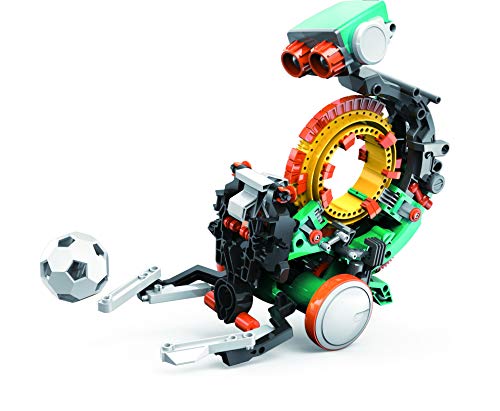
- Mechanical coding wheel
- Multiple hands-on robot actions
- Several-hour engineering build
Best For: Older homeschool learners exploring mechanical coding
Hands-On Variety Pick

- Six different robot and science projects
- Includes screwdriver and illustrated instructions
- Designed for hands-on STEM and family learning
Best For: Ages 8–12 seeking varied screen-free building activities
Screen-Free Coding Pick
Ozobot Ozo at Home Coding Robot

- Includes 27 guided coding and engineering activities
- Starts with color codes before Blockly programming
- Activity lengths support flexible homeschool lessons
Best For: Ages 5+ learning foundational coding through guided play
Renewable Energy Build

- Builds 15 robots, vehicles, and other models
- Uses solar or battery power
- Includes 212 pieces and an illustrated manual
Best For: Ages 8–13 exploring hands-on robotics and solar energy
Best All-Around Build-and-Code Pick

- 560-piece kit with three robot and vehicle builds
- Remote control plus app programming
- Color-coded instructions for STEM-focused projects
Best For: Homeschoolers seeking a versatile construction and coding kit
Best for Model Variety

- 780 pieces support six different builds
- App includes path coding and STEM programming
- Rechargeable robot with remote control and lights
Best For: Multi-session homeschool projects with a space theme
Best for Guided Beginners
468-Piece Programmable Robot Kit
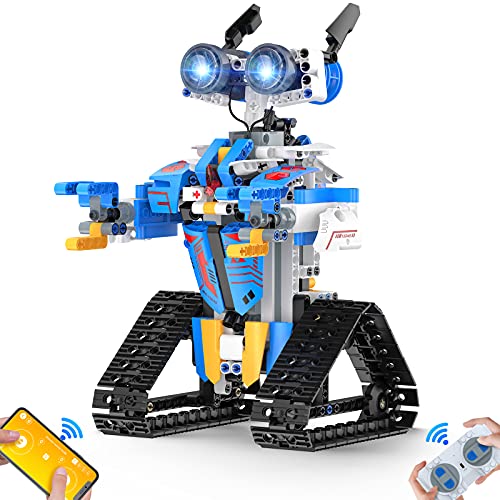
- Organized parts and marked step-by-step instructions
- App, remote, voice, gravity, and path-control modes
- 468-piece build with lights and stunt movement
Best For: Beginning builders who need a structured introduction to robotics
Best Entry-Level Coding Robot – Makeblock mBot
For families seeking robotics sets for homeschool, the Makeblock mBot offers a straightforward introduction to electronics, construction, and programming. Its guided build can be completed in about 15 minutes, then children can explore Scratch, Arduino, remote control, line-following, and obstacle avoidance.
Best For: Beginners ages 8 and up who want a reusable coding robot with structured lessons and room to expand.
Pros:
- Builds quickly with clear instructions.
- Supports Scratch and Arduino learning.
- Includes coding cards, lessons, and access to Makeblock apps and mBlock software.
- Compatible with more than 100 electronic modules and 500 Makeblock parts, as well as LEGO parts.
Cons:
- AA batteries and the CR2025 battery for the remote controller are not included.
- The core set includes one robot, so additional configurations require compatible add-on parts.
mBot is a practical choice when you want a guided first robotics experience that can grow into more advanced programming and electronics projects.
Best Multi-Model Build – Sillbird 5-in-1 Programmable Robot
The Sillbird 5-in-1 set is a flexible option for robotics sets for homeschool, combining a 488-piece build with app and remote control. Children can progress from simpler models to more complex robots, including a dinosaur, car, and tank, while practicing basic programming and problem-solving.
Best For: Kids ages 8 and up who enjoy rebuilding one kit into several moving models and learning through hands-on play.
Pros:
- Offers five buildable models with varying difficulty.
- Provides app-based Bluetooth control and remote control.
- Includes clear, colorful, step-by-step instructions.
- Rechargeable design provides up to 40 minutes of play on a charge.
Cons:
- The set has a shorter play duration of up to 40 minutes per charge.
- Its programming features are described as basic rather than advanced.
This kit works well for homeschoolers who value variety and independent building, especially when siblings or parents want to participate in the different model challenges.
Best Project Variety – ButterflyEdufields 40-in-1 Robotics Kit
For project-based robotics sets for homeschool, the ButterflyEdufields kit provides more than 100 components for 40-plus electronics, automation, and robot projects. Its plug-and-play approach lets children explore sensors, motors, LEDs, pumps, and a processor without soldering or prior coding knowledge.
Best For: Homeschool families seeking a broad, experiment-focused STEM kit for children ages 8 to 17.
Pros:
- Includes 40-plus project ideas and more than 100 parts.
- Offers reusable IR, flame, touch, LDR, and other sensors.
- Requires no soldering, specialized tools, or previous coding knowledge.
- Includes detailed instructions and concept manuals.
Cons:
- AA batteries are required and Duracell batteries are not suitable for the provided holder.
- The large number of components may require more organization and adult oversight during projects.
With an estimated 50-plus hours of learning and experimentation, this is a strong pick for families that prefer a sequence of practical STEM activities over a single robot build.
Best Mechanical Coding Challenge – TEACH TECH Mech-5
The TEACH TECH Mech-5 stands apart from many robotics sets for homeschool by focusing on mechanical coding rather than app-based control. Children ages 10 and up assemble the robot over several hours, then place coding buttons on its wheel to program actions such as throwing, lifting, kicking, and drawing.
Best For: Older learners who want a substantial build centered on mechanical engineering principles and hands-on coding basics.
Pros:
- Uses a mechanical coding wheel for programming actions.
- Can throw, lift, kick, draw, and perform other activities.
- Provides an in-depth, hands-on assembly experience.
- Includes a one-year warranty against manufacturer defects.
Cons:
- Assembly takes multiple hours and requires careful attention to the instructions.
- It is recommended for ages 10 and up, making it less suitable for younger children.
- Two AAA batteries are required.
Mech-5 is a good fit when the learning goal is patience, mechanical reasoning, and physical coding rather than a quick-build or screen-based robotics activity.
Hands-On Variety Pick – 6-in-1 Robotics STEM Set
For families comparing robotics sets for homeschool, this six-project kit offers a broad introduction to building and experimenting. Children can assemble projects such as a reptile robot, balance car, bubble machine, fiber lamp, and sliding plane while practicing construction and problem-solving skills.
Best For: Homeschool learners ages 8–12 who enjoy rotating through multiple screen-free engineering projects and working with an adult or sibling.
Pros:
- Includes six separate robot-building and science experiment projects.
- Supports construction, creative, logical-thinking, motor, and problem-solving skills.
- Includes a screwdriver and step-by-step instruction manuals.
- Suitable for family project time, classroom activities, or gift-giving.
Cons:
- The manufacturer’s recommended age range spans 36 months to 12 years, while the product description primarily targets ages 8–12.
- The supplied details do not specify whether batteries are included.
This is a practical choice when variety matters more than a single deep coding curriculum. Its multiple builds can help keep younger homeschool students engaged across several lessons.
Screen-Free Coding Pick – Ozobot Ozo at Home Coding Robot
Ozobot Ozo at Home is a strong option for families seeking robotics sets for homeschool with a clear coding progression. Children begin with color codes, markers, magnetic tiles, and guided activities before moving to block-based Ozobot Blockly programming on a computer or tablet.
Best For: Homeschool students ages 5 and up who need beginner-friendly coding lessons that can start screen-free and advance toward Blockly programming.
Pros:
- Includes 27 guided activities across coding, engineering, and design formats.
- Requires no prior coding experience, with step-by-step activity cards.
- Provides a progression from hands-on color coding to block-based programming.
- Offers short activities estimated at roughly 10–30 minutes for flexible lessons.
Cons:
- Advanced Blockly activities require a computer or tablet.
- The set includes one robot, so it is less suited to simultaneous multi-child building.
Choose this kit if coding is the main learning goal. Its structured activities and gradual progression make it easier to fit robotics into short homeschool sessions without requiring adult coding expertise.
Renewable Energy Build – 15-in-1 Solar Robot Kit
For homeschoolers interested in how robots are powered, this 15-in-1 kit combines construction with an introduction to solar energy. Its 212 pieces can be used to build robots, cars, boats, and other models, with solar or battery power for outdoor or indoor play.
Best For: Children ages 8–13 who want open-ended building practice and an accessible way to explore solar power, vehicles, and mechanical designs.
Pros:
- Offers 15 models and 212 pieces for repeated building projects.
- Supports both solar and battery operation for indoor or outdoor use.
- Encourages construction, creativity, critical thinking, and problem-solving.
- Includes a step-by-step illustrated manual for independent or shared building.
Cons:
- The supplied details do not identify the required battery type or confirm that batteries are included.
- Solar operation may depend on having suitable outdoor sunlight.
This kit fits families that want robotics connected to renewable energy rather than coding alone. The range of models also gives homeschool students opportunities to revisit the set at different challenge levels.
Best All-Around Build-and-Code Pick – 3-in-1 Kyanio Robotics Kit
For families comparing robotics sets for homeschool, this Kyanio kit combines 560 building pieces with three build options, remote control, app programming, and STEM-focused construction. Clear, color-coded instructions make it a practical choice for guided lessons or independent projects for children ages 8 and up.
Best For: Homeschoolers who want one kit covering construction, mechanical engineering, remote play, and introductory programming.
Pros:
- Builds three models: a machine gun robot, tracked vehicle, or mechanical cannon tank.
- Supports both 2.4GHz remote control and app programming.
- Includes step-by-step, color-coded instructions and educational objectives such as logic, concentration, and programming.
- Rechargeable via an upgraded Type-C connection and includes a one-year manufacturer-defect warranty.
Cons:
- Only one of the three models can be assembled at a time.
- The themed designs may appeal more to children interested in fantasy, science fiction, or vehicles.
With its combination of hands-on building and coding-oriented play, this is a flexible option for homeschool sessions that move from following instructions to exploring gears, movement, and programming.
Best for Model Variety – 6-in-1 Space Robotics Kit
This 780-piece set stands out among robotics sets for homeschool because it offers six different robot and vehicle designs, along with app-based coding activities and remote control. It can support a multi-session unit in which students repeatedly dismantle and rebuild while exploring construction, movement, and programming.
Best For: Homeschool families looking for the largest model variety and space-themed STEM activities for ages 8 and up.
Pros:
- Creates six models, including a space robot, battle robot, fighter, heavy tank, and tracked vehicle.
- App features include path coding, gravity control, driving simulation, and STEM programming.
- Offers 2.4GHz remote control, 360-degree stunt movement, lights, and a rechargeable battery.
- The 780-piece ABS construction set encourages rebuilding and hands-on problem-solving.
Cons:
- Only one model can be built at a time.
- The larger piece count may require more setup and sorting before independent building.
The six designs give this kit strong replay value, while its app modes create natural opportunities to connect a building project with introductory coding and movement challenges.
Best for Guided Beginners – 468-Piece Programmable Robot Kit
For younger or less experienced builders, this 468-piece set is one of the more approachable robotics sets for homeschool. Individually packaged parts, a color-coded assembly manual, and marked build areas help make the construction process manageable while the finished robot introduces remote control, app modes, and basic STEM programming.
Best For: Beginners ages 8 and up who benefit from organized parts, visual instructions, and several simple control modes.
Pros:
- Includes 468 pieces, stickers, a step-by-step manual, remote, and USB charging cable.
- Offers app Bluetooth control, 2.4GHz remote control, voice control, gravity sensing, path mode, and STEM programming.
- Robot moves in multiple directions, performs 360-degree stunts, and has glowing eyes and rotating joints.
- Parts are independently packaged, with red boxes and arrows marking assembly areas.
Cons:
- The product details list a 90-day warranty against manufacturer defects.
- The supplied age details are inconsistent, although the product is described for children ages 8 and up.
- Bluetooth app control requires a compatible phone or tablet.
This kit is a sensible entry point when ease of assembly matters most. Its organized packaging and range of control modes can help a student move from construction to experimentation without an overly complex build.
How We Picked These Robotics Sets for Homeschool
We focused on kits that support meaningful hands-on learning rather than simple assembly alone. The selection includes beginner-friendly coding robots, programmable building systems, sensor-based projects, solar-powered models, and sets with multiple construction possibilities.
We also considered stated age ranges, programming options, included components, control methods, project variety, and how easily each kit can fit into a homeschool lesson. Because children develop at different rates, age guidance should be treated as a starting point rather than a strict rule.
Quick Comparison
- Best for structured beginner coding: Makeblock mBot and TEACH TECH Mech-5.
- Best for screen-free learning: Ozobot Ozo at Home.
- Best for multiple projects: ButterflyEdufields 40-in-1 and the solar 15-in-1 kit.
- Best for app and remote control features: Kyanio and the 6-in-1, 780-piece set.
- Best for building-block fans: The programmable building-block robotics kits.
Key Buying Factors for Robotics Sets for Homeschool
Age and Skill Level
Choose a kit that matches the learner’s reading, fine-motor, and troubleshooting abilities. Younger children often benefit from visual coding or color commands, while older learners may enjoy motors, sensors, app controls, and open-ended programming.
Programming and Control Options
Remote controls offer immediate feedback and can build early confidence. Blockly-style programming, coding apps, and electronics boards provide more transferable skills. Check whether a compatible phone, tablet, computer, or batteries are required.
Project Variety and Reusability
Multi-model kits can support several lessons and maintain interest longer, but a focused kit may offer clearer instruction and a smoother learning path. Look for projects that encourage testing, redesign, and explanation rather than one-time construction.
Lesson Fit and Included Materials
Consider whether the kit includes motors, sensors, controllers, markers, building pieces, instructions, and necessary power components. A homeschool-friendly set should be easy to connect to lessons about forces, energy, sequencing, measurement, or problem-solving.
Who Should Buy Which Robotics Sets for Homeschool?
Families introducing robotics should start with a guided kit or screen-free coding robot. Learners who enjoy construction may prefer a larger building set with app or remote control. Children interested in engineering challenges can benefit from sensor-based or multi-project kits, while solar-powered options are useful for combining robotics with renewable-energy lessons.
Before buying, check the current contents, software compatibility, power requirements, and parental reviews. The best choice is the kit your child can use independently enough to feel capable while still offering room to experiment and grow.