If you want a fast PC without fan noise taking over your workspace, you are in the right place. Quiet desktop computers are ideal for home offices, bedrooms, shared rooms, and anyone who values a calmer setup.
In this roundup, we focus on compact, low-noise systems that balance speed, efficiency, and everyday practicality in 2026.
Best 10 Quiet Desktop Computers Picks for 2026
Fanless Quiet Pick

- Fanless design for silent operation
- Intel N300 with 16GB RAM and 512GB SSD
- Built for 24/7 everyday productivity
Best For: Quiet offices and compact workspaces
Refurbished Space Saver

- Ultra-small design for tight desks
- i5 8th Gen, 16GB RAM, 500GB NVMe
- Quiet, low-power business-focused build
Best For: Home or office users who need a compact PC
Quiet Tower Choice

- Ultra-quiet tower design for business use
- Dual 4K support plus Wi-Fi 6 and Bluetooth
- Upgradeable up to 64GB RAM and 4TB SSD
Best For: Office setups that need a quiet full-size PC
Multi-Display Mini PC

- Ryzen 5 with 16GB RAM and 512GB SSD
- Supports up to three 4K displays
- WiFi 6 and Bluetooth 5.3 included
Best For: Multitasking users who want a small dual- or triple-monitor PC
Ultra-Quiet Business Pick
Dell Pro Business Desktop Computer

- Ultra-quiet business tower design
- Intel i5-14500 with DDR5 memory
- 512GB PCIe SSD and Windows 11 Pro
Best For: Business users who want a quiet, responsive desktop with room to grow.
Refurbished Small-Form-Factor Value

- Compact SFF design for tight spaces
- 16GB RAM with 256GB SSD storage
- Supports 4K dual-display setups
Best For: Budget-conscious buyers who want a compact refurbished office desktop.
Compact Quiet Mini PC

- Mini PC form factor for tight desks
- Efficient cooling for steady operation
- USB4 and dual HDMI for multi-display use
Best For: Small desks, multi-monitor setups, and always-on lightweight business use.
Quiet Business Starter

- Ultra-quiet compact tower for office use
- Dual 4K monitor support and Windows 11
- USB-C, HDMI, VGA, Ethernet, and SD card reader
Best For: Small offices and home workspaces
Small Desk Workhorse
Lenovo ThinkCentre 50q Mini Desktop
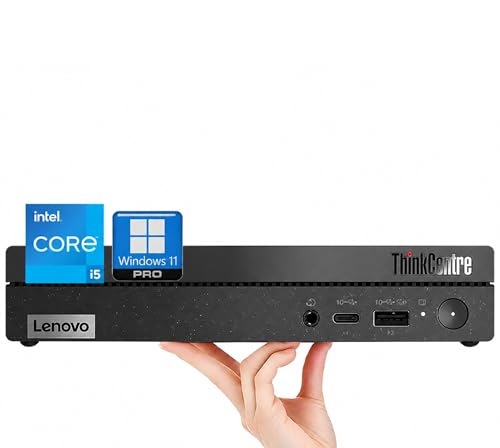
- Ultra-quiet 1L mini desktop design
- 32GB RAM and 1TB PCIe SSD
- Dual 4K monitor support for productivity
Best For: Multitaskers who want quiet compact performance
Fanless Quiet Pick – MINIX NEO Z300-0dB
If you want quiet desktop computers for a low-noise workspace, the MINIX NEO Z300-0dB is built around a fanless cooling design. It focuses on everyday office work, web browsing, and multitasking while staying compact and discreet on a desk.
Best For: Quiet offices, study spaces, and users who want a silent mini PC for daily productivity.
Pros:
- Fanless passive cooling helps keep operation silent.
- Intel N300 octa-core processor handles office tasks and browsing smoothly.
- 16GB RAM and a 512GB PCIe SSD provide a responsive base setup.
- Supports 24/7 operation for continuous use cases.
Cons:
- The top cover may become warm during use.
- Storage is expandable, but you may need to add more for larger libraries.
- Best suited to everyday computing rather than heavy workstation workloads.
This is a strong fit if silence matters more than raw power. It keeps the footprint tiny, supports expansion, and stays focused on dependable daily performance.
Refurbished Space Saver – Lenovo ThinkCentre M720Q
For buyers comparing quiet desktop computers with a very small footprint, the Lenovo ThinkCentre M720Q is a practical renewed option. It combines a compact micro desktop design with Windows 11 Pro, fast NVMe storage, and hardware aimed at everyday home or office use.
Best For: Space-conscious users who want a compact business PC for office tasks, browsing, and general productivity.
Pros:
- Ultra-small form factor saves desk space and supports flexible placement.
- Intel Core i5 8th Gen hexacore processor is suited to everyday multitasking.
- 16GB DDR4 RAM and 500GB NVMe SSD support responsive performance.
- Quiet operation and low power usage suit professional environments.
Cons:
- It is a renewed unit, which may not appeal to every buyer.
- Graphics are integrated, so it is not aimed at demanding creative work.
- The listing emphasizes business and everyday use rather than high-end performance.
If you want a small, efficient PC for a tidy desk setup, this Lenovo makes sense. It focuses on practical speed, wireless convenience, and a subdued footprint rather than flashy specs.
Quiet Tower Choice – Acer Aspire Business Desktop
If you prefer quiet desktop computers in a more traditional tower shape, the Acer Aspire Business Desktop offers an ultra-quiet design with practical business features. It is built for offices that need dependable connectivity, room for expansion, and straightforward everyday use.
Best For: Business users who want a quiet tower with broad connectivity and monitor support.
Pros:
- Ultra-quiet design is a strong fit for calm office environments.
- Includes USB-C, SD card reader, Wi-Fi 6, and Bluetooth for flexible connections.
- Supports dual 4K monitors for expanded workspace setups.
- Upgradeable to up to 64GB RAM and up to 4TB PCIe SSD.
Cons:
- Larger tower design takes more space than a mini PC.
- Starts with 8GB RAM and 256GB SSD, which may feel basic for some users.
- Integrated graphics limit its appeal for graphics-heavy workloads.
This Acer is a good match if you want a quieter tower instead of a tiny mini PC. It leans into office practicality, connectivity, and easy expansion more than compact size.
Multi-Display Mini PC – Glorlin GT100
For shoppers looking at quiet desktop computers that still support a flexible workstation, the Glorlin GT100 is a compact mini PC with Ryzen 5 power and triple-display support. It is aimed at daily work, study, and multitasking while keeping the footprint much smaller than a standard desktop.
Best For: Users who want a compact mini PC for multitasking and multi-monitor setups.
Pros:
- Ryzen 5 3501U processor handles everyday work and browsing smoothly.
- 16GB RAM and a 512GB SSD support responsive multitasking.
- Triple 4K display support can improve workflow across multiple screens.
- WiFi 6, Bluetooth 5.3, Ethernet, and USB ports add flexible connectivity.
Cons:
- It uses integrated graphics rather than a dedicated GPU.
- Best suited to daily productivity instead of demanding creative or gaming loads.
- Small form factor may limit upgrade needs compared with larger desktops.
This model stands out if you want a compact desktop replacement with multi-monitor flexibility. It balances space savings, practical performance, and modern wireless connectivity well.
Ultra-Quiet Business Pick – Dell Pro Business Desktop Computer
If you want quiet desktop computers for a modern office setup, this Dell Pro Business Desktop is built around an ultra-quiet design and a current-gen Intel i5-14500 processor. It pairs fast DDR5 memory, a PCIe SSD, and a compact tower form factor with practical business features like Windows 11 Pro, Wi-Fi 6, Bluetooth, and a broad port selection.
Best For: Business users who want a quiet, responsive desktop with room to grow.
Pros:
- Ultra-quiet design suited to office or shared workspaces
- Intel i5-14500 with 14 cores and up to 5.0 GHz boost
- 16GB DDR5 RAM and 512GB PCIe SSD for fast everyday use
- Includes wireless keyboard and mouse, plus Windows 11 Pro
Cons:
- Integrated graphics only, so it is not aimed at heavy visual workloads
- More desktop than mini PC, so it takes up standard tower space
- Higher-performance business configuration may be more than basic home users need
This is a strong fit if low noise and productivity are equally important. The combination of modern CPU power, DDR5 memory, and business-focused connectivity makes it an easy pick for an efficient, quiet desk setup.
Refurbished Small-Form-Factor Value – Dell Optiplex 3050 SFF
For buyers comparing quiet desktop computers on a budget, this refurbished Dell Optiplex 3050 SFF keeps things simple with a small-form-factor design, an Intel i5-6500, 16GB of RAM, and a 256GB SSD. It also includes Wi-Fi, Windows 11 Pro, and support for 4K dual displays, making it a practical workstation option for light office use.
Best For: Budget-conscious buyers who want a compact refurbished office desktop.
Pros:
- Small-form-factor design that fits neatly on or under a desk
- 16GB DDR4 RAM and SSD storage for everyday responsiveness
- Supports 4K dual displays via HDMI and DisplayPort
- Includes keyboard, mouse, and USB Wi-Fi adapter
Cons:
- Older 6th-gen Intel processor compared with newer desktops
- Refurbished unit, so condition can vary within certified standards
- 256GB storage is modest for larger files or many apps
This model is appealing if you want a compact, no-frills desktop that can handle basic business tasks without taking up much space. Its age is the main tradeoff, but the included accessories and dual-display support add solid value.
Compact Quiet Mini PC – GEEKOM IT12 Mini PC
If you need quiet desktop computers in a very small footprint, the GEEKOM IT12 Mini PC is a compact option with an Intel i3-12300HE, 16GB RAM, and a 512GB SSD. Its full-metal chassis, efficient cooling, and low-power design are aimed at reliable everyday operation, while USB4 and dual HDMI outputs make it flexible for multi-monitor desks.
Best For: Small desks, multi-monitor setups, and always-on lightweight business use.
Pros:
- Mini PC form factor saves substantial desk space
- Efficient cooling and low-power design for stable operation
- USB4 and dual HDMI support up to four displays
- 16GB RAM and 512GB SSD provide a solid starting point
Cons:
- i3-class processor is not intended for heavy creative workloads
- Compact size may limit upgrade flexibility compared with larger towers
- Advanced ports like RS-232/RS-485 are more niche than mainstream
This is the best fit if your priority is a compact, efficient system rather than maximum raw power. The feature set is broad for a mini PC, especially for offices that want quiet operation and multi-display support.
Quiet Business Starter – Acer Aspire Business Desktop
If you want quiet desktop computers for a straightforward office setup, this Acer Aspire Business Desktop focuses on low-noise practicality, essential connectivity, and everyday productivity. Its compact tower design, Windows 11, and dual 4K monitor support make it a sensible pick for workstations that need to stay unobtrusive.
Best For: Small offices, home workspaces, and users who want a simple business desktop with broad port support.
Pros:
- Ultra-quiet design suited to low-distraction work areas
- Dual 4K monitor support for multitasking
- Useful mix of ports, including USB-C, HDMI, VGA, Ethernet, and SD card reader
- Includes wired keyboard and mouse for a ready-to-use setup
Cons:
- Intel Celeron N4505 is built for basic business tasks, not heavy workloads
- 16GB RAM is solid, but not the maximum upgrade path
- Best suited to practical office use rather than performance-focused computing
This Acer is a good fit if your priority is a quiet, compact desktop that covers the essentials without complicating the setup. It looks especially appealing for offices that value easy connectivity and dependable day-to-day operation.
Ultra-Compact Power – HP Elite Mini G9 Business Desktop
Among quiet desktop computers, the HP Elite Mini G9 stands out for combining a very small footprint with a powerful 13th Gen Intel Core i7 and an ultra-quiet design. It is built for business users who want a capable mini desktop that can handle multitasking while staying out of the way on a crowded desk.
Best For: Professionals who need strong business performance in a compact, low-noise mini PC.
Pros:
- 13th Gen Core i7 processor for demanding multitasking
- Ultra-quiet mini desktop design with a very small footprint
- Fast DDR5 memory and SSD storage for responsive everyday use
- Strong port selection, including USB-C, HDMI, DisplayPort, and RJ-45
Cons:
- Mini PC form factor may limit expansion compared with larger towers
- External speakers are required
- Built for business efficiency rather than graphics-heavy workloads
This HP is a strong choice if you want a premium-feeling mini desktop that balances quiet operation with real business performance. Its compact size and broad connectivity make it especially practical for professional desks with limited space.
Small Desk Workhorse – Lenovo ThinkCentre 50q Mini Desktop
If your goal is to find quiet desktop computers that still feel ready for serious everyday work, the Lenovo ThinkCentre 50q is an appealing mini desktop. It pairs an ultra-quiet design with a strong Intel Core i5 processor, 32GB of RAM, and a 1TB SSD, making it a practical choice for busy desks.
Best For: Users who want a quiet, compact desktop with more memory and storage for multitasking.
Pros:
- Ultra-quiet 1L design with a very small desk footprint
- 32GB RAM and 1TB PCIe SSD for fast, responsive use
- Core i5 processor with turbo speeds up to 4.6 GHz
- Supports dual 4K monitors for productive multitasking
Cons:
- Mini PC design may not suit users who want easy internal expandability
- Wired keyboard is included, but the setup stays focused on basics
- Best aligned with productivity tasks rather than specialized workloads
This Lenovo is a strong all-around office pick if you want quiet operation without giving up memory, storage, or display support. It is especially useful for people who keep many apps open and need a compact machine that stays efficient.
How We Picked the Best Quiet Desktop Computers
We prioritized models that are built for low-noise operation, efficient cooling, and dependable everyday performance. That means looking at fanless designs, business-class mini PCs, compact desktops with restrained cooling profiles, and systems with enough memory and SSD storage to stay responsive without working harder than necessary.
We also considered practical details like multi-monitor support, wireless connectivity, upgrade potential, and whether each system makes sense for office work, light creative tasks, or general home use.
Quick Comparison
For the quietest possible experience, fanless mini PCs are the simplest choice. If you want more performance for multitasking, business mini desktops with efficient modern CPUs often deliver a better balance of speed and acoustics. Traditional small form factor desktops can offer more ports and expandability, but may be slightly more audible under load.
Key Buying Factors for Quiet Desktop Computers
Cooling Design
Start with the cooling approach. Fanless systems are nearly silent, while larger heatsinks and efficient low-power processors can keep fan noise minimal in compact desktops. If you plan to run demanding apps for long periods, check whether the cooling solution is designed for sustained use rather than brief bursts only.
Processor Efficiency
A more efficient CPU often matters more than raw peak speed when choosing Quiet Desktop Computers. Chips built for business and light productivity typically generate less heat, which helps reduce fan activity.
Memory and Storage
At least 16GB of RAM and an SSD are the sweet spot for smooth everyday use. More RAM helps with multitasking, while NVMe SSDs improve boot times and app launches without adding noise.
Ports and Display Support
Make sure the desktop supports the monitors and accessories you already own. Dual- or triple-display support is especially useful for office setups, and extra USB, HDMI, or Ethernet ports can save you from relying on adapters.
Size and Placement
Compact systems are easier to tuck behind a monitor or on a shelf, which can help keep your desk quiet and uncluttered. If the computer will sit close to you, acoustics matter even more.
Who Should Buy Which Quiet Desktop Computers?
Choose a fanless mini PC if silence is your top priority and your workload is mostly browsing, streaming, office apps, or remote work. Pick a business mini desktop if you want a better mix of quiet operation and performance for multitasking.
Go with a small form factor tower if you need more ports, more room for expansion, or stronger sustained performance. Among Quiet Desktop Computers, the best choice is the one that fits your workload, your monitor setup, and how sensitive you are to noise.