The best portable SSD enclosures turn an internal drive into fast, flexible external storage for laptops, desktops, game consoles, and compact computers. The right model can also make drive upgrades, data recovery, and backups much easier.
This roundup compares 10 enclosures across USB, SATA, and NVMe formats, including rugged designs, tool-free options, and high-speed USB4 models. Use the guide below to match enclosure performance and compatibility to your setup.
Best 10 Portable SSD Enclosures Picks for 2026
Rugged Pick
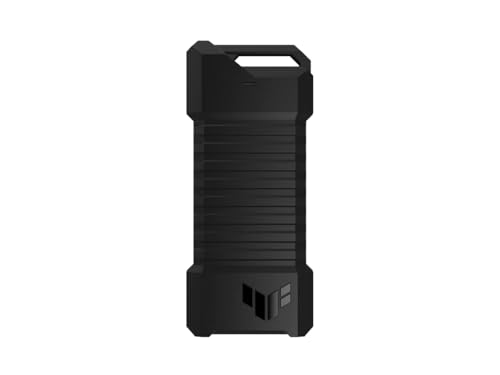
- 10Gbps USB-C connectivity
- Supports NVMe and SATA M.2 drives
- IP68 and MIL-STD-810H protection
Best For: Gamers and travelers needing a durable, flexible enclosure
High-Speed Pick

- Up to 3836MB/s real-world performance
- 40Gbps USB-C connection
- Supports USB4 and Thunderbolt devices
Best For: High-speed creative, business, and gaming workloads
Budget SATA Pick

- Tool-free 2.5-inch drive installation
- USB 3.0 speeds up to 5 Gbps
- Supports SATA SSDs and HDDs
Best For: Affordable reuse of 2.5-inch SATA drives
Compact NVMe Pick

- 10Gbps USB 3.2 Gen 2 interface
- Tool-free support for 2230–2280 NVMe drives
- Includes USB-C and USB-A cables
Best For: Portable NVMe storage for computers and mobile devices
Most Versatile M.2 Pick

- Supports compatible NVMe and SATA M.2 drives
- USB 3.2 Gen 2 up to 10Gbps
- Includes USB-C and USB-A cables
Best For: Mixed-drive users needing flexible M.2 compatibility
Best for 2.5-Inch SATA Drives
BENFEI Tool-Free SATA Enclosure

- Fits 2.5-inch SATA I/II/III drives
- Tool-free, plug-and-play installation
- USB Type-C/Type-A connectivity up to 5Gbps
Best For: Repurposing 2.5-inch SATA SSDs or hard drives
Best for Cooler NVMe Transfers
Tool-Free 10Gbps NVMe Enclosure

- Flip-open, screw-free SSD installation
- Aluminum-assisted cooling for longer transfers
- Supports 2230–2280 NVMe drives
Best For: NVMe upgrades, cloning, and heavy portable workloads
Best for Mixed M.2 Compatibility
Tool-Free NVMe and SATA Enclosure

- Accepts both NVMe and SATA M.2 SSDs
- Tool-free drive installation
- 10Gbps USB Type-C connection
Best For: Users switching between compatible NVMe and SATA M.2 drives
Best for Travel Flexibility
Sandwich-Style NVMe SSD Reader

- Tool-free sandwich-style installation
- Supports 2230–2280 NVMe drives
- Includes USB-C cable and USB-A adapter
Best For: Travelers needing a compact, flexible NVMe reader
Rugged Pick – ASUS TUF Gaming A1
The ASUS TUF Gaming A1 is one of the more versatile portable ssd enclosures for users who want fast USB-C connectivity and extra protection. It supports both M.2 NVMe PCIe and SATA drives in common 2242, 2260, and 2280 sizes, with a tool-friendly Q-latch for installation.
Best For: Gamers, travelers, and anyone needing a durable enclosure for NVMe or SATA M.2 drives.
Pros:
- USB-C 3.2 Gen 2×1 supports transfer speeds up to 10 Gbps.
- Supports both M.2 NVMe PCIe and SATA SSDs.
- MIL-STD-810H drop resistance and IP68 water and dust resistance.
- Compatible with PCs, laptops, mobile devices, PS5, and Xbox Series X.
Cons:
- USB 3.2 Gen 2×1 is slower than newer 40Gbps enclosure interfaces.
- Its broader dual-interface design may be more than users need for a single drive type.
The TUF Gaming A1 stands out when protection and drive flexibility matter as much as speed. Its 10Gbps ceiling is practical for everyday transfers, while the rugged construction suits gaming and mobile use.
High-Speed Pick – OWC Express 1M2
The OWC Express 1M2 is a high-performance choice among portable ssd enclosures, using a 40Gbps connection to deliver up to 3836MB/s real-world performance. Its heat-dissipating metal design and bus-powered format make it suited to demanding mobile workflows.
Best For: Creative professionals, power users, and gamers with USB4 or Thunderbolt-capable devices.
Pros:
- Up to 3836MB/s real-world performance.
- Works with USB4, Thunderbolt, and USB-C computers and devices.
- Supports NVMe M.2 2280, 2242, and 2230 SSDs.
- Includes a 40Gbps USB-C cable and screwdriver.
Cons:
- Its top performance depends on a compatible 40Gbps host connection.
- It supports NVMe drives rather than SATA M.2 drives.
The Express 1M2 is the performance-oriented option in this group. Choose it when fast sustained transfers are a priority and your computer can take advantage of USB4 or Thunderbolt speeds.
Budget SATA Pick – SABRENT EC-UASP
The SABRENT EC-UASP is a straightforward option for older or repurposed 2.5-inch SATA drives. This compact portable ssd enclosure uses a tool-free design, supports USB 3.0 speeds up to 5 Gbps, and works with both SSDs and standard notebook SATA hard drives.
Best For: Affordable upgrades, drive reuse, and users with 2.5-inch SATA SSDs or HDDs.
Pros:
- Tool-free installation with plug-and-play operation.
- Supports 2.5-inch SATA and SATA II drives.
- USB 3.0 transfer rates up to 5 Gbps with UASP support.
- Backwards compatible with USB 2.0 and USB 1.1.
Cons:
- Designed for 2.5-inch SATA drives, not M.2 SSDs.
- Plastic enclosure material offers less ruggedness than metal alternatives.
- USB 3.0 is slower than 10Gbps and 40Gbps options.
The EC-UASP is a practical, low-complexity enclosure for SATA-based storage. It makes the most sense when you already have a 2.5-inch drive and want an inexpensive external connection.
Compact NVMe Pick – UGREEN 10Gbps Enclosure
The UGREEN USB-C enclosure is a compact portable ssd enclosure for NVMe M.2 drives, with USB 3.2 Gen 2 connectivity reaching up to 10Gbps. Its tool-free buckle, aluminum shell, included cables, and silicone case make it convenient for travel and everyday file transfers.
Best For: Laptop, Mac mini, tablet, and smartphone users who need a portable NVMe enclosure.
Pros:
- USB 3.2 Gen 2 supports transfer rates up to 10Gbps.
- Tool-free design supports M and B&M key NVMe drives in 2230 through 2280 sizes.
- Includes USB-C to USB-C and USB-C to USB-A cables.
- Aluminum enclosure, silicone case, and thermal pad support portable use.
Cons:
- Does not support SATA NGFF or mSATA SSDs.
- Requires a USB-C 3.2 Gen 2 data cable to reach 10Gbps speeds.
- It is limited to NVMe drives rather than supporting both NVMe and SATA.
UGREEN offers a balanced mix of portability, compatibility, and speed for NVMe users. Confirm your drive protocol and host port before buying, since SATA-based M.2 drives are not supported.
Fastest USB4 Pick – Sabrent USB4 NVMe Enclosure
For users comparing portable ssd enclosures, the SABRENT EC-U4TN is a high-speed choice for PCIe NVMe drives. It supports transfers up to 3,900 MB/s over USB4 and includes active cooling for sustained workloads.
Best For: Creators, editors, and mobile power users with PCIe NVMe SSDs and USB4 or Thunderbolt ports.
Pros:
- USB4 speeds up to 3,900 MB/s and Thunderbolt 3/4 speeds up to 2,700 MB/s.
- Tool-free installation supports 2230, 2242, 2260, and 2280 PCIe NVMe drives.
- Integrated fan and aluminum/ABS construction help manage heat during large transfers.
- Works with Windows and macOS without drivers or external power.
Cons:
- Supports PCIe NVMe SSDs only; SATA M.2 drives are not compatible.
- Full performance requires a compatible USB4 or Thunderbolt connection.
This enclosure is a strong fit when transfer speed and sustained performance matter most. Its compatibility with older USB-C standards adds flexibility, but users with SATA drives should choose a different model.
Most Versatile M.2 Pick – SSK NVMe/SATA SSD Enclosure
The SSK SHE-C325 PRO stands out among portable ssd enclosures because it supports compatible M.2 NVMe and SATA drives. Its USB 3.2 Gen 2 interface reaches up to 10Gbps and includes both USB-C and USB-A cables.
Best For: Users who want one compact enclosure for compatible M.2 NVMe or SATA SSDs across Windows, macOS, Linux, Android, and iOS devices.
Pros:
- Supports M.2 NVMe and SATA M-Key or B+M-Key drives in 2242, 2260, and 2280 sizes.
- USB 3.2 Gen 2 provides transfer rates up to 10Gbps.
- Includes USB-C and USB-A cables, thermal pads, and a screwdriver.
- Aluminum shell, UASP, TRIM, and bus-powered plug-and-play operation add practicality.
Cons:
- Does not support M.2 PCIe AHCI drives, mSATA drives, or non-M.2 SSDs.
- Maximum speed depends on the host port and connected drive.
Choose this model when broad M.2 compatibility is more useful than top-end USB4 performance. Confirm your SSD’s interface and key type before installation, since several M.2 formats are excluded.
Best for 2.5-Inch SATA Drives – BENFEI Tool-Free SATA Enclosure
For a 2.5-inch SATA drive, the BENFEI enclosure offers a simple, portable way to create external storage. It uses USB Type-C/Type-A connectivity, supports UASP, and installs without tools or drivers.
Best For: Anyone repurposing a 2.5-inch SATA SSD or hard drive for use with a computer, laptop, PS4, phone, or tablet.
Pros:
- Tool-free installation: slide out the cover, insert the drive, and close it.
- Supports 2.5-inch SATA I/II/III drives up to 6TB and 7/9.5mm thicknesses.
- USB 3.0 transfer rates reach up to 5Gbps with UASP support.
- Compatible with USB Type-C and Type-A connections and requires no drivers.
Cons:
- Designed for 2.5-inch SATA drives, not M.2 NVMe SSDs.
- Its USB 3.0-class interface is slower than USB 3.2 Gen 2 and USB4 enclosures.
This is a straightforward choice for older 2.5-inch SATA hardware and everyday file transfers. Its tool-free design and dual connector options make it convenient, while users seeking NVMe speeds should look elsewhere.
Best for Cooler NVMe Transfers – Tool-Free 10Gbps NVMe Enclosure
For shoppers comparing portable ssd enclosures for demanding transfers, the SABRENT EC-PNVO combines a flip-open, tool-free design with aluminum-assisted cooling. It supports M.2 NVMe drives from 2230 through 2280 and connects over USB-C at up to 10Gbps without external power.
Best For: NVMe SSD upgrades, cloning, troubleshooting, gaming handhelds, and extended transfers where heat management matters.
Pros:
- Flip-open installation requires no screws or tools.
- Thermal pad and aluminum top help transfer heat from the SSD.
- Supports M.2 NVMe sizes 2230, 2242, 2260, and 2280, up to at least 8TB.
- Includes USB-C connectivity and works with Mac, PC, and USB-C devices.
Cons:
- Supports NVMe drives only; M.2 SATA SSDs are not compatible.
- USB-C connection may require an adapter for devices without USB-C.
This is a focused choice for NVMe owners who prioritize quick installation and steadier performance during longer workloads. Its main limitation is the lack of M.2 SATA support.
Best for Mixed M.2 Compatibility – Tool-Free NVMe and SATA Enclosure
If you need portable ssd enclosures that can accept either major M.2 interface, the SABRENT EC-SNVE supports both NVMe and SATA drives. Its tool-free design, USB 3.2 Type-C connection, and slim aluminum body make it practical for moving between compatible SSDs.
Best For: Users who have both M.2 NVMe and M.2 SATA drives and want one enclosure for 2242, 2260, or 2280 bare SSDs.
Pros:
- Supports both M.2 PCIe NVMe and M.2 SATA SSDs.
- Tool-free installation and removal take only seconds.
- USB 3.2 Type-C supports up to 10Gbps and is bus powered.
- Includes a thermal pad, Type-C cable, and user manual.
Cons:
- SSD is not included.
- Does not fit 2.5-inch SATA, mSATA, or drives with pre-installed heatsinks.
- Listed compatible M.2 lengths are 2242, 2260, and 2280.
The EC-SNVE stands out for interface flexibility, especially if your storage collection includes both SATA and NVMe M.2 drives. Check your drive length and heatsink clearance before buying.
Best for Travel Flexibility – Sandwich-Style NVMe SSD Reader
Among portable ssd enclosures, the FIDECO M210 is designed for convenient travel and quick drive swaps. Its sandwich-style, tool-free construction supports M.2 NVMe drives in four common sizes, while the included USB-C cable and USB-A adapter broaden device compatibility.
Best For: Travelers, Windows/Mac/Linux users, and anyone who wants a compact NVMe reader with both USB-C and USB-A connection options.
Pros:
- Supports M.2 NVMe drives with M or M+B keys in 2230, 2242, 2260, and 2280 sizes.
- Sandwich design enables tool-free installation and thermal-pad contact.
- USB 3.2 Gen 2 and UASP support up to 10Gbps in theory.
- Includes a USB-C cable with an attached USB-A adapter.
Cons:
- Not compatible with M.2 SATA SSDs.
- New SSDs may need to be initialized before a computer recognizes them.
- Transfer speeds depend on the connected device and USB interface.
The M210 is a convenient pick when portability and connection flexibility are more important than supporting multiple SSD interfaces. It is best matched with NVMe drives and systems that can take advantage of USB 3.2 Gen 2.
How We Picked These Portable SSD Enclosures
We focused on enclosure type, interface speed, drive compatibility, installation method, portability, and practical protection. The selection includes 2.5-inch SATA enclosures, M.2 SATA/NVMe readers, 10Gbps USB-C models, and USB4 options designed for substantially higher transfer rates.
We also considered features that affect daily use, including tool-free access, thermal design, cable flexibility, rugged construction, and support for both M-key NVMe and B+M-key SATA drives where specified. Advertised speeds represent interface limits; actual performance depends on the SSD, host device, cable, and file workload.
Quick Comparison
| Best For | Recommended Type | Typical Interface | What to Prioritize |
|---|---|---|---|
| Everyday external storage | M.2 NVMe enclosure | USB 3.2 Gen 2 | 10Gbps support, cooling, and broad host compatibility |
| Maximum portable speed | USB4 NVMe enclosure | USB4, up to 40Gbps | Compatible USB4 host, thermal management, and quality cable |
| Older 2.5-inch SSDs or HDDs | 2.5-inch SATA enclosure | USB 3.0 or USB-C | Tool-free access, UASP, and included adapter support |
| Travel and outdoor use | Rugged M.2 enclosure | USB-C | Drop and water resistance, secure closure, and heat control |
Key Buying Factors for Portable SSD Enclosures
Drive Format and Keying
Confirm whether your SSD is a 2.5-inch SATA drive or an M.2 module. M.2 drives can use SATA or NVMe protocols, and they are not interchangeable in every enclosure. Check the drive length, connector key, and supported protocol before buying.
USB and Transfer Speed
A 10Gbps USB 3.2 Gen 2 enclosure is a strong choice for most users and can deliver excellent real-world performance with a capable NVMe SSD. USB4 models are better suited to large video projects, frequent cloning, and demanding workflows, but they require a compatible USB4 or Thunderbolt host and cable to reach their potential.
Cooling and Sustained Performance
NVMe drives can throttle when copying large files for extended periods. Look for an aluminum body, thermal pad, heatsink, or other cooling provision. A compact enclosure that runs cooler may outperform a faster-rated model during long transfers.
Installation, Protection, and Accessories
Tool-free latches and screws make drive swaps easier, while rugged protection is valuable for travel. Check whether the package includes USB-C and USB-A cables, a thermal pad, mounting hardware, and a protective sleeve. For 2.5-inch drives, verify whether the enclosure supports both SSDs and thicker hard drives.
Who Should Buy Which Portable SSD Enclosures?
Choose a 10Gbps NVMe Model for Most Users
These enclosures offer the best balance of price, speed, size, and compatibility for backups, media libraries, game storage, and general file transfers.
Choose USB4 for High-Performance Workloads
Video editors, photographers, developers, and anyone moving very large files regularly should consider a USB4 NVMe enclosure, provided their computer supports the required standard.
Choose a SATA Enclosure for Existing 2.5-Inch Drives
If you are reusing an older laptop SSD or hard drive, a 2.5-inch SATA enclosure is the simplest and most economical option. Tool-free designs are especially convenient for occasional drive swaps.
Choose a Rugged Enclosure for Travel
Frequent travelers should prioritize drop resistance, water protection, a secure lid, and a compact design over headline speed. Always eject the drive properly and keep a second backup for important data.