Portable NAS enclosures make it easier to build flexible, private storage without committing to a full rack or bulky server. They’re ideal for backing up files, sharing media, and keeping data accessible across devices.
In this roundup, we focus on compact options with the right mix of speed, drive support, and usability so you can pick a setup that fits your workspace, budget, and storage needs.
Best 10 Portable Nas Enclosures Picks for 2026
Portable Backup NAS
PocketCloud Portable NAS for Outdoor Use

- M.2 NVMe slot with up to 8TB capacity
- Wi‑Fi 6, SD, USB, AP mode, and Dock Ethernet
- Dual batteries and LCD make field backup easier
Best For: Creators and travelers who need portable, battery-powered backup
Desktop Drive Enclosure
Vantec NexStar JX SATA Enclosure

- Fits one 3.5-inch or 2.5-inch SATA drive
- USB 3.2 Gen1x1 plus eSATA support
- Aluminum body with vents for cooling
Best For: Basic single-drive expansion for desktops and media appliances
Beginner Home NAS
UGREEN DH2300 2-Bay Personal Storage

- 2-bay NAS with up to 64TB capacity
- Automatic backups for phones, PCs, and Macs
- AI photo tagging and solid privacy features
Best For: Beginners who want simple personal storage and backup
High-Speed SSD NAS
TERRAMASTER D4 4-Bay NVMe Enclosure

- 40Gbps performance with broad USB and Thunderbolt support
- Four NVMe bays for up to 32TB total
- Tool-free install and active cooling
Best For: Fast editing and large-file workflows
Tool-Free SATA Enclosure

- Tool-free enclosure for one 2.5-inch or 3.5-inch SATA drive
- USB 3.0 with UASP and external power adapter
- Aluminum shell with shock-absorbing tray
Best For: Simple single-drive storage on Windows, macOS, or Linux
Ultra-Compact NVMe NAS
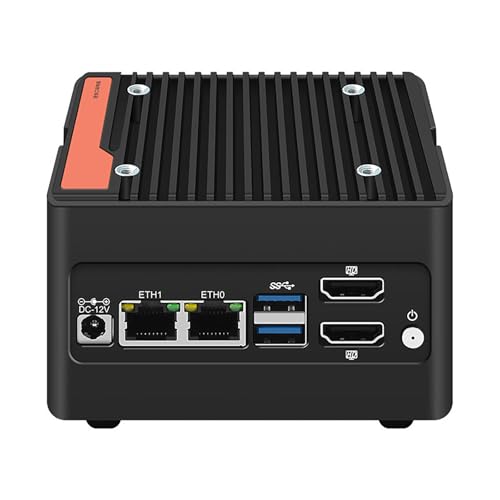
- 4 x M.2 2280 NVMe drive support
- Dual 2.5GbE and dual HDMI 2.0
- Compact aluminum body with active cooling
Best For: Portable high-speed storage builds and compact mobile office use
8-Bay DIY NAS Case

- Eight hot-swap bays for HDDs and SSDs
- Mini-ITX and Micro-ATX compatible
- Dual air channels with quiet temperature-controlled fans
Best For: DIY builders needing a larger NAS chassis for media and backup storage
Portable Backup NAS – PocketCloud Portable NAS for Outdoor Use
If you want one of the more travel-friendly portable nas enclosures, the PocketCloud focuses on mobile backup rather than rack-style expansion. It combines an M.2 NVMe slot, SD card support, Wi‑Fi 6, and app-based control so you can save media in the field, then sync it later through the Dock or cloud when needed.
Best For: Photographers, vloggers, and frequent travelers who need a compact, battery-powered backup device.
Pros:
- Supports up to 8TB on the unit, with expansion to 16TB using the matching Dock
- Offers multiple backup paths including SD cards, USB drives, Wi‑Fi 6, AP mode, and Ethernet with Dock
- Dual 3200mAh replaceable batteries are rated for about six hours of continuous use
- Includes LCD display, control knob, and one-click backup for simpler operation in low light
Cons:
- Diskless design means you still need to buy an M.2 NVMe SSD separately
- Ethernet support requires the Dock
- Best fit is field backup and personal media storage, not heavy server use
The PocketCloud stands out for portability, battery safety, and flexible capture workflows. It is best viewed as a mobile backup NAS enclosure for creators who value convenience, privacy, and all-in-one field use.
Desktop Drive Enclosure – Vantec NexStar JX SATA Enclosure
For shoppers comparing portable nas enclosures that are really meant for simple drive housing, the Vantec NexStar JX is a straightforward SATA enclosure for a single 3.5-inch or 2.5-inch drive. It is designed for easy external storage expansion over USB 3.2 Gen1x1 or eSATA, with cooling vents and aluminum casing to help manage heat.
Best For: Users who want a dependable single-drive enclosure for desktops, DVR/PVR setups, or basic storage expansion.
Pros:
- Supports both 3.5-inch and 2.5-inch SATA III HDDs or SSDs
- Includes USB and eSATA connectivity for flexible system compatibility
- Tool-free hot-swapping is supported with compatible systems
- Aluminum casing and vents are designed to help cool the drive
Cons:
- Only supports one drive at a time
- Not a network NAS system and has no built-in app or cloud features
- Bulkier than small SSD-only portable options
This Vantec enclosure is best for practical single-drive storage, not advanced network sharing. If you mainly need a reliable housing for a SATA drive, it delivers simple connectivity and cooling without extra complexity.
Beginner Home NAS – UGREEN DH2300 2-Bay Personal Storage
The UGREEN DH2300 is aimed at buyers who want entry-level portable nas enclosures-style convenience in a more traditional 2-bay home NAS form. It is built for personal storage, phone backup, and simple file organization, with automatic backups across Windows, iOS, Android, and macOS.
Best For: Beginners and personal users who want a private, easy-to-manage home NAS for photos, videos, and backups.
Pros:
- 2-bay design supports up to 64TB of total capacity with drives installed separately
- Automatic backups work across major desktop and mobile operating systems
- AI tagging helps sort photos by faces, locations, text, and objects
- Includes privacy and security features such as RAID modes, 2FA, permissions, and encrypted transfers
Cons:
- Drives are not included
- Does not support Docker or virtual machines
- Wi‑Fi requires an external USB adapter, as wireless networking is not built in
As an entry-level NAS, the DH2300 keeps the focus on easy backup and long-term private storage. It makes sense if you want a simple first NAS rather than a more advanced power-user platform.
High-Speed SSD NAS – TERRAMASTER D4 4-Bay NVMe Enclosure
If speed matters most in portable nas enclosures, the TERRAMASTER D4 SSD is built around four M.2 NVMe bays and a 40Gbps connection. It is aimed at fast external storage, large file transfers, and video-editing workflows, while still staying compact enough for a desk or travel bag.
Best For: Creators and power users who need very fast multi-SSD storage for editing, backup, or high-speed expansion.
Pros:
- 40Gbps interface with support for Thunderbolt 5/4/3 and USB 4/3.x standards
- Holds four M.2 NVMe 2280 SSDs for up to 32TB total capacity
- Active cooling with temperature sensors helps maintain quiet operation under load
- Tool-free installation and hot-swap design make drive changes easier
Cons:
- Diskless, so SSDs must be purchased separately
- No built-in RAID, only soft RAID through third-party tools
- Requires external power, so it is not a battery-powered portable unit
The D4 SSD is a strong fit when raw throughput matters more than all-in-one NAS features. It is especially appealing for users who want a compact, high-speed NVMe enclosure with broad device compatibility.
Desktop Drive Dock – ORICO Tool-Free SATA Dock
If you want one of the more flexible portable nas enclosures for direct-drive access, this ORICO docking station is built for quick swapping and straightforward backups. It works with 2.5-inch and 3.5-inch SATA HDDs and SSDs, supports UASP/Trim over USB 3.0, and is easy to move between a PC, laptop, smart TV, router, or even a PS5 setup.
Best For: Fast, tool-free access to a single SATA drive for backups, imaging, and file transfers.
Pros:
- Supports 2.5-inch and 3.5-inch SATA drives up to 22TB
- UASP and Trim support with up to 5Gbps transfer speeds
- Tool-less hot-swapping and dust-proof design
- Includes 12V power supply and silicone anti-skid pad
Cons:
- Only supports one drive at a time
- Not compatible with IDE or SAS drives
- New or unallocated drives must be initialized in Disk Management
This is a practical dock rather than a full network storage box, so it makes sense if your priority is fast local drive handling over shared NAS features. The broad device compatibility and external power make it a handy utility choice for everyday storage tasks.
Entry-Level Private Cloud – Yxk Zero1 2-Bay NAS
Among portable nas enclosures, the Yxk Zero1 stands out as a beginner-friendly 2-bay desktop NAS for home storage and private file access. It is diskless, so you add your own drives, then use the remote-access apps and browser tools to gather photos, videos, and documents into one central hub.
Best For: First-time NAS buyers who want a simple private cloud with room to grow.
Pros:
- 2-bay design with diskless flexibility as your storage grows
- 2.5GbE networking for faster transfers and 4K streaming
- Remote access from phone app, desktop client, or web browser
- Includes RAID modes, automated backups, snapshot recovery, and Docker support
Cons:
- Hard drives must be purchased separately
- Not as compact as a simple single-drive dock
- Best value depends on whether you need NAS software features
If you want more than a basic enclosure, this model offers the NAS features that matter most: shared access, backup tools, and privacy controls. It is a stronger fit for a home private cloud than a simple USB dock, especially if you plan to expand over time.
Tool-Free SATA Enclosure – SABRENT EC-KSL3
If you want a straightforward option in portable nas enclosures for a single drive, this SABRENT enclosure focuses on easy setup and dependable USB 3.0 connectivity. It accepts 2.5-inch and 3.5-inch SATA HDDs and SSDs, includes external power, and uses a tool-free design that keeps drive swaps quick.
Best For: Users who want a simple, powered enclosure for one SATA drive on Windows, macOS, or Linux.
Pros:
- Tool-free slide-in design for fast drive changes
- Supports 2.5-inch and 3.5-inch SATA HDDs and SSDs up to 22TB
- USB 3.0 with UASP for solid transfer performance
- Aluminum shell with internal shock-absorbing tray and LED indicator
Cons:
- Requires the included 12V/2A power adapter
- USB-C users may need an adapter for Type-A host connection
- Not compatible with SAS, NVMe, M.2, or IDE/PATA drives
This enclosure is best viewed as a reliable single-drive housing rather than a networked storage appliance. For users who mainly need easy local access and good compatibility across major desktop operating systems, it covers the basics well.
Ultra-Compact NVMe NAS – 4-Bay Pocket Server
If you want portable nas enclosures with real performance headroom, this 4-bay mini NAS is built for fast NVMe storage in an ultra-small footprint. It pairs an Intel i3-N305 processor with four M.2 2280 NVMe slots, dual 2.5GbE, and dual HDMI, making it a practical choice for mobile office use, compact file storage, and lightweight server tasks.
Best For: Users who want a pocket-size NVMe NAS for portable high-speed storage and compact office setups.
Pros:
- Intel i3-N305 with 8 cores/8 threads for efficient everyday NAS performance
- Supports 4 x M.2 2280 NVMe drives for high-capacity, fast storage
- Dual Intel i226-V 2.5GbE ports plus dual HDMI 2.0 output
- Compact aluminum enclosure with built-in cooling and optional extra fan support
Cons:
- Ships with no RAM and no SSD included
- Uses M.2 PCIe 3.0 x1 drive support through the adapter layout
- Best suited to users comfortable with a DIY-style setup
This is a strong pick if your priority is maximum storage density in a tiny chassis. It is less of a turnkey appliance and more of a compact platform for building a fast portable NAS around your own memory and drives.
4-Bay USB-C Storage Dock – 10Gbps Aluminum Enclosure
For buyers comparing portable nas enclosures that double as desktop storage, this WAVLINK 4-bay unit focuses on simple expansion and flexible connectivity. It supports both 3.5-inch and 2.5-inch SATA drives, offers up to 10Gbps over USB-C, and includes HDMI output for setups that need storage and display support in one enclosure.
Best For: Users who want a versatile multi-bay SATA enclosure for backups, media storage, and dock-style desktop use.
Pros:
- Supports 4 SATA bays for 3.5-inch and 2.5-inch HDDs/SSDs
- USB 3.2 Type-C interface with up to 10Gbps transfer speed
- HDMI output supports up to 4K@60Hz when host video output is available
- Dual built-in fans and aluminum shell help with heat management
Cons:
- 2.5-inch drives require additional mounting brackets that are not included
- HDMI only works if the host USB-C port supports video output
- It is an enclosure/docking solution rather than a full NAS computer
This enclosure makes sense if you want a straightforward way to consolidate several SATA drives without building a full server. It is especially appealing for users who value hot-swappable bays, cooling, and easy desktop connectivity.
8-Bay DIY NAS Case – Hot-Swap Media Server Chassis
If you are building a custom system and want one of the more flexible portable nas enclosures for larger drive counts, this 8-bay case gives you plenty of room to grow. It supports 3.5-inch and 2.5-inch drives, includes hot-swap bays, and is designed for Mini-ITX or Micro-ATX builds with separated airflow for the drives and mainboard.
Best For: DIY NAS builders who want an 8-bay chassis for media, backup, or small business storage.
Pros:
- Eight hot-swap drive bays support both 3.5-inch HDDs and 2.5-inch SSDs
- Dual independent air channels help separate drive and system cooling
- Compatible with Mini-ITX and Micro-ATX motherboards
- Steel chassis includes drive indicators, front USB 3.0, and power button
Cons:
- Motherboard, CPU, and power supply are not included
- Requires a DIY assembly approach rather than plug-and-play setup
- Maximum CPU cooler height is limited to 58mm
This case is a solid foundation for a custom NAS if you want more bays and more control over your hardware choices. It is best suited to builders who are comfortable assembling a full system around the enclosure.
How We Picked These Portable Nas Enclosures
We looked for enclosures that balance real-world portability with dependable storage performance. That means checking drive compatibility, expansion potential, network or USB transfer speed, thermal design, setup simplicity, and whether the unit makes sense for home users, creators, or small teams.
We also favored models that offer clear value: enough bays or capacity to matter, but not so much complexity that first-time buyers will struggle.
Quick Comparison: What Matters Most
When comparing Portable Nas Enclosures, the biggest differences usually come down to drive type and access method. Single-bay and docking-style units are simpler and cheaper, while 2-bay and 4-bay options offer better redundancy, capacity, and flexibility. Networked NAS devices add remote access and app features, while USB-based enclosures are often easier to deploy for local storage and backups.
If speed is your priority, look closely at NVMe support, 10Gbps or faster connectivity, and cooling. If simplicity matters more, choose a basic SATA enclosure with straightforward setup and broad drive compatibility.
Key Buying Factors for Portable Nas Enclosures
Drive Compatibility and Bay Count
Match the enclosure to the drives you already own or plan to buy. SATA HDDs and SSDs are common and affordable, while NVMe options deliver much faster performance but usually cost more. More bays mean better expansion and often better data protection options, but also a higher price.
Connectivity and Performance
USB 3.2, USB-C, 2.5GbE, and 10Gbps links can make a noticeable difference in transfer times. For shared media or backups, that may be enough. For editing or heavy multitasking, faster networked models are worth paying for.
Cooling and Noise
Portable Nas Enclosures with active cooling or built-in temperature control tend to sustain better performance during long transfers. If the unit will sit on a desk or in a bedroom, fan noise and drive vibration should also factor into your choice.
Software, Backup, and Access Features
Some Portable Nas Enclosures are basically hardware-only, while others add app-based backup, phone syncing, or remote access. Choose software features that you’ll actually use rather than paying extra for a complicated ecosystem.
Who Should Buy Which Portable Nas Enclosures?
Choose a single-drive or dock-style enclosure if you want the lowest-cost way to back up one drive or move data between systems. Go with a 2-bay portable NAS enclosure if you want a good balance of capacity, redundancy, and everyday usability. Pick a 4-bay or larger model if you expect to store large media libraries, run multiple backups, or expand over time.
If you’re buying for home use, focus on ease of setup and quiet operation. For creators and power users, speed and cooling matter more. And if you need shared access across multiple devices, a networked NAS-style enclosure is usually the better long-term choice.