A useful pointer should help an audience follow your work without becoming a distraction. For academic presentations, that might mean a simple visible dot; for complex slide decks, it might mean a remote with reliable navigation and hyperlink controls.
These 10 picks cover handheld pointers and presentation remotes. Match the device to your room, display, and institution’s laser-safety rules before you buy.
Best 10 Laser Pointers for Academic Research Picks for 2026
Adjustable Beam Pick
USB-Rechargeable Green Laser Pointer

- Removable cap reveals focused beam
- Built-in USB charging
- Aluminum body with hand strap
Best For: Rechargeable pointing during lectures and presentations
Class 2 Pick
M Monoie Green Laser Indicator
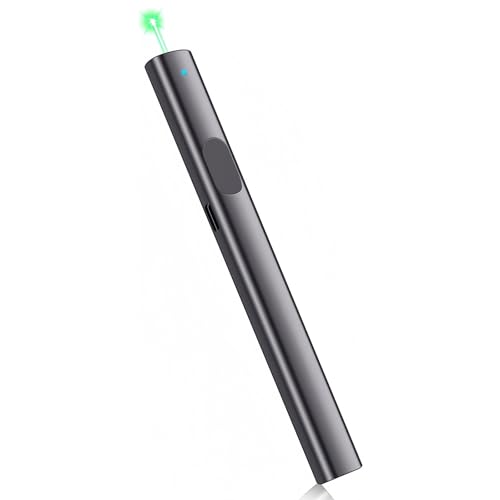
- Specified Class 2 green output, ≤1 mW
- Simple one-button operation
- Compact flat-sided metal body
Best For: Presentations requiring a stated laser classification
Slide-Control Pick

- Red pointer plus slide and volume controls
- Plug-and-play USB receiver
- Up to 100-foot listed wireless range
Best For: Laptop-based research presentations
Two-Mode Pick
IVVTRYI Rechargeable Green Presentation Light
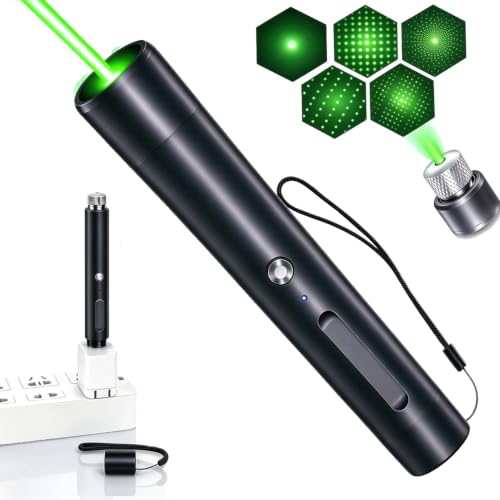
- Floodlight and straight-beam modes
- Direct USB-A charging
- Compact aluminum-alloy body
Best For: Lectures needing broad and focused light modes
Best for Digital Displays
Norwii N97s Presentation Remote
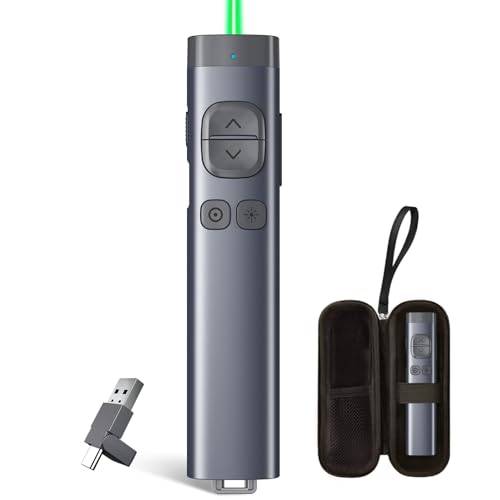
- Digital pointer works on TV and projection screens
- Highlights and magnifies on-screen details
- Bluetooth and USB-A/USB-C receiver options
Best For: Presenting detailed research visuals on digital displays
Best Two-Pack Value
IVVTRYI Rechargeable Green Pointers

- Two green-light devices per pack
- USB-A rechargeable
- Compact for teaching and meetings
Best For: Keeping a pointer in two locations or sharing one
Best Plug-and-Play Clicker
NinjajoyOX Presentation Remote

- Up to 82-foot wireless control range
- Slide, hyperlink, and volume controls
- Red pointer unsuitable for LED/LCD screens
Best For: Moving around during projected research presentations
Green Beam With Longer Listed Runtime
MIPREZT Rechargeable Green Laser Pointer

- Green beam with removable pattern cap
- USB-A rechargeable
- Three-hour listed runtime
Best For: Longer classroom or meeting presentations
Red Beam Presentation Pick
Rechargeable Red Laser Pointer

- Red beam with removable pattern cap
- USB charging cable included
- 30-minute listed runtime
Best For: Lectures and meetings where a red pointer is preferred
Compact Green Presentation Option
Rechargeable Green Laser Pointer

- Green beam and removable pattern cap
- One-hour listed runtime
- Battery and light-source details conflict
Best For: Shorter talks, after confirming specifications
Adjustable Beam Pick – USB-Rechargeable Green Laser Pointer
For laser pointers for academic research, this green pointer offers a removable star cap that switches to a focused beam. Its direct USB charging and aluminum-alloy body suit researchers who want a handheld pointer without buying replacement batteries.
Best For: Pointing during lectures or research presentations when a rechargeable, focused green beam is useful.
Pros:
- Remove the star cap for a single focused beam.
- Charges through a built-in USB plug; no cable is needed.
- Aluminum-alloy shell includes a carrying strap.
Cons:
- No stated laser class or output rating in the supplied product details.
- No slide-control functions.
This is a straightforward beam pointer, not a presentation remote. Check your institution’s laser-safety requirements before using it in a classroom or lab.
Class 2 Pick – M Monoie Green Laser Indicator
Among laser pointers for academic research presentations, the M Monoie indicator stands out for its specified IEC 60825-1 Class 2 green output of 1 mW or less. A single button and slim metal body keep pointing simple during lectures and training sessions.
Best For: Presenters who want a green pointer with a stated laser classification and uncomplicated controls.
Pros:
- Specified Class 2 output of 1 mW or less.
- One-button operation requires no setup.
- Compact aluminum-alloy body has a flat-sided, non-slip design.
Cons:
- No slide-advancing or computer-control features listed.
- No rechargeable charging method listed.
Its documented output rating makes it easier to assess against campus policies than an unclassified listing, though users should still follow their institution’s laser rules.
Slide-Control Pick – DinoFire Wireless Presenter
For laser pointers for academic research talks, this DinoFire remote combines a red pointer with slide navigation, volume control, hyperlink access, and screen controls. Its plug-and-play USB receiver lets presenters move around the room without installing software.
Best For: Researchers giving laptop-based slide presentations who want pointing and presentation controls in one device.
Pros:
- Advances slides and supports volume, hyperlink, window-switching, and screen controls.
- RF wireless range is listed at up to 100 feet.
- Magnetic storage keeps the USB receiver with the remote.
- Plug-and-play setup requires no software download.
Cons:
- Requires one AAA battery, which is not included.
- Red pointer is not recommended for LCD, LED, or TV screens.
Choose this for computer-driven talks rather than standalone pointing. If your room uses a flat-panel display, its stated pointer limitation is worth considering.
Two-Mode Pick – IVVTRYI Rechargeable Green Presentation Light
For laser pointers for academic research presentations, the IVVTRYI offers a two-mode green light: leave the star-shaped cap on for its default floodlight mode, or remove it for a straight beam. It plugs directly into a USB-A port to recharge.
Best For: Lecturers who want a rechargeable handheld light with both broad and focused pointing modes.
Pros:
- Removable cap switches between floodlight and straight-beam modes.
- Built-in USB-A plug charges without a separate cable.
- Aluminum-alloy body is compact and portable.
Cons:
- No slide-control functions listed.
- No laser classification is stated in the supplied details.
The two modes add flexibility for in-person explanations, but the listing’s specifications are inconsistent in places. Confirm the beam specifications and your institution’s safety requirements before purchase.
Best for Digital Displays – Norwii N97s Presentation Remote
For laser pointers for academic research presentations, the Norwii N97s is a strong fit when findings appear on TVs as well as projection screens. Its software-enabled digital pointer can highlight or magnify details on screen, while cursor control helps you open links or play and pause videos.
Best For: Researchers presenting detailed charts or mixed media on digital displays.
Pros:
- Digital pointing, highlighting, and magnification help direct attention to specific on-screen details.
- Connects through Bluetooth or the included 2.4 GHz USB-A/USB-C receiver.
- Supports presentation tools including PowerPoint, Keynote, Google Slides, and Zoom.
Cons:
- Advanced digital features require the Norwii Presenter software.
- Cursor control provides left-click only, not right-click or double-click.
Choose this remote if on-screen precision matters more than a simple point-and-click setup. Check the user guide for feature compatibility with your operating system and presentation software.
Best Two-Pack Value – IVVTRYI Rechargeable Green Pointers
If your search for laser pointers for academic research is really about keeping presentations supplied across two locations, this IVVTRYI two-pack offers a straightforward option. Each compact green-light device charges through a USB-A port and is intended for pointing at slides, charts, whiteboards, and screens.
Best For: Researchers or instructors who want a pointer at both the office and home, or one to share with a colleague.
Pros:
- Two devices in the pack offer a convenient spare or shareable pointer.
- USB-A charging avoids disposable batteries.
- Compact design is easy to carry between classrooms and meeting rooms.
Cons:
- The supplied notes do not list slide-advancing controls or computer connectivity.
- No operating range is provided.
This is the practical pick when you need two rechargeable green pointers rather than a presentation remote. If slide control or a documented range is essential, look for a model that specifies those features.
Best Plug-and-Play Clicker – NinjajoyOX Presentation Remote
For laser pointers for academic research talks held in rooms with projection screens, this NinjajoyOX remote pairs a red pointer with slide controls. Its 2.4 GHz USB receiver works without software installation, and the listed wireless control range is up to 82 feet.
Best For: Lecturers and researchers who want to move around the room while advancing projected slides.
Pros:
- Controls include page changes, full or black screen, hyperlinks, window switching, and volume.
- Plug-and-play USB receiver stores magnetically in the remote.
- Pen clip makes the remote easy to keep close at hand.
Cons:
- The red pointer is not suitable for LED or LCD screens.
- Requires one AAA battery.
It is a useful fit for projected academic talks that need more than basic slide advancing. For presentations shown on TVs or monitors, choose a pointer designed for those displays instead.
Green Beam With Longer Listed Runtime – MIPREZT Rechargeable Green Laser Pointer
For laser pointers for academic research presentations, this MIPREZT model offers a green beam, an aluminum body, and USB-A charging. Its removable star cap switches between a straight beam and decorative patterns.
Best For: Researchers who want a rechargeable green pointer for classroom talks and meeting presentations.
Pros:
- Listed runtime of three hours.
- Charges through a USB-A port beneath the bottom lid.
- Non-slip aluminum body and removable pattern cap.
Cons:
- Not water-resistant.
- The decorative cap is unnecessary for ordinary slide pointing.
The three-hour listed runtime makes this a practical option for longer presentation schedules. The supplied notes do not specify a laser safety class, so confirm suitability for your institution before use.
If you prefer a red beam when shopping for laser pointers for academic research presentations, this handheld model pairs an aluminum body with USB-A charging. Removing its star cap provides a straight beam; fitting the cap creates patterns.
Best For: Presenters who want a rechargeable red pointer for lectures or meeting rooms.
Pros:
- Red beam and removable pattern cap.
- Non-slip aluminum construction.
- Includes a USB charging cable.
Cons:
- Listed runtime is only 30 minutes, despite the bullet description suggesting longer use.
- Not water-resistant.
Its red beam distinguishes it from the green options, but the runtime information conflicts within the supplied notes. Check operating time and your institution’s laser requirements before relying on it for a full session.
For buyers comparing laser pointers for academic research talks, this compact green model offers an aluminum body, a non-slip design, and a removable star-pattern cap. Its description also specifies USB-A charging beneath the bottom lid.
Best For: Presenters seeking a compact green pointer for classroom or meeting use.
Pros:
- Green beam with a removable decorative-pattern cap.
- Aluminum construction with a non-slip design.
- Low-battery flashing indicator described in the listing.
Cons:
- Not water-resistant.
- Battery and light-source specifications conflict: the description says rechargeable lithium-ion laser, while the details list an included AAA battery and LED light source.
The listed one-hour runtime may suit shorter talks, but verify its power source, light source, and laser safety class before purchase; the supplied specifications are inconsistent.
How We Picked the Best Laser Pointers for Academic Research
We organized these picks around common academic tasks: pointing out details during lectures, advancing conference slides, and indicating features during demonstrations. We considered the stated pointer type, color, power source, focus or alignment features, and presentation controls. Product names alone do not establish tested brightness, range, laser classification, or display compatibility, so confirm those specifications with the seller before purchase.
Quick Comparison
Start by deciding whether you need a physical beam or a presentation remote. The standalone green and red pointers suit situations where you need to indicate a location directly, provided their documented laser class is permitted. The wireless clickers add slide controls; the Norwii N97s is described as a digital laser pointer, which may be a better fit when you present on screens. A two-pack can make sense for shared teaching spaces, while a rechargeable model avoids disposable batteries. Check whether each remote needs a USB receiver, supports your operating system, and offers the controls your slide software uses.
Key Buying Factors for Laser Pointers for Academic Research
Laser Safety and Institutional Policy
Check the verified laser class, output rating, labeling, and local rules—not marketing terms such as “high power” or “long distance.” For ordinary presentations, choose the lowest suitable output. Never aim a beam at people, animals, vehicles, or reflective surfaces. If you need precise optical alignment in a lab, use equipment approved for that procedure and follow your institution’s laser-safety protocol rather than treating a presentation pointer as a calibrated instrument.
Display and Room Compatibility
A conventional laser dot may be hard to see on some TV, LED, or LCD displays, despite claims in a listing. A software-based digital pointer can be more useful for screen-shared talks, but check its app, operating-system, and connection requirements. For projection screens, consider viewing distance and ambient light; green often appears more visible than red at comparable output, but the actual result depends on the device and room.
Controls, Charging, and Handling
For presentations, prioritize dependable forward/back controls, a comfortable button layout, and any needed hyperlink or volume functions. Verify USB receiver type and compatibility before a conference. For handheld models, look for a secure activation button and a power setup you can maintain. Adjustable focus can change the apparent dot or beam, but it is not a substitute for a verified safety rating.
Who Should Buy Which Laser Pointers for Academic Research?
Choose a presentation clicker if you move through slides while speaking; consider a digital-pointer remote for talks centered on electronic displays or screen sharing. Choose a documented, policy-compliant handheld pointer for occasional pointing on a suitable projection surface. A rechargeable two-pack is practical for shared classrooms if both units meet your safety requirements. For alignment work, favor the explicitly Class 2–described alignment option only after confirming its certification and suitability for your task. Avoid selecting a “high power” model on range claims alone.