Choosing the right laser cutting machine can make hobby projects easier, cleaner, and more repeatable. The best model depends on your materials, workspace, project size, ventilation setup, and comfort with calibration and software.
We compared 10 popular machines across laser power, work area, speed, safety features, air assist, controls, and overall versatility to help you find a practical fit for your workshop.
Best 10 Laser Cutting Machine for Hobbyists Picks for 2026
Best Overall Power

- 40W laser cuts thick wood and supports large projects.
- Enclosed Class 1 design adds multiple safety features.
- Autofocus and guided software ease the learning curve.
Best For: Large projects, rotary engraving, and frequent hobby use.
Best Compact Starter

- 300-by-300mm workspace suits smaller projects.
- Supports LightBurn, LaserGRBL, Wi-Fi, and TF-card control.
- Air-assist-ready design helps produce cleaner cuts.
Best For: Beginners and makers handling lighter materials.
Best Air-Assist Package
Longer RAY5 10W Laser Engraver
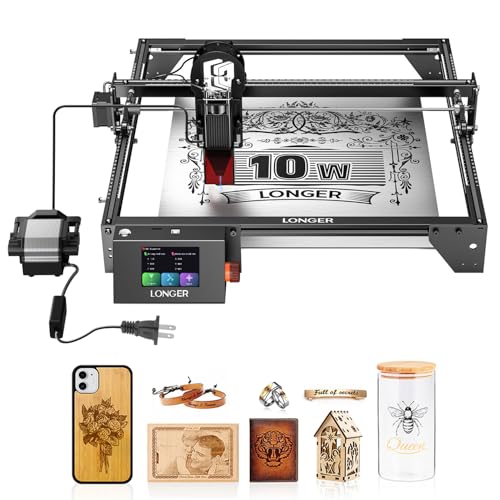
- Large 400-by-400mm working area supports bigger layouts.
- Included air pump improves smoke control and cut quality.
- Offers touchscreen, app, Wi-Fi, USB, and TF-card control.
Best For: Roomy DIY projects and flexible workshop operation.
Best Detail-Focused Upgrade

- 12W output handles engraving and deeper multi-pass cuts.
- Fine spot and claimed 0.01mm positioning accuracy suit detailed art.
- Compatible with three software platforms and optional expansion accessories.
Best For: Detailed personalization and an expandable maker setup.
Power Workshop Pick

- 20W power with a 300×300mm work area
- Up to 20,000mm/min operating speed
- Enclosure with multiple protection features
Best For: Wood crafting, custom orders, and larger hobby projects
Heavy-Duty Cutting Pick

- Switchable 24W and 48W output modes
- Auto air assist and aluminum-alloy structure
- Designed for substantial wood, MDF, and acrylic cutting
Best For: Ambitious cutting projects and small-business production
Best Precision Pick

- Fine 0.06mm compression spot for detailed work
- 400 × 415mm workspace
- Eye cover and active stop function
Best For: Precision-focused hobby projects and larger layouts
Best Power Upgrade

- 20W output for stronger cutting
- Up to 400mm/s engraving speed
- Works with LightBurn and LaserGRBL
Best For: Fast, higher-power hobby cutting and engraving
Best Simple Pick

- Three-minute assembly with starter accessories
- A4 workspace for common craft projects
- App, offline, LightBurn, and LaserGRBL support
Best For: Beginners and compact home crafting
Best Overall Power – xTool S1 40W Rotary Bundle
For hobbyists who want substantial cutting power and a large work area, the xTool S1 is a versatile laser cutting machine for hobbyists. Its enclosed design, autofocus, rotary bundle, and guided software make it approachable for both everyday crafts and larger projects.
Best For: Large projects, rotary engraving, and hobbyists who prioritize power, safety, and an easier setup.
Pros:
- 40W laser can cut up to 18mm cherry wood in a single pass, according to the supplied specifications.
- Spacious 23.93-by-15.16-inch bed and up to 600mm/s engraving speed support larger projects.
- Enclosed Class 1 design includes a protective cover, flame sensors, emergency stop, and lid-open protection.
- Autofocus, XCS software, material settings, tutorials, and AI-assisted design tools simplify startup.
Cons:
- At 86.8 pounds, it is substantially heavier than the open-frame options in this roundup.
- The larger enclosed setup may require more dedicated workspace.
The xTool S1 is the strongest choice here for users who expect to cut thicker materials, work on oversized designs, or engrave tumblers and other curved items. Its premium feature set is best suited to hobbyists who plan to use their machine frequently.
Best Compact Starter – Twotrees TTS-55 Pro 5.5W
The Twotrees TTS-55 Pro is a compact laser cutting machine for hobbyists who want an affordable-style open-frame setup for smaller crafts. It combines a 300-by-300mm work area with air-assist support, wireless control, and compatibility with popular maker software.
Best For: Beginners, small workshop projects, and makers working with wood, acrylic, leather, paper, and coated materials.
Pros:
- 5.5W laser is specified to cut up to 5mm plywood, 3mm acrylic, and 0.7mm leather.
- Fine 0.08-by-0.46mm spot focus and claimed engraving accuracy up to 0.1mm support detailed work.
- Built-in Wi-Fi, TF-card offline engraving, and web or mobile control provide flexible operation.
- Supports LaserGRBL and LightBurn across listed operating systems.
Cons:
- The 300-by-300mm work area is smaller than the larger machines in this selection.
- Its 5.5W output is better suited to lighter cutting than thick-material projects.
- The open-frame design requires more attention to workspace safety and ventilation.
This Twotrees model makes sense when compact size and software flexibility matter more than maximum cutting depth. The included air-assist-ready nozzle is a useful upgrade for hobbyists who want cleaner cuts and room to improve their setup later.
Best Air-Assist Package – Longer RAY5 10W Laser Engraver
The Longer RAY5 offers a capable middle ground for hobbyists seeking a laser cutting machine for hobbyists with a generous 400-by-400mm workspace. Its included air pump, touchscreen, offline controls, and multiple data-transfer options make it practical for varied DIY workflows.
Best For: Hobbyists who want a roomy work area, cleaner cuts from included air assistance, and flexible offline or wireless control.
Pros:
- 400-by-400mm engraving area provides room for signs, layouts, and larger craft pieces.
- Included adjustable 10-30L/min air pump helps suppress smoke, reduce burning, and cool cuts.
- 3.5-inch color touchscreen and Wi-Fi, USB, app, and TF-card transfer support convenient operation.
- Protective cover, included glasses, and abnormal-movement shutdown add safety-oriented features.
Cons:
- The supplied specifications do not identify a specific maximum material thickness for every material.
- Assembly is required, even though tools and instructions are included.
- The 10,000mm/min maximum speed is lower than the xTool S1’s stated 600mm/s speed when directly converted.
With its large bed and included air pump, the RAY5 is a practical choice for hobbyists who want more workspace without moving to the heaviest enclosed machine. The touchscreen and offline modes are especially useful for a dedicated workshop setup.
Best Detail-Focused Upgrade – ACMER S2 12W Laser Engraver
The ACMER S2 is a detail-oriented laser cutting machine for hobbyists who want fine engraving, a useful 300-by-300mm workspace, and a platform that can expand with accessories. Its 12W laser balances intricate artwork with deeper cutting across a broad range of materials.
Best For: Personalized gifts, signs, ornaments, detailed artwork, and hobbyists planning to expand their setup.
Pros:
- True 12W laser is specified for more than 100 materials and can cut paulownia wood and black acrylic with multiple passes.
- 0.08-by-0.08mm spot and claimed 0.01mm positioning accuracy support fine text and intricate patterns.
- Works with ACMER Studio, LightBurn, and LaserGRBL on Windows, macOS, and Linux.
- Expansion options include rotary modules, risers, and air assist.
Cons:
- The 300-by-300mm workspace is smaller than the Longer RAY5 and xTool S1 beds.
- Rotary, riser, and air-assist accessories are optional rather than included in the supplied package.
- Deeper cuts such as 15mm paulownia or 12mm black acrylic require multiple passes.
The ACMER S2 is a strong fit for creators who value engraving detail and software flexibility over the largest possible bed. Its accessory ecosystem also gives hobbyists a clear path to add capabilities as their projects grow.
Power Workshop Pick – 20W Enclosed Laser Cutter
For hobbyists who want a laser cutting machine for hobbyists that can also support custom orders, this enclosed 20W model combines a 300×300mm work area with high-speed cutting and engraving. Its higher power suits thicker wood and detailed projects, while the enclosed design is practical for a home workshop.
Best For: Wood crafting, personalized products, batch projects, and hobbyists who want a larger enclosed work area.
Pros:
- 20W power is suited to denser wood, plywood, and demanding cutting tasks.
- Large 300×300mm work area supports bigger designs or multiple pieces.
- Up to 20,000mm/min speed and 0.01mm square focus support detailed, efficient work.
- Enclosure includes flame detection, tilt protection, automatic shutdown, and emergency stop features.
Cons:
- The 16-pound, 21.5-inch-wide machine needs dedicated workspace.
- Its stronger feature set may be more than a casual beginner needs.
- Material compatibility and ventilation requirements still need to be considered for each project.
This is the most capable all-around option here for hobbyists who value workspace, speed, and added enclosure features. It is especially appealing if projects may grow into small-business or batch-production work.
Beginner-Friendly Pick – ACMER S1 Compact Engraver
If you are looking for a laser cutting machine for hobbyists that is easy to start with, the ACMER S1 emphasizes simple setup and compact storage. It arrives 99% preassembled, weighs 4.2 pounds, and works with ACMER Studio, LightBurn, and LaserGRBL.
Best For: Beginners, apartment or home users, portable crafting, and small engraving projects on thinner materials.
Pros:
- 99% preassembled design requires only a short laser-head installation.
- Compact 130×130mm working area and lightweight aluminum construction make it easy to store.
- Supports macOS, Windows, and Linux, plus common design formats such as JPG, PNG, BMP, and DXF.
- AI-assisted ACMER Studio software can help turn prompts or photos into engraving designs.
Cons:
- The 130×130mm work area is considerably smaller than the other listed machines.
- Its 6000mW diode laser is positioned for thin plywood, MDF, and acrylic rather than heavier cutting.
- As a Class 4 laser, it requires careful operation and attention to the safety guidance.
The S1 is a practical entry point when convenience and portability matter more than a large work area. Its software options and quick setup make it approachable, but larger or thicker projects will call for a more powerful machine.
Heavy-Duty Cutting Pick – ATOMSTACK A40 PRO V2
For hobbyists who need a laser cutting machine for hobbyists with substantial cutting output, the ATOMSTACK A40 PRO V2 offers switchable 24W and 48W modes. Its aluminum-alloy structure, auto air assist, and broad material support make it suited to ambitious home projects and small-business production.
Best For: Higher-volume cutting, thicker wood and MDF, detailed engraving, and users comfortable with a Class IV open-frame machine.
Pros:
- One-key switching between 24W engraving mode and 48W cutting mode adds flexibility.
- Listed cutting capability includes up to 18mm wood, 9mm MDF, and 7nm acrylic in a single pass.
- Auto air assist and a rigid anodized aluminum structure support cutting and accuracy.
- Quick-install design can typically be assembled in 20–30 minutes.
Cons:
- The Class IV design requires strict safety practices, protective glasses, and supervision.
- Its 22.4-pound, open-frame format needs a dedicated, controlled workspace.
- Compared with a compact engraver, setup and operation may be less approachable for first-time users.
The A40 PRO V2 is the performance-oriented choice for makers who prioritize cutting power and material range. Its open Class IV design demands more care, but the switchable output and air assist provide useful flexibility for serious projects.
Best Precision Pick – Creality Falcon 5W
If you want a laser cutting machine for hobbyists that balances fine detail with a generously sized work area, the Creality Falcon 5W is a practical option. Its 400 × 415mm workspace, 10,000mm/min engraving speed, and fine compression spot suit detailed wood, leather, acrylic, and other craft projects.
Best For: Hobbyists who prioritize precise, repeatable engraving and larger one-piece projects.
Pros:
- 0.06 × 0.06mm compression spot and claimed 0.004-inch accuracy for detailed designs.
- Large 400 × 415mm working area for signs and other larger projects.
- Engraves more than 200 material types, including wood, leather, and acrylic.
- Eye-protective cover and active stop function add useful safety features.
Cons:
- Rotary roller and raisers for cylindrical or taller items are optional extras.
- The 5W laser output may be less suited to users seeking maximum cutting power.
The Falcon 5W stands out for detail-focused hobby work and a spacious bed. It is especially appealing when accurate repeat jobs and larger layouts matter more than the highest available laser power.
Best Power Upgrade – ATOMSTACK A20 Pro V2
The ATOMSTACK A20 Pro V2 is a laser cutting machine for hobbyists who want stronger cutting capability and fast processing. Its stated 20W output, speeds up to 400mm/s, modular frame, and support for LightBurn and LaserGRBL make it suitable for expanding craft and small-batch work.
Best For: Hobbyists who want higher laser power, fast jobs, and flexible software compatibility.
Pros:
- 20,000mW output is designed for high-energy cutting and engraving.
- Engraving speeds reach up to 400mm/s for shorter processing times.
- Compatible with the ATOMSTACK app, LightBurn, and LaserGRBL.
- Includes limit switches, cross-line light, magnetic protective cover, and safety glasses.
Cons:
- The stronger setup may be more capability than casual users need.
- Its listed warranty is one year, so buyers should review support terms carefully.
Choose the A20 Pro V2 if cutting strength and speed are your main priorities. Its modular construction and broad software support also give experienced hobbyists room to refine their workflow.
Best Simple Pick – K15 Pro 10W
The K15 Pro is a laser cutting machine for hobbyists who want a compact setup with accessible controls. It assembles with six screws, supports app-based and offline operation, and offers an 11.8 × 7.9-inch A4 work area for common crafts such as coasters, signs, tags, and gifts.
Best For: Beginners, home crafters, and small businesses working on compact projects.
Pros:
- Free CutLabX software supports computers, tablets, and phones, with LightBurn and LaserGRBL compatibility.
- Offline batch jobs can be run from a TF card without a connected PC.
- Verified 10.36–10.58W output, 15,000mm/min speed, and one-touch smart focus.
- Compact A4 work area with heightening columns for taller objects.
Cons:
- The A4 workspace is smaller than the larger-bed machines in this roundup.
- The optional IR head, rotary roller, honeycomb plate, and other accessories add to the upgrade cost.
The K15 Pro is a strong fit for users who value simple setup, mobile-friendly control, and a small footprint. Its upgrade path is useful if your projects later expand into coated metal or tumbler work.
How We Picked the Best Laser Cutting Machine for Hobbyists
We evaluated these machines by looking at the specifications that matter most in real hobby use: laser output, usable work area, advertised cutting and engraving speed, focusing method, air-assist capability, enclosure or safety options, software compatibility, and offline controls. We also considered whether each machine is better suited to occasional crafts, detailed engraving, larger signs, personalized gifts, or small-business production.
Power ratings are not the only measure of performance. Material thickness, lens condition, focus accuracy, air flow, passes, and the material itself all affect results. Treat advertised cutting claims as starting points rather than guarantees.
Quick Comparison
| Best For | What to Prioritize | Models to Consider |
|---|---|---|
| Beginners and small projects | Simple setup, manageable footprint, reliable focusing | Creality Falcon 5W, K15 Pro, ACMER S1 |
| Detailed engraving | Fine beam, stable frame, accurate positioning | Twotrees TTS-55 Pro, Longer RAY5, ATOMSTACK A20 PRO V2 |
| Thicker wood and faster work | Higher optical power and air assist | ACMER S2, ATOMSTACK A40 PRO V2, 20W DIY model |
| Broad material and project flexibility | Larger bed, stronger safety and workflow features | xTool S1 |
Key Buying Factors for a Laser Cutting Machine for Hobbyists
Laser Power and Material Goals
Lower-power diode lasers are suitable for engraving wood, leather, coated metal, and similar materials, while higher-power models generally cut thicker wood and acrylic more efficiently. Confirm that your intended material is laser-compatible and never cut PVC, vinyl, or other materials that release dangerous fumes.
Work Area and Machine Size
A larger bed accommodates signs, panels, and batch projects but requires more table space. Measure your workspace, including room for cable routing, ventilation, and material loading. A compact machine may be the better choice if most projects involve ornaments, cards, or small personalized items.
Air Assist, Enclosure, and Ventilation
Air assist can reduce scorching and help maintain a cleaner cut. An enclosure can contain light and smoke, but it does not replace proper exhaust ventilation, fire awareness, or protective eyewear. Look for a complete safety setup rather than relying on laser power alone.
Software and Ease of Use
Check support for your preferred design workflow, such as LightBurn or the manufacturer’s software. Touchscreens, offline controls, automatic focusing, and clear assembly instructions can significantly reduce setup friction for beginners.
Who Should Buy Which Laser Cutting Machine for Hobbyists?
Choose a compact, lower-power machine if you are learning laser engraving or primarily making small crafts. Step up to a 10W or 20W model if you want more efficient cutting and room to experiment with thicker materials. A 40W-plus machine makes more sense for frequent cutting, larger projects, or small-batch production, provided you have suitable ventilation and safety space.
For the most versatile experience, prioritize a stable frame, useful work area, air assist, dependable software support, and safety features over headline power alone. Those fundamentals usually matter more than a small difference in advertised speed.