The best label printers make shipping, organizing, and business labeling faster without the mess and maintenance of ink cartridges. This roundup compares compact Bluetooth models, dedicated shipping printers, and versatile desktop label makers.
Whether you need crisp 4×6 package labels or neatly printed labels for files, cables, shelves, and products, these picks cover the most useful formats, connections, and workflows for 2026.
Best 10 Label Printers Picks for 2026
Best Wireless Shipping Pick
JADENS Bluetooth Thermal Shipping Label Printer

- Inkless 203 DPI thermal printing
- Bluetooth and USB connectivity
- Supports major shipping platforms
Best For: Online sellers printing shipping labels wirelessly
Best Portable Organizer
Brother P-Touch PT-D210 Label Maker
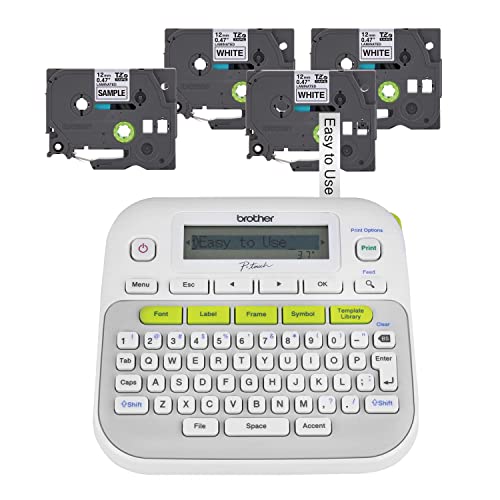
- Portable battery-powered design
- Includes four label tapes
- Hundreds of symbols and templates
Best For: Home and office organization
Best High-Speed Shipping Printer
Rollo USB Thermal Label Printer

- Prints one 4x6 label per second
- 203 DPI clear thermal output
- Compatible with major platforms
Best For: High-volume computer-based shipping
Best Connected Business Label Maker
Brother P-Touch PT-D610BT Business Label Maker
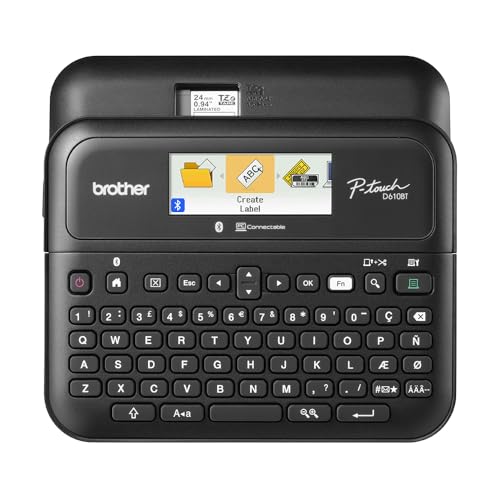
- Bluetooth and USB connectivity
- 175 business templates
- Stores up to 90 labels
Best For: Inventory, asset, and merchandise labeling
Best for Easy Setup
Phomemo 241BT Bluetooth Label Printer

- Bluetooth and USB printing options
- Supports labels up to 4.6 inches wide
- Prints up to 72 4x6 labels per minute
Best For: Online sellers and home businesses needing flexible shipping label printing
Best High-Speed Office Pick
Brother QL-800 Professional Label Printer

- Prints up to 93 labels per minute
- Offers black-and-red label printing
- Includes auto-cutter and USB connectivity
Best For: Busy offices and businesses producing high volumes of professional labels
Best Portable Organization Pick
SUPVAN E11 Keyboard Label Maker

- Built-in keyboard plus Bluetooth app control
- Rechargeable and weighs about 0.5 pounds
- Includes four tapes and supports continuous labels
Best For: Portable home, school, office, and garage organization
Best Wireless Workhorse
Nelko Bluetooth Thermal Shipping Label Printer

- Prints up to 72 4x6 labels per minute
- Bluetooth app and USB connectivity
- Supports multiple label sizes and formats
Best For: Small businesses and home sellers needing fast, flexible label printing
Best App Features
NULLTONEX Bluetooth Thermal Label Printer

- App includes 1,800+ templates and 300+ fonts
- Bluetooth and USB connectivity
- Prints up to 72 labels per minute without ink
Best For: Small businesses wanting customizable labels and flexible connections
Best Compact Option
Rongta RP425 Wireless Shipping Label Printer

- Lightweight 16-ounce compact design
- Bluetooth and USB connectivity
- Inkless 203 DPI printing for labels
Best For: Users needing a small wireless printer for standard shipping labels
Best Wireless Shipping Pick – JADENS Bluetooth Thermal Shipping Label Printer
For small businesses comparing label printers, the JADENS JD268BT is a flexible shipping-focused option with Bluetooth and USB connectivity. Its direct-thermal design avoids ink and toner, while support for roll and fanfold labels accommodates common shipping workflows.
Best For: Online sellers who need wireless or USB printing for 4×6 shipping labels.
Pros:
- Prints without ink or toner using a 203 DPI thermal print head.
- Supports Bluetooth on compatible Windows and Mac computers, plus app-based printing on Android and iOS.
- Works with major marketplaces and shipping platforms, including Amazon, eBay, Shopify, ShipStation, and Shippo.
- Accepts label widths from 1.57 to 4.1 inches and includes a one-year warranty.
Cons:
- Mobile printing requires the Jadens printer app rather than direct Bluetooth printing.
- Labels must be identified and calibrated when changing label types.
The JADENS stands out among label printers for combining wireless convenience with broad shipping-platform compatibility. It is especially practical for a growing home-based shipping operation.
Best Portable Organizer – Brother P-Touch PT-D210 Label Maker
Brother P-Touch, PTD210, Easy-to-Use Label Maker Bundle (4 Label Tapes Included), White, Small
Check Price On AmazonThe Brother PT-D210 is one of the more approachable label printers for household and office organization. Its compact, button-controlled design includes a preview screen, built-in formatting options, and four included label tapes to get started.
Best For: Home, school, and office users making organized labels for folders, storage, supplies, and clothing.
Pros:
- Portable design runs on six AAA batteries or an optional AC adapter.
- Offers 10 styles, 14 fonts, 98 frames, more than 600 symbols, and 27 templates.
- Includes one sample tape and three full-length black-on-white tapes.
- Compatible with durable Brother TZe laminated tapes in several widths and specialty formats.
Cons:
- Batteries and the AC adapter are sold separately.
- Its maximum compatible tape width is 12 mm, so it is intended for smaller labels rather than shipping labels.
Choose the PT-D210 if you want simple, standalone label printers for everyday organizing rather than ecommerce shipping. The included tapes and broad selection of symbols make it a convenient starter bundle.
Best High-Speed Shipping Printer – Rollo USB Thermal Label Printer
The Rollo USB is a commercial-grade choice among label printers for sellers who prioritize fast, consistent shipping output. It connects by USB to Windows or Mac computers, prints one 4×6 label per second, and uses direct thermal technology without ink or toner.
Best For: High-volume ecommerce shipping from a computer or laptop.
Pros:
- Prints at up to 150 mm/s, or approximately one 4×6 label per second.
- Uses a 203 DPI print head for clear, scannable labels.
- Works with major carriers, marketplaces, and shipping platforms.
- Supports labels from 1.57 to 4.1 inches wide and includes the Rollo Ship app with shipping-rate features.
Cons:
- Connectivity is wired USB rather than wireless.
- Designed for Windows and Mac computers, not direct smartphone printing.
The Rollo USB is a strong fit when speed and platform compatibility matter more than portability. Its wired setup is straightforward, though shoppers seeking wireless label printers should consider another model.
Best Connected Business Label Maker – Brother P-Touch PT-D610BT Business Label Maker
Brother P-Touch PT-D610BT Business Professional Connected Label Maker with Bluetooth®
Check Price On AmazonThe Brother PT-D610BT is a business-oriented option among label printers, combining a physical QWERTY keyboard with Bluetooth and USB connectivity. Its large color LCD, automatic cutter, extensive templates, and memory support repeatable labeling for organized workplaces.
Best For: Businesses managing inventory, assets, merchandise, security seals, and custom labels.
Pros:
- Supports label creation through Bluetooth or USB from computers and mobile devices.
- Provides 17 fonts, 17 styles, 160 frames, 900 symbols, and 175 business templates.
- Stores up to 90 frequently used labels for quick reprinting.
- Includes an automatic cutter and a two-line, 20-character color LCD preview.
Cons:
- Uses Brother TZe tapes up to 1 inch wide, making it unsuitable for 4×6 shipping labels.
- Its business-focused feature set may be more than casual home organizers need.
For structured workplace labeling, the PT-D610BT offers more control and repeatability than basic label printers. Bluetooth, USB, templates, and stored designs make it particularly useful for teams with recurring labeling tasks.
Best for Easy Setup – Phomemo 241BT Bluetooth Label Printer
If you need label printers for shipping, online selling, or general document labeling, the Phomemo 241BT offers flexible Bluetooth and USB connectivity. It prints black-and-white labels up to 4.6 inches wide and works with major platforms including Amazon, eBay, Shopify, Etsy, UPS, USPS, and FedEx.
Best For: Home businesses, online sellers, and users who want wireless printing from phones, tablets, PCs, or Macs.
Pros:
- Supports Bluetooth printing through the Labelife app on iOS and Android.
- USB connectivity supports Windows, Mac OS, Chrome OS, and Linux.
- Prints at up to 150 mm/s, or up to 72 sheets of 4×6 labels per minute.
- Uses direct thermal printing, so no ink or toner is required.
Cons:
- Prints black-and-white only.
- PC and Mac users need to download the driver, while mobile users need the Labelife app.
- The manufacturer recommends using genuine Phomemo thermal labels for best results.
The 241BT is a practical choice when wireless convenience and broad platform compatibility matter. Its fast thermal printing suits shipping workflows, while USB support adds flexibility for desktop use.
Best High-Speed Office Pick – Brother QL-800 Professional Label Printer
Among label printers for busy offices and shipping stations, the Brother QL-800 stands out for speed and straightforward USB operation. It prints at up to 93 labels per minute and supports Brother DK pre-sized labels plus continuous-length tape for custom signage.
Best For: Offices, warehouses, and businesses that need fast labels for shipping, folders, name badges, and organization.
Pros:
- Prints up to 93 labels per minute at 300 dpi.
- Supports black-and-red printing with compatible Brother DK-2251 media.
- Plug & Label technology works with Windows and Mac, including Microsoft Word, Excel, and Outlook.
- Built-in auto-cutter helps finish labels neatly.
Cons:
- Connectivity is USB rather than wireless.
- Uses Brother Genuine DK labels and continuous-length tapes.
- Black-and-red printing requires compatible DK-2251 media.
The QL-800 is well suited to high-volume labeling where speed, sharp 300 dpi output, and an automatic cutter are priorities. Its USB-only design is less convenient for mobile or wireless workflows, but it keeps desktop operation simple.
Best Portable Organization Pick – SUPVAN E11 Keyboard Label Maker
For household and school organization, the SUPVAN E11 is one of the more portable label printers, combining a built-in keyboard with Bluetooth app editing. Its compact rechargeable design works with continuous and die-cut labels, making it useful for pantry items, tools, files, and supplies.
Best For: Home, office, school, and garage labeling when portability and on-device typing are important.
Pros:
- Supports direct keyboard printing or customized designs through a Bluetooth app.
- Compact 0.5-pound design includes a rechargeable 1200 mAh battery.
- App offers more than 30 fonts, 50 frames, 660 icons, and 17 languages.
- Works with both continuous and die-cut labels and uses only a 0.2-inch margin.
Cons:
- Prints monochrome labels at 203 dpi.
- Its maximum media size is 15 mm by 6 m, making it unsuitable for larger shipping labels.
- Bluetooth connectivity is designed for smartphones rather than desktop systems.
The E11 is a convenient organization-focused label maker rather than a shipping printer. Its keyboard, rechargeable battery, creative app tools, and included tapes make it especially useful for quick personal labeling.
Best Wireless Workhorse – Nelko Bluetooth Thermal Shipping Label Printer
For sellers comparing label printers, the Nelko PL70E-BT combines Bluetooth and USB connectivity with fast direct-thermal printing. It supports 4×6 labels and other sizes, works with major marketplaces and carriers, and avoids ink and toner costs.
Best For: Small businesses and home sellers that need fast, flexible shipping-label printing from phones, tablets, or computers.
Pros:
- Prints up to 72 4×6 labels per minute at 203 DPI.
- Supports Bluetooth through the NELKO app plus USB connections for Windows, macOS, and Chrome OS.
- Works with roll and fanfold labels from approximately 1.54 to 4.1 inches wide.
- Compact design and included 50 4×6 labels make setup convenient.
Cons:
- Mac users can print only through USB, not Bluetooth.
- Bluetooth printing requires saving platform labels as PDFs and uploading them to the NELKO app.
The Nelko is a practical all-around option when speed, platform compatibility, and wireless convenience matter. Its Mac Bluetooth limitation is worth noting, but USB support and broad label-size compatibility add versatility.
Best App Features – NULLTONEX Bluetooth Thermal Label Printer
This NULLTONEX model is one of the more feature-focused label printers for small businesses. Its FlashLabel Pro app offers templates, fonts, editing tools, and offline storage, while Bluetooth and USB connections support both mobile and desktop workflows.
Best For: Small-business users who want customizable label designs alongside quick 4×6 shipping-label printing.
Pros:
- Direct-thermal printing requires no ink or toner and reaches up to 72 labels per minute.
- FlashLabel Pro includes more than 1,800 templates and 300 fonts.
- Supports Bluetooth and USB connections for phones, laptops, and PCs.
- Compatible with Amazon, Shopify, Etsy, USPS, UPS, FedEx, and DHL.
Cons:
- Prints in black and white only.
- The included starter supply is limited to 25 sheets of 4×6 labels.
Choose the NULLTONEX if app-based customization is a priority rather than simple label output alone. Its compact design and overheat protection also suit busy desks, while USB provides a steadier alternative to wireless printing.
Best Compact Option – Rongta RP425 Wireless Shipping Label Printer
The Rongta RP425 is a compact choice among label printers for shipping and small-business tasks. It uses inkless thermal printing at 203 DPI and supports Bluetooth from mobile devices or USB printing from a PC or laptop.
Best For: Users who want a lightweight wireless printer for standard 4×6 shipping labels and other small-business labels.
Pros:
- Bluetooth and USB connectivity support phones, tablets, PCs, and laptops.
- Inkless thermal printing produces sharp monochrome output without cartridges.
- Supports multiple-size label printing, with a maximum media size of 4×6 inches.
- Compact 16-ounce design takes up little workspace.
Cons:
- Its listed print speed is 15 pages per minute, slower than the other options here.
- Computer printing requires downloading the driver and using USB.
- It includes a one-year manufacturer warranty rather than a lifetime warranty.
The Rongta is a sensible fit when portability and a small footprint outweigh maximum throughput. It covers the core needs for wireless 4×6 shipping labels, though higher-volume sellers may prefer a faster model.
How We Picked the Best Label Printers
We evaluated these Label Printers by looking at their intended use, label compatibility, connection options, print speed, ease of setup, portability, and ongoing supply costs. We also considered whether each model is better suited to occasional home use, high-volume shipping, office organization, or small-business workflows.
Thermal printers were prioritized because they avoid ink cartridges and are generally simple to maintain. However, thermal label systems differ: some use proprietary cartridges or tape cassettes, while others print on standard 4×6 shipping labels. That distinction can matter as much as the printer’s upfront price.
Quick Comparison
| Best For | Recommended Type | What to Look For |
|---|---|---|
| Shipping packages | 4×6 thermal printer | Reliable wireless or USB connection, broad platform compatibility, and easy label loading |
| Home organization | Compact label maker | Portable design, simple controls, and affordable tape refills |
| Office filing | Desktop label printer | Clear text, multiple layouts, and computer or mobile support |
| Small-business use | Connected professional model | Fast output, durable labels, flexible software, and dependable connectivity |
Key Buying Factors for Label Printers
Label Size and Format
Start with the labels you actually need. Shipping businesses typically require 4×6 labels, while home and office users may prefer narrow tape labels for containers, folders, cables, and shelves. Confirm supported widths before buying, especially if you already have rolls or cartridges on hand.
Connectivity and Compatibility
Bluetooth is convenient for phones and tablets, while USB is often dependable for desktop shipping workflows. Check compatibility with your operating system, ecommerce platform, carrier tools, or preferred label-design app. A printer that works with your existing setup is more valuable than one with extra features you will not use.
Speed, Resolution, and Workload
Occasional users can choose nearly any straightforward model, but frequent shippers should prioritize fast printing, consistent feed performance, and easy roll replacement. Resolution affects small text, barcodes, and logos, so business users should choose a model known for sharp, legible output.
Running Costs and Maintenance
Thermal printing eliminates ink, but labels are still an ongoing expense. Compare compatible roll or tape prices, available sizes, and how easy supplies are to find. Also check whether the printer requires proprietary consumables or accepts broadly available media.
Who Should Buy Which Label Printers?
Choose a compact tape label maker if your priorities are household organization, school supplies, craft projects, or occasional office labeling. A Bluetooth model is especially useful when you want to design labels from a phone.
Choose a 4×6 thermal shipping printer if you sell online, ship packages regularly, or want a faster alternative to printing labels on letter-size paper. USB models suit fixed workstations, while Bluetooth versions offer more flexibility for small packing areas.
For a growing business, look for a connected professional label printer with strong software support, quick output, and access to affordable supplies. The best choice is ultimately the one that matches your label format and daily volume rather than the model with the longest feature list.