The right label printer for warehouse work can speed up shipping, improve inventory accuracy, and reduce the interruptions caused by ink, paper jams, or unreliable connections.
This roundup compares 10 thermal and industrial options, from high-volume 4×6 shipping printers to rugged portable models for equipment and shelf labeling.
Best 10 Label Printer for Warehouse Picks for 2026
Best Overall
Rollo USB Shipping Label Printer

- Fast 4x6 direct thermal printing
- Works with Windows and Mac
- Supports shipping and barcode labels
Best For: Ecommerce and small warehouse workstations
Best for Networked Identification
Brother PT-P950NW Industrial Label Printer
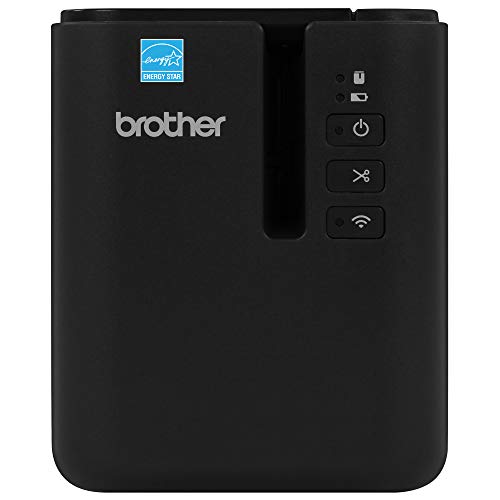
- Durable laminated labels up to 36mm
- Wi-Fi and Ethernet for shared printing
- High-resolution 360 dpi output
Best For: Industrial identification and shared warehouse labeling
Best for Flexible Media
Arkscan 2054A Shipping Label Printer
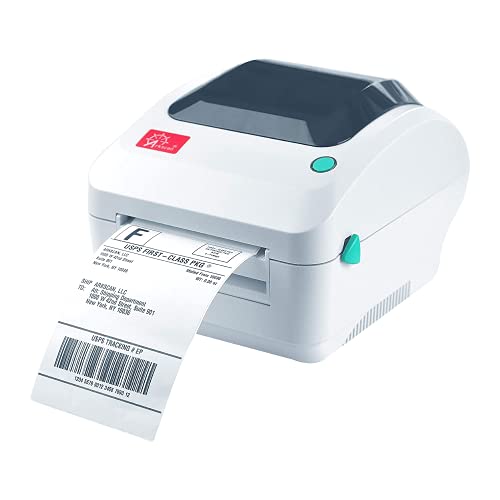
- Supports roll and fanfold labels
- Prints up to 5 inches per second
- Handles shipping and warehouse labels
Best For: High-volume stations with varied label sizes
Best Portable Industrial Option
Brady M210 Portable Label Printer Kit

- Portable, battery-powered industrial labeling
- Drop-tested with a protective hard case
- Supports over 90 cartridges
Best For: On-site maintenance and equipment identification
Flexible Wi-Fi Workhorse
Wireless Shipping Label Printer

- Fast 203 DPI, ink-free 4x6 printing
- Wi-Fi, AirPrint, USB, and broad device support
- Handles shipping and custom labels
Best For: Mixed warehouse shipping and identification tasks
Field Labeling Specialist
Industrial Bluetooth Label Printer
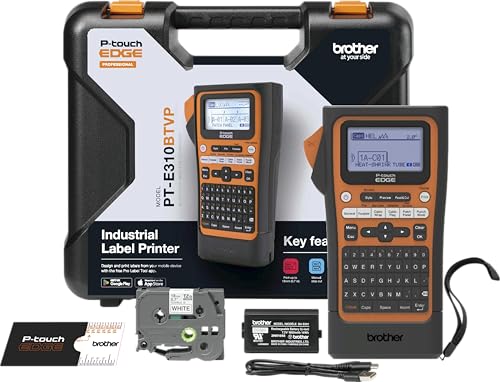
- Supports laminated tape and heat-shrink tubes
- Dedicated keys for cable and panel labels
- Bluetooth and USB-C design options
Best For: Industrial, electrical, and MRO identification
Scalable Warehouse Standard
ZD421 Thermal Shipping Printer

- Direct-thermal printing up to 6 ips
- USB, Ethernet, and Bluetooth connectivity
- Supports ZPL, EPL, and printer emulations
Best For: Connected warehouse shipping and logistics operations
Best Compact Pick
Omezizy D450BT Shipping Label Printer

- Built-in bin holds up to 250 4x6 labels
- Bluetooth and USB connectivity
- Prints up to 72 labels per minute
Best For: Space-conscious warehouses and small online businesses
Best for High-Volume Workflows
NULLTONEX Bluetooth 4x6 Label Printer

- Prints up to 72 labels per minute
- App offers 1,800+ templates and 300+ fonts
- Bluetooth and USB connections
Best For: Small businesses printing frequent shipping batches
Best for Mixed Label Sizes
RONGTA RP425 Bluetooth Printer

- Handles labels from 0.98 to 4.37 inches wide
- Automatic label identification and feeding
- Bluetooth, USB, Windows, Mac, and Chrome OS support
Best For: Warehouses using shipping, barcode, QR, and product labels
Best Overall – Rollo USB Shipping Label Printer
The Rollo USB is a practical label printer for warehouse tasks that require fast, readable shipping, barcode, and inventory labels. It connects by USB to Windows or Mac computers, uses inkless direct thermal printing, and handles labels from 1.57 to 4.1 inches wide.
Best For: Small warehouses, ecommerce operations, and workstations that primarily need 4×6 shipping labels.
Pros:
- Prints up to one 4×6 label per second at 203 dpi.
- Supports shipping, barcode, product, QR code, and other label formats.
- Works with Windows, Mac, major shipping platforms, and marketplaces.
- Does not require ink or toner.
Cons:
- USB connectivity is wired rather than wireless.
- Maximum media width is 4.1 inches.
- Limited to monochrome printing.
Choose the Rollo when straightforward USB setup, broad platform compatibility, and quick 4×6 output matter more than network connectivity or industrial-grade labeling features.
Best for Networked Identification – Brother PT-P950NW Industrial Label Printer
The Brother PT-P950NW is a label printer for warehouse identification where durable, narrow labels and shared access are priorities. Its laminated labels can resist water, chemicals, UV exposure, and abrasion, while Wi-Fi and Ethernet connectivity allow printing from multiple devices.
Best For: Warehouses, facilities, and industrial teams labeling equipment, shelving, panels, and other surfaces in demanding environments.
Pros:
- Prints durable laminated labels up to 36mm wide.
- Supports Wi-Fi, Ethernet, USB, and Bluetooth connectivity.
- Prints at up to 3.1 inches per second with up to 360 dpi resolution.
- Includes an auto cutter, easy-peel function, and professional label-design software.
Cons:
- Designed for tape labels up to 36mm wide rather than standard 4×6 shipping labels.
- Its industrial feature set may be more than a basic packing station needs.
- Label media is cartridge-based.
The PT-P950NW is a strong fit when labels must remain legible on exposed or dirty surfaces and several workers need access to the same printer.
Best for Flexible Media – Arkscan 2054A Shipping Label Printer
The Arkscan 2054A is a versatile label printer for warehouse and shipping operations that use different media types and label sizes. It supports roll and fanfold paper, prints up to 5 inches per second, and works with Windows, Mac, Chromebook, and Android devices through USB.
Best For: Busy shipping stations that need 4×6 labels plus custom warehouse, product, or barcode labels.
Pros:
- Supports roll and fanfold label media.
- Handles label widths from 0.75 to 4.25 inches and lengths up to 90 inches.
- Prints at up to 5 inches per second using direct thermal technology.
- Includes BarTender UltraLite software for Windows label design.
Cons:
- USB is the listed connection method, with no wireless connectivity noted.
- BarTender UltraLite is Windows-only.
- Setup and software support may be most useful to buyers comfortable with label configuration.
Consider the 2054A if your operation needs more media flexibility than a standard shipping-label printer provides and values access to U.S.-based technical support.
Best Portable Industrial Option – Brady M210 Portable Label Printer Kit
The Brady M210 is a portable label printer for warehouse teams that identify wires, panels, circuit boards, and equipment away from a fixed desk. Its keypad, backlit display, rechargeable battery, hard case, and six-foot drop resistance support mobile labeling in demanding work areas.
Best For: Maintenance, electrical, and facilities teams that need durable labels at the point of installation or inspection.
Pros:
- Creates multi-line labels for wires, panels, circuit boards, and industrial items.
- Supports more than 90 cartridges and 12 material types.
- Drop-tested with molded rubber impact bumpers.
- Kit includes a rechargeable battery, charger, hard case, and starter label cartridge.
Cons:
- Maximum media width is 0.75 inch, so it is not intended for standard 4×6 shipping labels.
- Its listed print speed is slower than dedicated shipping printers.
- Output is monochrome and limited to 203 dpi.
The M210 makes the most sense when portability, rugged construction, and specialized industrial labeling are more important than high-volume package labeling.
Flexible Wi-Fi Workhorse – Wireless Shipping Label Printer
For a warehouse that needs a versatile label printer for warehouse tasks, the Rollo Wireless Shipping Label Printer combines Wi-Fi and USB connectivity with fast, ink-free 4×6 printing. It supports major shipping platforms and can also produce smaller product, barcode, QR code, and identification labels.
Best For: Warehouses and small businesses needing wireless shipping labels plus flexible custom label sizes.
Pros:
- Prints one 4×6 label per second at 203 DPI without ink or toner.
- Works with Wi-Fi, AirPrint, USB, and a broad range of computers and mobile devices.
- Supports labels from 1.57 to 4.1 inches wide for shipping and custom applications.
- Compatible with major carriers, marketplaces, and shipping platforms.
Cons:
- Limited to monochrome, simplex label printing.
- Wi-Fi setup may require more configuration than a direct USB connection.
The Rollo is a strong all-purpose option when warehouse labeling involves more than standard shipping labels. Its wireless access and broad media flexibility make it especially useful for mixed workstations.
Field Labeling Specialist – Industrial Bluetooth Label Printer
The Brother PT-E310BT is a practical label printer for warehouse maintenance, electrical, and low-voltage work. Its handheld design, application-specific keys, Bluetooth connectivity, and support for laminated tape and heat-shrink tubes help teams create durable identification labels close to the job.
Best For: Maintenance, electrical, MRO, cable, patch-panel, and facility-labeling tasks.
Pros:
- Prints laminated labels and heat-shrink tubes from 3.5mm to 18mm.
- Dedicated keys simplify cable wrap, cable flag, patch panel, punch block, and faceplate labels.
- Supports mobile Bluetooth design and USB-C connection to P-touch Editor.
- Includes a carry case, wrist strap, patch panel ruler, and flexible ID tape.
Cons:
- Its 0.78 pages-per-minute specification is slower than dedicated shipping printers.
- Maximum media width is 18mm, so it is not intended for standard 4×6 shipping labels.
- Requires compatible P-touch tape cartridges.
This Brother is better suited to asset, cable, and equipment identification than outbound shipping. Its portable industrial focus makes it useful when labels must be designed and printed throughout a warehouse or facility.
Scalable Warehouse Standard – ZD421 Thermal Shipping Printer
The Zebra ZD421 is a purpose-built label printer for warehouse shipping, logistics, retail, and laboratory environments. Its direct-thermal design avoids ink and toner, while Ethernet, USB, and Bluetooth connectivity support integration with existing workstations and networks.
Best For: Busy warehouse shipping and logistics operations that need a connected, upgradeable thermal printer.
Pros:
- Prints 4-inch-class labels at up to 6 inches per second using direct thermal technology.
- Supports USB, Ethernet, and Bluetooth connectivity for flexible deployment.
- Includes simple three-button controls and five LED status indicators.
- Supports EPL and ZPL languages and can emulate other printer languages.
Cons:
- The supplied model information does not specify included wireless networking.
- Designed primarily for thermal paper and standard warehouse label workflows.
- Its business-focused feature set may be more than needed for occasional printing.
The ZD421 is the strongest fit for a warehouse that values dependable integration and room to grow. Language compatibility and field-upgradeable media handling can help it remain useful as labeling requirements change.
Best Compact Pick – Omezizy D450BT Shipping Label Printer
If you need a label printer for warehouse tasks but have limited desk space, the Omezizy D450BT is a practical option. Its built-in bin holds up to 250 4×6 labels, while Bluetooth and USB connectivity support phones, computers, and several operating systems.
Best For: Small warehouses, online sellers, and workstations where compact storage and flexible connectivity matter.
Pros:
- Built-in compartment stores up to 250 4×6 labels and supports folded paper.
- Bluetooth and USB connections work with Android, iOS, Windows, macOS, Linux, and ChromeOS.
- 203 DPI thermal printing reaches up to 72 labels per minute without ink or toner.
- Supports media from 1 to 4.6 inches wide for shipping, barcode, pricing, and organization labels.
Cons:
- Print output is monochrome only.
- Bluetooth printing may require using the control app.
The D450BT stands out when space efficiency is a priority. Its auto-alignment feature and included labels can help simplify setup, while the broad platform compatibility suits mixed-device warehouse environments.
Best for High-Volume Workflows – NULLTONEX Bluetooth 4×6 Label Printer
For buyers seeking a label printer for warehouse shipping workflows, the NULLTONEX combines 203 DPI output with speeds up to 72 labels per minute. Its Bluetooth and USB connections, offline app capability, and compact design make it suited to busy small-business work areas.
Best For: Small businesses handling recurring shipping batches and users who want app-based label customization.
Pros:
- Direct thermal printing requires no ink or toner and produces scannable barcodes and text.
- Bluetooth and USB connectivity support phones, laptops, PCs, Macs, and tablets.
- FlashLabel Pro includes more than 1,800 templates, over 300 fonts, and offline storage.
- Supports 4×6 labels and media from 1.57 to 4.3 inches wide.
Cons:
- Prints in black and white only.
- The included supply is limited to 25 sheets of 4×6 labels.
This model is a strong workflow-focused choice for teams that value quick setup and design flexibility. Overheat protection and a reinforced compact body are useful additions for repeated printing, though buyers should confirm their preferred label sizes fall within the supported range.
Best for Mixed Label Sizes – RONGTA RP425 Bluetooth Printer
The RONGTA RP425 is a versatile label printer for warehouse environments that use more than standard shipping labels. It automatically identifies and feeds direct thermal media from 0.98 to 4.37 inches wide, covering 4×6 shipping labels along with barcode, QR, and circular formats.
Best For: Warehouses and offices that need one printer for shipping, barcode, QR code, and smaller product labels.
Pros:
- Supports a broad range of direct thermal label widths from 0.98 to 4.37 inches.
- Automatic label identification and feeding reduce manual adjustments.
- Bluetooth printing works with iOS and Android devices through the RONGTA app.
- Windows, Mac, and Chrome OS support expands workstation compatibility.
Cons:
- The listed design is larger than some compact alternatives.
- USB connectivity is limited to one USB Type-C port.
- Print output is monochrome.
The RP425 is especially appealing when label variety is more important than minimal footprint. Its 203 DPI resolution and up to 150 mm/s speed support efficient routine printing, while automatic feeding can make frequent format changes less cumbersome.
How We Picked the Best Label Printer for Warehouse
We focused on the demands of warehouse printing rather than general home-office use. The selected models were evaluated by their label formats, connection options, operating-system support, portability, durability, setup requirements, and suitability for shipping or industrial identification.
We included dedicated thermal printers because they avoid ink and are typically economical for recurring label production. The lineup also covers USB, Wi-Fi, Bluetooth, and network-connected models so different warehouse layouts and software environments are represented. Compatibility with common shipping platforms, desktop systems, and mobile devices was also considered where applicable.
Quick Comparison
- Best for high-volume shipping: Choose a commercial 4×6 thermal printer with fast, consistent output and broad carrier-platform support.
- Best for shared warehouse use: A network-capable printer can serve multiple workstations without repeatedly moving cables.
- Best for mobile labeling: Bluetooth models and portable industrial printers work well for aisles, receiving areas, and field inventory tasks.
- Best for industrial identification: Look for rugged construction, specialty tape support, and strong connectivity rather than shipping-label speed alone.
- Best for small operations: A compact wireless printer can reduce setup complexity while handling routine package labels.
Key Buying Factors for a Label Printer for Warehouse
Label Size and Printer Type
Confirm the required media before buying. Standard 4×6 thermal shipping labels are appropriate for most carrier packages, while industrial units may support narrower tapes, durable materials, cable labels, or multiple widths. Direct thermal printers do not require ink, but their labels can fade with heat, sunlight, or long-term exposure.
Connectivity and Software
USB is simple and dependable at one workstation. Wi-Fi and Ethernet are more practical when several employees need access, while Bluetooth is useful for phones, tablets, and point-of-use printing. Check compatibility with your warehouse management system, shipping software, operating system, and label-design tools—not just the printer’s advertised platform list.
Workload and Durability
Estimate daily label volume and choose a printer designed for that workload. A consumer-oriented model may be sufficient for occasional shipping, but busy warehouses benefit from sturdy construction, clear status indicators, easy media loading, and a reliable support ecosystem.
Maintenance and Total Cost
Compare label prices, replacement parts, supported media, warranty coverage, and cleaning requirements. A low purchase price can be outweighed by proprietary supplies, frequent connection problems, or downtime.
Who Should Buy Which Label Printer for Warehouse?
Shipping teams processing many parcels should prioritize a dependable 4×6 thermal model with strong software compatibility. Multi-user warehouses should favor network connectivity. Small businesses can choose a compact USB or wireless printer that matches their shipping platform. For aisle work, asset tags, cables, and durable identification labels, an industrial or portable label printer is usually the better fit. Before ordering, verify label dimensions, device compatibility, and the expected daily print volume against your workflow.