A good network switch can remove bottlenecks between your router, computers, access points, game consoles, and NAS. The right model depends on port speed, port count, cabling, and whether you need simple plug-and-play expansion or multi-gig performance.
These 10 high-speed network switches range from compact 2.5GbE and 10GbE options to larger Gigabit models for growing home offices and small businesses.
Best 10 High Speed Network Switches Picks for 2026
Best Compact 10G Upgrade
NICGIGA 6-Port 10G/2.5G Switch

- Two 10Gb RJ45 and four 2.5Gb ports
- 60Gbps switching capacity
- Fanless metal desktop/wall-mount design
Best For: Compact mixed-speed home and office networks
Best Full 10G Expansion
TP-Link TL-SX1008 8-Port 10G Switch

- Eight 10Gb/multi-gig RJ45 ports
- 160Gbps switching capacity
- Desktop or rackmount metal chassis
Best For: Dense 10Gb NAS, server, workstation, and gaming networks
Best Quiet 2.5G Value

- Eight 2.5Gbps RJ45 ports
- 40Gbps switching capacity
- Fanless desktop/wall-mount design
Best For: Quiet home-office, gaming, and entertainment networks
Best Home 2.5G Upgrade

- Eight 2.5Gb auto-negotiating ports
- 40Gbps switching capacity
- Silent fanless desktop/wall-mount design
Best For: Home offices and small networks moving beyond gigabit
Best Quiet Multi-Gig Upgrade

- Five 2.5 Gbps RJ45 ports
- Plug-and-play fanless operation
- Desktop or wall mounting
Best For: Quiet gaming, NAS, and home-office networks
Best Durable 2.5GbE Value
TP-Link 5-Port Multi-Gig Switch

- Five 2.5Gbps ports
- Auto-negotiates three link speeds
- Fanless metal desktop/wall-mount design
Best For: Mixed-speed home offices and workstations
Best for Expanding Wired Connections
NETGEAR 16-Port Gigabit Switch

- Sixteen 1Gbps Ethernet ports
- Plug-and-play unmanaged setup
- Silent metal housing with flexible mounting
Best For: Larger home and small-office wired networks
Best for Growing Networks
TP-Link TL-SG116 16-Port Gigabit Switch
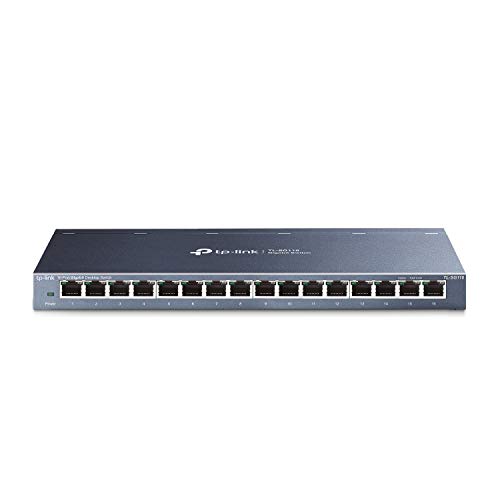
- 16 gigabit Ethernet ports
- Fanless metal housing
- QoS and IGMP Snooping
Best For: Expanding offices and media-heavy wired networks
Best for Maximum Port Capacity
NETGEAR GS324 24-Port Gigabit Switch

- 24 1Gbps Ethernet ports
- Desktop, wall, or rack mounting
- Fanless and energy efficient
Best For: Larger wired networks needing extensive port capacity
Best Compact Network Expansion
TP-Link TL-SG105 5-Port Gigabit Switch
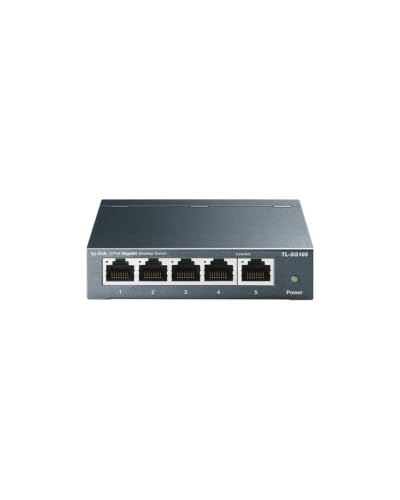
- Five gigabit Ethernet ports
- Compact fanless metal design
- QoS and IGMP Snooping
Best For: Small workspaces needing a few extra wired connections
Best Compact 10G Upgrade – NICGIGA 6-Port 10G/2.5G Switch
For a compact high speed network switches setup, the NICGIGA combines two 10Gb RJ45 ports with four 2.5Gb ports. Its unmanaged design makes it a practical choice for connecting a NAS, Wi-Fi 7 router, gaming PC, or other multi-gig devices without software configuration.
Best For: Home offices and small networks that need a mix of 10Gb and 2.5Gb wired connections.
Pros:
- Two 10Gb ports and four 2.5Gb ports support mixed-speed devices.
- Up to 60Gbps switching capacity helps handle heavy local traffic.
- Fanless metal design supports quiet operation and desktop or wall mounting.
Cons:
- Only two ports support 10Gb speeds.
- As an unmanaged switch, it does not provide advanced configuration features.
This is a strong space-conscious option when you want a few 10Gb connections without moving to a larger switch. The metal case, cooling openings, and included one-year warranty add practical reassurance for everyday use.
Best Full 10G Expansion – TP-Link TL-SX1008 8-Port 10G Switch
The TP-Link TL-SX1008 is built for high speed network switches buyers who want 10Gb connectivity across every port. Eight auto-negotiating RJ45 ports support 100Mb, 1Gb, 2.5Gb, 5Gb, and 10Gb links, making it suitable for dense multi-gig networks.
Best For: Offices, studios, NAS users, and power users with several 10Gb-capable devices.
Pros:
- All eight ports support speeds up to 10Gb.
- Up to 160Gbps switching capacity suits substantial local data transfers.
- Metal desktop/rackmount design and adjustable smart fan provide installation flexibility.
- Plug-and-play setup requires no software or configuration.
Cons:
- Its larger desktop/rackmount format may be excessive for small networks.
- The smart fan may be less silent than a fully fanless design.
Choose this model when your network is already centered on 10Gb hardware or you expect to add more of it. Auto-negotiation preserves compatibility with slower devices while the eight-port layout leaves room for expansion.
Best Quiet 2.5G Value – BrosTrend 8-Port 2.5Gb Switch
The BrosTrend 8-port model offers an accessible way to build high speed network switches around 2.5Gb Ethernet. Every RJ45 port supports 2.5Gbps, and the fanless enclosure is designed for quiet gaming, home-office, and entertainment setups.
Best For: Users who need eight quiet 2.5Gb wired connections for PCs, consoles, NAS devices, and access points.
Pros:
- All eight ports deliver 2.5Gbps connectivity.
- 40Gbps switching capacity supports multiple active devices.
- Fanless operation stays quiet during demanding tasks.
- RJ45-only design avoids the cost and complexity of SFP transceivers.
Cons:
- It does not provide 5Gb or 10Gb ports.
- The plastic case may feel less robust than metal alternatives.
For a straightforward 2.5Gb upgrade, this switch balances port count, silence, and simple installation. It is particularly practical when your devices use standard Ethernet cables and you do not need optical connectivity or advanced management.
Best Home 2.5G Upgrade – TP-Link TL-SG108S-M2
The TP-Link TL-SG108S-M2 is a practical entry point for high speed network switches when 2.5Gb performance is the target. Its eight ports automatically negotiate between 100Mb, 1Gb, and 2.5Gb, helping connect newer multi-gig devices alongside existing Ethernet equipment.
Best For: Home offices, LAN parties, entertainment systems, and small networks upgrading from gigabit Ethernet.
Pros:
- Eight 2.5Gb ports provide up to 40Gbps switching capacity.
- Auto-negotiation supports 100Mb, 1Gb, and 2.5Gb devices.
- Fanless operation is suited to quiet home or business spaces.
- Desktop/wall-mount design and plug-and-play setup simplify installation.
Cons:
- It does not support 5Gb or 10Gb connections.
- The plastic enclosure is less rugged than a metal chassis.
This model makes sense for a gradual multi-gig upgrade, especially if you want to keep existing cabling and devices in place. Its simple unmanaged operation and silent design keep the focus on adding faster wired connections without extra setup.
Best Quiet Multi-Gig Upgrade – BrosTrend 5-Port 2.5G Switch
The BrosTrend 5-port switch is a practical choice for anyone looking for high speed network switches without adding management complexity. Each RJ45 port supports up to 2.5 Gbps, making it suitable for gaming PCs, consoles, NAS devices, access points, and other wired equipment.
Best For: Gaming setups, small offices, home entertainment systems, and users who want a silent plug-and-play 2.5GbE upgrade.
Pros:
- Five 2.5 Gbps ports provide up to 25 Gbps of switching capacity.
- Unmanaged plug-and-play setup requires no software or configuration.
- Fanless design operates quietly, with desktop or wall-mount placement.
- Uses standard RJ45 connections without requiring SFP transceivers or fiber cables.
Cons:
- Only five ports are available for wired devices.
- As an unmanaged Layer 1 switch, it does not provide advanced network controls.
- Its 2.5GbE benefits require compatible network devices and service equipment.
This is a straightforward multi-gig option when speed, quiet operation, and simple installation matter more than managed networking features.
Best Durable 2.5GbE Value – TP-Link 5-Port Multi-Gig Switch
The TP-Link TL-SG105S-M2 is one of the more flexible high speed network switches for mixed-speed home and small-business networks. Its five 2.5Gbps ports automatically negotiate between 100Mbps, 1Gbps, and 2.5Gbps, helping it work with both newer multi-gig equipment and existing devices.
Best For: Home offices, LAN parties, workstations, NAS devices, and users who want a metal-bodied switch with broad speed compatibility.
Pros:
- Five 2.5Gbps ports offer up to 25Gbps of switching capacity.
- Auto-negotiation supports 100Mbps, 1Gbps, and 2.5Gbps connections.
- Fanless operation provides silent performance.
- Metal housing supports desktop or wall-mounted installation.
Cons:
- Five ports may be limiting for larger wired networks.
- It is an unmanaged switch without advanced configuration features.
- The listed dimensions are relatively substantial for a compact five-port model.
Choose this TP-Link when you want easy multi-gig expansion, automatic speed matching, and a durable enclosure for a mixed-device network.
Best for Expanding Wired Connections – NETGEAR 16-Port Gigabit Switch
The NETGEAR GS316v3 is a useful alternative for networks that need more connections than a compact multi-gig switch provides. With 16 auto-negotiating Gigabit Ethernet ports, it supports high-speed wired connectivity over existing Cat5e or Cat6 cables and uses a simple unmanaged design.
Best For: Homes, small offices, and workspaces with many computers, printers, laptops, and other wired devices.
Pros:
- Sixteen 1Gbps ports provide ample room for multiple wired devices.
- Auto-negotiating ports detect the appropriate connection speed.
- Fanless metal housing supports quiet desktop or wall-mounted operation.
- Plug-and-play setup includes 802.3az energy-efficient operation and 9K jumbo frame support.
Cons:
- Ports are limited to 1Gbps rather than 2.5Gbps multi-gig speeds.
- The larger enclosure takes more space than five-port alternatives.
- The product is specified for use in the U.S. and Canada only.
This NETGEAR model makes the most sense when port count is the priority and Gigabit performance is sufficient for the connected devices and network service.
Best for Growing Networks – TP-Link TL-SG116 16-Port Gigabit Switch
For expanding a home office or small-business network, the TP-Link TL-SG116 is one of the more practical high speed network switches. It provides 16 gigabit Ethernet ports, plug-and-play setup, and a fanless metal design for quiet everyday operation.
Best For: Users who need multiple wired connections, traffic prioritization, and flexible desktop or wall-mounted placement.
Pros:
- Sixteen 10/100/1000Mbps RJ45 ports support automatic speed negotiation and cable detection.
- Fanless operation and a sturdy metal case help keep the switch quiet and durable.
- Port-based 802.1p/DSCP QoS and IGMP Snooping support video and voice traffic management.
- Plug-and-play installation requires no software or configuration.
Cons:
- It is an unmanaged Layer 1 switch, so advanced network administration features are not included.
- Its 16-port design may be more capacity than needed for a small setup.
The TL-SG116 is a strong middle-ground option when five ports are too few but a larger 24-port unit is unnecessary. Its quiet design and traffic-optimization features make it well suited to connected workspaces and media-heavy networks.
Best for Maximum Port Capacity – NETGEAR GS324 24-Port Gigabit Switch
The NETGEAR GS324 is designed for setups that need many wired connections in one unit. With 24 1Gbps ports, plug-and-play operation, and desktop, wall, or rack mounting, it is a straightforward choice among high speed network switches for larger installations.
Best For: Offices, workrooms, and home networks that need up to 24 gigabit connections and flexible installation.
Pros:
- Twenty-four auto-negotiating 1Gbps Ethernet ports provide substantial connection capacity.
- Supports desktop, wall-mount, and rack-mount placement.
- Fanless operation provides silent performance.
- IEEE 802.3az Energy Efficient Ethernet helps reduce power consumption.
Cons:
- As an unmanaged switch, it does not provide advanced configuration controls.
- The listed model is intended for use in the U.S. and Canada only.
The GS324 is the capacity-focused pick in this group. It makes sense when a network has numerous computers, displays, entertainment devices, or other wired hardware and needs a clean, simple expansion point.
Best Compact Network Expansion – TP-Link TL-SG105 5-Port Gigabit Switch
The TP-Link TL-SG105 is a compact way to add wired connections without taking up much desk space. Its five gigabit ports, plug-and-play setup, fanless metal housing, and traffic-optimization features make it a convenient entry among high speed network switches.
Best For: Small desks, home offices, and individual work areas that need a few additional gigabit connections.
Pros:
- Five 10/100/1000Mbps ports support automatic negotiation and Auto MDI/MDIX.
- Small metal enclosure supports quiet operation and desktop or wall-mounted use.
- QoS and IGMP Snooping help prioritize video and voice traffic.
- Requires no software installation or network configuration.
Cons:
- Five ports limit expansion for larger networks.
- It is an unmanaged switch without advanced management features.
The TL-SG105 is best when the priority is simple, quiet, and compact network expansion. It adds gigabit connectivity for a few devices while keeping installation and ongoing operation uncomplicated.
How We Picked the Best High Speed Network Switches
We focused on unmanaged switches that are easy to install and suitable for homes, gaming setups, home labs, media servers, and small offices. The selection covers 1Gbps, 2.5Gbps, and 10Gbps classes, with five-, six-, eight-, 16-, and 24-port designs. We also considered practical details such as fanless operation, desktop or wall-mount flexibility, metal enclosures, and the balance between capacity and cost.
Because unmanaged switches generally require no configuration, they are judged primarily on speed, port layout, compatibility, physical design, and likely use case rather than advanced management features.
Quick Comparison
| Network speed | Best suited to | Typical advantage |
|---|---|---|
| 1Gbps | Basic wired expansion | Affordable, broadly compatible, and sufficient for standard internet access |
| 2.5Gbps | Gaming PCs, Wi-Fi 6/7, and NAS users | Faster transfers without requiring 10GbE hardware throughout the network |
| 10Gbps | High-performance workstations and storage | Maximum throughput for compatible devices and large file transfers |
Key Buying Factors for High-Speed Network Switches
Match the Switch to Your Devices
A faster switch does not automatically make slower equipment faster. Check the Ethernet ports on your router, computers, access points, and NAS. A 2.5GbE switch is often the practical middle ground, while 10GbE makes more sense when multiple devices already support it.
Check Cabling and Uplink Needs
Existing Cat5e cable may support 2.5GbE over normal home distances, while 10GbE performance can depend more heavily on cable quality and length. Also consider whether one port must connect back to the router or another switch; a dedicated faster uplink can prevent congestion.
Choose Enough Ports
Count current wired devices, then leave room for expansion. Five ports suit a small desk, while eight ports provide useful flexibility for gaming, streaming, and NAS equipment. Sixteen- and 24-port models are better for offices, wired access points, cameras, and multiple rooms.
Consider Noise, Placement, and Power
Fanless models are appealing for bedrooms, offices, and media cabinets because they operate quietly. Confirm that the enclosure fits your space and check whether desktop or wall mounting is supported. A metal chassis can also improve durability in busy work areas.
Who Should Buy Which High Speed Network Switches?
Choose a 10GbE model if you regularly move large video files, run demanding local storage, or have several 10GbE-capable devices. Choose 2.5GbE for modern gaming PCs, Wi-Fi 6E or Wi-Fi 7 access points, and NAS setups that need more than Gigabit without the cost and complexity of a full 10GbE network. Choose a five-port Gigabit switch for basic plug-and-play expansion at a desk or entertainment center. Choose a 16- or 24-port Gigabit model when port capacity matters more than multi-gig speed, especially in a small office or a network with many standard Ethernet devices.