Hard drive docking stations make it easier to access, clone, and back up bare 2.5-inch and 3.5-inch SATA drives without installing them in a computer. The best models add useful features such as USB-C connectivity, dual-bay cloning, tool-free operation, and multi-drive support.
We selected 10 options across different budgets and use cases, from straightforward single-purpose adapters to four-bay enclosures with expanded connectivity. Compare their interfaces, drive compatibility, cloning functions, capacity limits, and included features before choosing.
Best 10 Hard Drive Docking Stations Under 300 Picks for 2026
Best Dual-Bay Cloner

- Dual bays for 2.5-inch and 3.5-inch SATA drives
- Offline cloning without a computer
- USB 3.0 speeds up to 5Gbps
Best For: Simple drive access and offline duplication
Best 40TB Dual-Bay Dock

- Up to 40TB across two drive bays
- One-key offline cloning with progress LEDs
- Supports UASP, TRIM, and S.M.A.R.T.
Best For: Large-capacity storage management and drive migration
Best Simple Plug-and-Play Dock
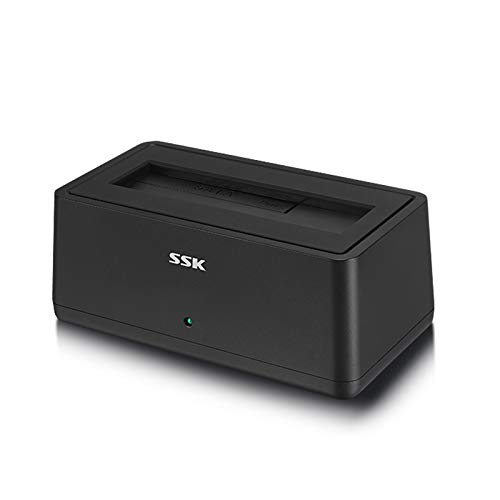
- Reads 2.5-inch and 3.5-inch SATA drives
- Tool-free setup with USB 3.0
- Automatic sleep and LED status display
Best For: Basic single-drive file access and transfers
Best Offline Cloning Dock

- Offline 1-to-1 SATA cloning
- Supports 2.5-inch and 3.5-inch drives
- Two-drive USB access with hot swap
Best For: SATA drive cloning and migration
Best Four-Bay Enclosure
CENMATE 4-Bay SATA Storage System

- Four tool-free hot-swappable bays
- Supports 2.5-inch and 3.5-inch SATA drives
- Includes USB-A and USB-C 3.0 cables
Best For: Multi-drive external storage
Best Dock With USB Hub

- Offline cloning for SATA drives
- Three USB 3.0 Type-A hub ports
- Supports 2.5-inch and 3.5-inch drives
Best For: Drive cloning with USB-A expansion
Best Overall Clone-Friendly Dock

- Dual-bay support for 2.5-inch and 3.5-inch HDDs and SSDs
- Offline cloning without a computer
- USB-C with 5Gbps UASP-supported transfers
Best For: Drive upgrades, backups, and dual-drive management
Best Legacy-Drive Value
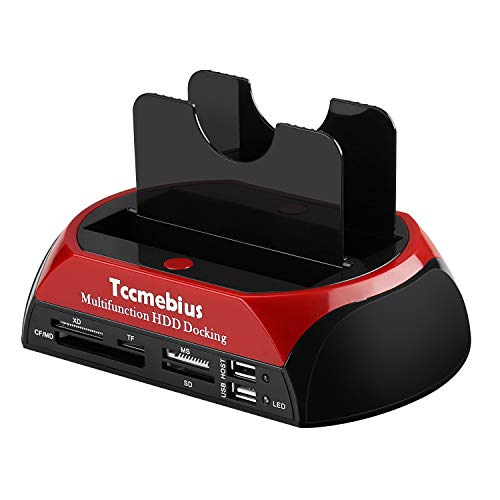
- Handles both IDE and SATA drives
- Built-in multi-format card reader and USB hub
- One-touch backup support
Best For: Recovering older IDE drives and managing mixed storage
Best Protected Dual-Bay Design

- Two-bay SATA support for drives up to 20TB each
- Offline cloning without a computer
- Fixed bezels and USB 3.0 UASP support
Best For: Stable SATA backups, upgrades, and drive duplication
Best Dual-Bay Cloner – Sabrent EC-HD2B
For shoppers comparing hard drive docking stations under 300, the SABRENT EC-HD2B is a practical dual-bay option for accessing or cloning 2.5-inch and 3.5-inch SATA drives. It supports USB 3.0 transfer speeds up to 5Gbps and offline cloning without requiring a computer.
Best For: Users who need a straightforward two-drive dock with offline duplication capabilities.
Pros:
- Supports 2.5-inch and 3.5-inch SATA HDDs and SSDs.
- Provides two drive bays and supports drives up to 10TB each.
- Offers plug-and-play operation with offline cloning.
- Includes USB 3.0 connectivity and UASP support.
Cons:
- Offline cloning is limited to compatible SATA drives and does not replace a full backup strategy.
- Its USB 3.0 interface is slower than newer USB standards.
The EC-HD2B stands out when dual-drive access and simple disk duplication matter more than advanced connectivity. Its included power supply and USB cable make it a ready-to-use choice for home or basic technical work.
Best Single-Bay High-Capacity Dock – ORICO DD18
Among hard drive docking stations under 300, the ORICO DD18 is a compact single-bay dock designed for 2.5-inch and 3.5-inch SATA storage. It supports drives up to 22TB, tool-free hot-swapping, and USB 3.0 transfers up to 5Gbps.
Best For: Users who want broad device compatibility and support for very high-capacity SATA drives.
Pros:
- Supports 2.5-inch and 3.5-inch SATA I/II/III HDDs and SSDs.
- Handles drives up to 22TB.
- Works with Windows, macOS, Linux, iPadOS devices with Thunderbolt, and more.
- Includes UASP, hot-swapping, automatic sleep, and a 36W power supply.
Cons:
- Only one drive can be connected at a time.
- Does not support IDE or SAS drives.
- New or unallocated drives must be initialized and formatted before recognition.
The ORICO DD18 is a flexible choice for file transfers, backups, and media access across several device types. Its single-bay design keeps it simple, while the 22TB capacity ceiling makes it suitable for large modern SATA disks.
Best 40TB Dual-Bay Dock – SUITOK SATA Cloner
For buyers searching hard drive docking stations under 300 with maximum storage flexibility, this SUITOK dual-bay dock supports two 2.5-inch or 3.5-inch SATA drives. It combines 5Gbps USB connectivity, one-key offline cloning, and up to 40TB of total capacity.
Best For: Users managing large storage collections, drive migrations, or two-disk backup workflows.
Pros:
- Two bays support up to 20TB per drive, or 40TB total.
- Provides one-key offline cloning with LED progress indicators.
- Supports USB 3.2 Gen 1 transfer rates up to 5Gbps.
- Includes UASP, TRIM, S.M.A.R.T., cooling vents, and anti-slip pads.
Cons:
- Its 5Gbps interface does not offer faster USB 3.2 Gen 2 speeds.
- Offline cloning requires compatible SATA source and target drives.
- The supplied notes do not specify the complete included-cable details.
This dock is a strong fit for capacity-focused users who need both everyday file access and standalone cloning. Its dual-bay design and 40TB aggregate support are especially useful for technicians, home offices, and large media libraries.
Best Simple Plug-and-Play Dock – SSK DK102
The SSK DK102 is a straightforward option among hard drive docking stations under 300, letting you insert a 2.5-inch or 3.5-inch SATA drive directly for file access and transfers. Its USB 3.0 interface reaches up to 5Gbps and supports tool-free, plug-and-play use.
Best For: Users who want an uncomplicated single-drive reader for desktops, laptops, and compatible consumer devices.
Pros:
- Works with 2.5-inch and 3.5-inch SATA I/II/III HDDs and SSDs.
- Supports USB 3.0 speeds up to 5Gbps and UASP.
- Offers tool-free installation, LED status indication, and automatic sleep.
- Includes a USB 3.0 cable and 12V/2A power adapter.
Cons:
- Supports only one drive at a time.
- Uses an older USB 3.0 connection rather than a newer USB-C interface.
- The notes specify broad compatibility but do not list newer operating-system versions.
The SSK DK102 keeps drive access uncomplicated and avoids the assembly required by traditional enclosures. It is a sensible everyday dock for swapping SATA drives, transferring files, and reading desktop or laptop storage.
Best Offline Cloning Dock – SABRENT Dual-Bay USB-C Dock
For shoppers comparing hard drive docking stations under 300, the SABRENT EC-CH2B is a focused dual-bay option for bare 2.5-inch and 3.5-inch SATA drives. Its standout feature is offline drive cloning without a computer, while USB-C connectivity lets both installed drives appear separately for file transfers.
Best For: Users who need straightforward SATA drive cloning, migration, or two-drive access.
Pros:
- Clones one SATA drive to another without a computer.
- Supports both 2.5-inch and 3.5-inch SATA HDDs and SSDs.
- Reads and writes both drives simultaneously over USB, with hot-swappable bays.
- Includes a USB-C cable and requires no drivers on Windows or Mac.
Cons:
- Does not support IDE/PATA, M.2, or NVMe drives.
- Offline cloning runs at up to 60MBps, and the target drive must be the same size or larger.
- The included cable connects to a USB-C computer port; a USB-C-to-USB-A cable is not included.
This is a practical choice when offline cloning matters more than extra ports or broad drive-format support. Confirm that your drives are SATA and that your computer has a compatible USB-C connection before buying.
Best Four-Bay Enclosure – CENMATE 4-Bay SATA Storage System
Among hard drive docking stations under 300, the CENMATE four-bay enclosure is designed for users who want several SATA drives organized in one external storage system. It accepts 2.5-inch and 3.5-inch HDDs or SSDs, supports hot swapping, and includes both USB-A and USB-C 3.0 cables.
Best For: Individuals and small businesses building a multi-drive external storage setup.
Pros:
- Holds up to four 2.5-inch or 3.5-inch SATA drives.
- Supports up to 20TB per drive according to the supplied specifications.
- Tool-free installation and hot swapping simplify drive changes.
- Includes USB-A and USB-C 3.0 connectivity for Windows, Mac, and Linux systems.
Cons:
- It is an enclosure rather than an offline drive cloner.
- USB 3.0 transfer bandwidth is up to 5Gbps, so actual speeds depend on the installed drives.
- The product is intended for SATA HDDs and SSDs; other drive interfaces are not listed as supported.
The CENMATE makes the most sense when capacity and multi-drive organization are priorities. Its four bays provide more expansion room than a typical dual-bay dock, while the included cable options make connection to different computers easier.
Best Dock With USB Hub – MAIWO Dual-Bay SATA Cloner
For buyers seeking hard drive docking stations under 300 with extra connectivity, the MAIWO dual-bay dock combines SATA drive access, offline cloning, and three USB 3.0 hub ports. It supports 2.5-inch and 3.5-inch SATA HDDs and SSDs, making it useful for backups, transfers, and general drive management.
Best For: Users who want a dual-bay SATA dock plus USB-A expansion and charging.
Pros:
- Performs offline cloning without connecting to a computer.
- Supports two 2.5-inch or 3.5-inch SATA drives, with up to 48TB total capacity listed.
- Provides three USB 3.0 Type-A hub ports for peripherals or flash drives.
- Includes a 12V 3A power supply and clone-progress LED indicators.
Cons:
- Does not list support for IDE/PATA, M.2, or NVMe drives.
- The dock uses USB 3.0 Type-A host connectivity rather than USB-C.
- Actual transfer rates depend on the connected drives despite the 5Gbps USB 3.0 bandwidth.
The MAIWO stands out if a built-in USB hub is valuable alongside drive cloning and storage access. Choose it over a simpler dock when you need extra USB-A ports, but verify that your computer and drives match its connection requirements.
Best Overall Clone-Friendly Dock – BENFEI Dual-Bay USB-C Dock
For shoppers comparing hard drive docking stations under 300, the BENFEI dual-bay dock is a practical choice for working with two 2.5-inch or 3.5-inch SATA HDDs or SSDs. Its USB-C connection, UASP support, and computer-free cloning make it useful for backups, drive upgrades, and storage expansion.
Best For: Users who want a dual-bay dock with one-button offline cloning and USB-C connectivity.
Pros:
- Supports simultaneous reading, writing, and transfers between two 2.5-inch or 3.5-inch drives.
- Offline clone function works without a computer when the target drive is at least as large as the source.
- USB 3.1 Gen 1, 5Gbps performance, and UASP support help speed up transfers.
- Includes a dedicated 12V/2.5A power adapter and an 18-month warranty.
Cons:
- Cloning requires the target drive to have equal or greater capacity than the source.
- Power should be switched off before connecting or disconnecting drives.
The BENFEI stands out when straightforward cloning and dual-drive access matter more than extra ports or card-reader features. Its USB-C interface and protected power setup make it a well-rounded option for routine drive management.
Best Legacy-Drive Value – TCC-S862-US IDE/SATA Dock
Among hard drive docking stations under 300, the TCC-S862-US is aimed at users managing older IDE drives alongside newer SATA storage. It combines dual drive interfaces with a card reader, USB hub, and one-touch backup capability, though its USB 2.0 connection is slower than newer alternatives.
Best For: Users who need broad IDE and SATA compatibility plus memory-card access in one desktop dock.
Pros:
- Includes one IDE port and one SATA port for 2.5-inch and 3.5-inch drives.
- Supports SATA drives up to 20TB and IDE drives up to 1TB, according to the supplied specifications.
- Built-in all-in-one card reader supports SD, CF, XD, TF, and MS card formats.
- Offers one-touch backup functionality and compatibility with Windows and later Mac OS versions.
Cons:
- USB 2.0 limits data transfer rates to up to 480MB/s.
- OTB backup software cannot be installed on macOS or iOS.
- The product advises against replacing a drive while the dock is operating.
This TCC-S862-US is a useful archival and recovery tool for mixed-generation storage, especially when IDE support and card reading are priorities. It is less suitable for frequent large transfers where a USB 3.0 or USB-C dock would save time.
Best Protected Dual-Bay Design – WAVLINK SATA Clone Dock
The WAVLINK dual-bay dock is a strong contender among hard drive docking stations under 300 for users who want fast SATA access and offline duplication. It accepts 2.5-inch and 3.5-inch SATA drives, includes fixed bezels for added stability, and supports cloning without a connected computer.
Best For: Users who want a stable two-drive SATA dock for backups, transfers, and offline cloning.
Pros:
- Supports two 2.5-inch or 3.5-inch SATA I/II/III HDDs or SSDs, with up to 20TB per bay as stated.
- Offline cloning starts from the dock with no computer required.
- USB 3.0 and UASP support provide up to 5Gbps transfer rates.
- Fixed bezels help stabilize and protect inserted drives, while tool-free operation simplifies setup.
Cons:
- It is designed for SATA drives and does not provide IDE support.
- The clone target must have capacity equal to or greater than the source drive.
- Actual cloning and transfer times can vary by drive and file conditions.
Choose the WAVLINK if stability, two-bay SATA access, and convenient offline cloning are your main priorities. Its included USB-A-to-C adapter also gives the package added connection flexibility, while compatibility extends across Windows, Mac, Chrome OS, Linux, and supported Android OTG devices.
How We Picked the Best Hard Drive Docking Stations Under 300
We focused on practical features that affect everyday drive access, migration, and backup work. Each selected model supports SATA hard drives or SSDs in common 2.5-inch and 3.5-inch formats, while several also provide dual-bay or multi-bay operation for copying data between drives.
Our comparison emphasizes connection speed, USB-A or USB-C compatibility, offline cloning, supported capacity, power requirements, build convenience, and extra ports. We also included products for different users, including occasional home users, PC builders, IT technicians, and creators managing multiple drives.
Quick Comparison
- Best for broad compatibility: A dual-bay SATA dock that supports both 2.5-inch and 3.5-inch drives.
- Best for modern laptops: A USB-C model with up to 5Gbps transfer speeds.
- Best for drive cloning: A dock with clearly marked source and target bays and offline clone support.
- Best for multiple drives: A four-bay enclosure when simultaneous access matters more than portability.
- Best for light-duty use: A basic USB 3.0 adapter-style dock for occasional recovery or file transfers.
Key Buying Factors for Hard Drive Docking Stations Under $300
Drive Size and Interface
Confirm that the dock accepts both 2.5-inch and 3.5-inch SATA drives if you use desktop and laptop storage. SATA compatibility does not automatically mean support for older IDE or PATA drives, so legacy-drive users should check for a dedicated IDE connector.
Connection Speed
USB 3.0 and USB 3.2 Gen 1 models commonly reach up to 5Gbps in ideal conditions. Actual speeds depend on the drive, computer port, cable, and file size. USB-C can make connection easier, but it does not guarantee faster performance by itself.
Cloning and Backup Features
Offline cloning copies one drive to another without requiring cloning software or a computer. Check whether the target drive must be equal to or larger than the source and verify that the bays are labeled correctly before starting.
Power, Cooling, and Capacity
3.5-inch hard drives generally require an external power adapter. For frequent or extended use, consider a dock with stable power delivery, ventilation, and a secure drive fit. Capacity claims vary, so verify support for the specific high-capacity drives you plan to use.
Ports and Convenience
Tool-free bays simplify drive swaps, while hot-swappable designs can improve workflow when supported by the operating system. USB hubs and card readers are useful extras, but they may share bandwidth with the connected drives.
Who Should Buy Which Hard Drive Docking Stations Under 300?
Choose a simple USB 3.0 dock if you only need occasional access to spare drives or recovered data. A dual-bay cloner is better for upgrading a laptop, duplicating a working disk, or maintaining a local backup without installing software. USB-C models suit newer laptops and desktops with limited USB-A ports.
Users handling several drives at once should consider a four-bay enclosure, particularly for organizing archives or working with multiple project disks. If you need to access older IDE media, select a model that explicitly lists IDE support rather than assuming a SATA dock will work. Before buying, match the dock’s ports, capacity rating, power adapter, and cloning requirements to your actual workflow.