Choosing the right desktop computer for architects can make a major difference in workflow speed, model stability, and render times. The best systems handle CAD, BIM, 3D modeling, and multitasking without slowing down under large project files.
In this roundup, we focused on desktops that balance processor power, graphics performance, memory capacity, and storage speed so you can find a machine that fits your projects and budget.
Best 10 Desktop Computer for Architects Picks for 2026
Flagship AI Workstation
Lenovo ThinkStation P3 Tower Gen 2

- Core Ultra 9 285 vPro and RTX 4000 Ada graphics
- 256GB DDR5-6400 memory with 2TB Gen 5 SSD
- Tool-less expansion, cooling, and business security
Best For: Architects needing top-tier BIM, 3D modeling, and AI-ready performance
Balanced Business Tower
Dell Tower Desktop Core Ultra 7

- Core Ultra 7 processor with built-in AI support
- Up to four FHD monitors or two 4K displays
- Tool-less upgrades and TPM-based security
Best For: Architects who prioritize productivity, multi-monitor setups, and easy upgrades
Value Creator Tower

- Ryzen 7 8700G with Ryzen AI support
- 32GB DDR5 memory and 1TB NVMe SSD
- Wi-Fi 6, Bluetooth 5.4, keyboard, and mouse included
Best For: Architects wanting a responsive midrange desktop for everyday work
Compact Pro Workstation
Lenovo ThinkStation P3 Tower 64GB
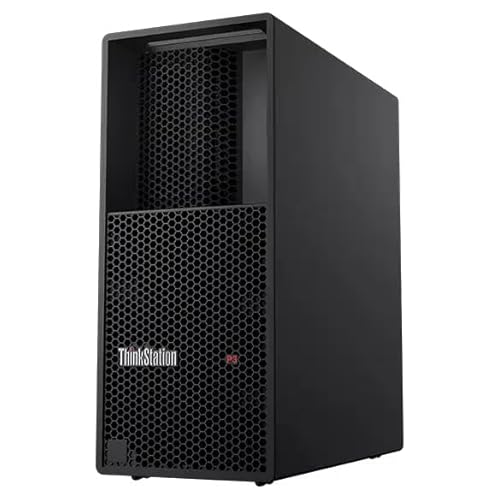
- Core Ultra 9 285 vPro and RTX 4000 Ada 20GB
- 64GB DDR5 memory with 1TB PCIe Gen4 SSD
- Windows 11 Pro and business-class warranty
Best For: Architects who want workstation-grade performance in a less extreme configuration
Value Business Tower
Dell Pro Tower for Everyday Professional Work
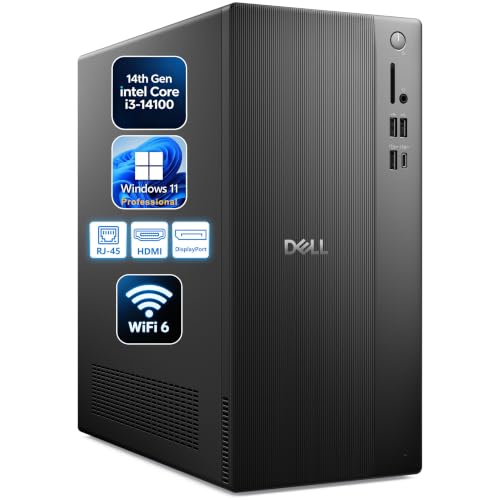
- 14th Gen Core i3 with 16GB DDR5
- 512GB SSD for fast boots and loading
- Dual-display support via HDMI and DisplayPort
Best For: Budget-conscious architects needing a dependable office PC
Workstation Power Pick
Dell Precision 5820 for Heavy Design Tasks

- Xeon W-2223 and 64GB RAM
- Quadro RTX 4000 with 8GB GDDR6
- 1TB + 512GB SSD storage setup
Best For: Architects needing stronger workstation performance for design work
Compact Office Choice
HP ProDesk SFF for Space-Saving Setups

- Small form factor saves desk space
- 32GB RAM and 1TB SSD included
- Dual 4K display support via HDMI and DisplayPort
Best For: Space-constrained architects needing an efficient office desktop
Creator-Focused Worktower
Dell Tower ECT1250 with RTX 4060

- Core Ultra 7-265F with built-in AI
- RTX 4060 8GB for graphics-heavy tasks
- 32GB RAM and 1TB NVMe SSD
Best For: Architects needing a fast, well-rounded tower for CAD and creative work
Business Dual-Monitor Pick
Dell Tower QCT1250 with i7 and 4K support

- Core i7-12700K for responsive multitasking
- Dual 4K monitor support with HDMI and DP
- 32GB DDR5 RAM and 1TB PCIe SSD
Best For: Architects who prioritize dual-monitor productivity and business workflows
Most Future-Ready Tower
Dell Tower ECT1250 with 64GB RAM
- Core Ultra 7-265F processor
- 64GB DDR5 RAM for heavy multitasking
- 2TB NVMe SSD plus RTX 4060
Best For: Architects working with larger files and heavier multitasking demands
Flagship AI Workstation – Lenovo ThinkStation P3 Tower Gen 2
If you’re shopping for a desktop computer for architects who need serious performance for BIM, 3D modeling, and content creation, this Lenovo ThinkStation P3 Tower Gen 2 is built like a true workstation. It pairs Intel Core Ultra 9 processing with RTX 4000 Ada graphics, huge memory capacity, and fast Gen 5 storage, so it can handle demanding design workflows without feeling cramped.
Best For: Architects and design teams who want a high-end workstation for BIM, advanced imaging, and 3D work.
Pros:
- Intel Core Ultra 9 285 vPro with integrated NPU and NVIDIA RTX 4000 Ada graphics for heavy professional workloads
- Massive 256GB DDR5-6400 memory and 2TB PCIe Gen 5 SSD for fast multitasking and load times
- Tool-less expandability, advanced cooling, and enterprise security features for business use
- Dual 2.5Gbps Ethernet, Wi-Fi 7, and Windows 11 Pro included
Cons:
- Likely more machine than casual office or light drafting users need
- Large workstation tower is less compact than a small-form-factor desktop
For architects who rely on demanding software and want room to grow, this ThinkStation stands out as the most capable option in the roundup. Its strength is not just raw specs, but the professional features that support long workdays and heavier project files.
Balanced Business Tower – Dell Tower Desktop Core Ultra 7
This Dell Tower Desktop is a practical desktop computer for architects who need a capable everyday machine for design work, multitasking, and multiple displays. The Intel Core Ultra 7 processor adds built-in AI support, while the tool-less design makes upgrades easier if your workload grows over time.
Best For: Architects who want a versatile business desktop with multi-monitor support and easy maintenance.
Pros:
- Intel Core Ultra 7 processor with built-in AI for productivity-focused workflows
- Supports up to four FHD monitors or two 4K displays for expanded workspace
- Tool-less entry and removable side panel make upgrades straightforward
- TPM chip, lock slot, and padlock loop add useful business security
Cons:
- Integrated Intel UHD graphics are not as strong as a discrete workstation GPU for heavy 3D work
- 32GB RAM max may limit future headroom for very large projects
For architects focused on office productivity, coordination, and moderate design tasks, this Dell offers a strong balance of features and flexibility. It makes the most sense if you value multi-display support and a simpler upgrade path over workstation-class graphics horsepower.
Value Creator Tower – HP OmniDesk Ryzen 7 8700G
The HP OmniDesk is a solid desktop computer for architects who want a responsive general-purpose tower without stepping all the way into workstation pricing. With a Ryzen 7 8700G, 32GB of DDR5 memory, and a 1TB NVMe SSD, it should handle everyday drafting, presentation prep, and lighter 3D tasks comfortably.
Best For: Architects who need a capable midrange PC for everyday design work and general productivity.
Pros:
- Ryzen 7 8700G processor with AMD Ryzen AI support
- 32GB DDR5 memory and 1TB PCIe Gen4 NVMe SSD for smooth day-to-day use
- Wi-Fi 6 and Bluetooth 5.4 included for modern connectivity
- Includes keyboard and mouse, so it is ready to set up quickly
Cons:
- Integrated Radeon 780M graphics are less suitable for demanding professional 3D workloads
- Windows 11 Home is less business-oriented than Pro editions
As a practical midrange choice, the OmniDesk covers the essentials well and keeps the price point more approachable than a full workstation. It is best suited to architects whose work leans more toward planning, documentation, and moderate visual tasks than large-scale rendering.
Compact Pro Workstation – Lenovo ThinkStation P3 Tower 64GB
If you want a desktop computer for architects that feels closer to a true professional workstation than a standard office tower, this Lenovo ThinkStation P3 is a strong fit. It combines an Intel Core Ultra 9 285 vPro processor, RTX 4000 Ada graphics, and 64GB of DDR5 memory to support serious BIM, 3D modeling, and visualization work.
Best For: Architects who need workstation-grade graphics and memory in a more moderate configuration.
Pros:
- Core Ultra 9 285 vPro processor with NVIDIA RTX 4000 Ada 20GB graphics
- 64GB DDR5 memory is strong for large design files and multitasking
- 1TB PCIe Gen4 SSD provides fast storage for projects and software
- Windows 11 Pro and Lenovo’s 1-year warranty suit business deployment
Cons:
- Only one USB port is listed in the supplied details, which may be limiting
- Less memory and storage than the maxed-out ThinkStation option in this roundup
This model lands in a useful middle ground: still a high-end workstation, but with a more restrained configuration than the fully loaded Lenovo option. It makes sense if you want professional graphics and strong memory without going to the absolute top spec.
Value Business Tower – Dell Pro Tower for Everyday Professional Work
If you need a desktop computer for architects for everyday drafting, specs review, email, and light multitasking, this Dell Pro Tower is a practical budget-friendly option. Its 14th Gen Intel Core i3, 16GB DDR5 RAM, and 512GB SSD should keep common business workflows moving smoothly, while the tower form factor gives you room to connect dual monitors and peripherals.
Best For: Architects who want an affordable office desktop for documentation, project coordination, and basic multi-app work.
Pros:
- 14th Gen Intel Core i3-14100 with 4 cores, 8 threads, and up to 4.7GHz turbo
- 16GB DDR5 RAM and 512GB PCIe SSD for quick boot times and responsive daily use
- DisplayPort 1.4 and HDMI 2.1 support dual monitors for a wider workspace
- Windows 11 Pro adds business security and remote desktop features
Cons:
- Intel UHD Graphics 730 is fine for business visuals, but not built for demanding 3D rendering
- 512GB storage may feel limited if you keep large project files locally
- It is positioned as a business PC, not a high-performance workstation
Overall, this is a solid entry-level tower for architects who mostly need reliable everyday performance rather than heavy CAD or rendering horsepower. It offers a good mix of speed, connectivity, and professional features for a main office PC.
Workstation Power Pick – Dell Precision 5820 for Heavy Design Tasks
For architects looking for a desktop computer for architects that can handle heavier creative workloads, this Dell Precision 5820 stands out with workstation-class parts. The Xeon W-2223 processor, 64GB of RAM, dual NVMe SSDs, and Nvidia Quadro RTX 4000 graphics make it a stronger fit for demanding software, larger project files, and smoother multitasking.
Best For: Architects who need a workstation for CAD, visualization, and larger design files.
Pros:
- Xeon W-2223 processor with 4 cores and boost up to 3.9GHz
- 64GB DDR4 RAM supports heavy multitasking and many open tabs or apps
- Nvidia Quadro RTX 4000 with 8GB GDDR6 is designed for photo and video editing workflows
- 1TB SSD plus 512GB SSD provides fast storage and plenty of space
Cons:
- Renewed unit, so condition can vary more than a new system
- No built-in Wi-Fi or Bluetooth card included according to the notes
- Larger and heavier tower at 32 pounds
This is the strongest option in the group if your priority is workstation-style performance rather than a compact office footprint. It makes the most sense for architects who work with more demanding visuals, multitasking, and local file storage needs.
Compact Office Choice – HP ProDesk SFF for Space-Saving Setups
If desk space is tight, this HP ProDesk SFF is a compact desktop computer for architects who mainly need reliable day-to-day productivity and dual-display support. The small form factor design, 32GB RAM, and 1TB SSD make it a sensible option for office tasks, file management, and running standard business applications without taking over the workstation.
Best For: Architects who want a space-saving desktop for office work, coordination, and dual-monitor productivity.
Pros:
- Compact Small Form Factor chassis saves desk space
- 32GB RAM and 1TB SSD offer responsive multitasking and storage
- Dual 4K display support via HDMI and DisplayPort improves productivity
- Windows 11 Pro plus Wi-Fi and Bluetooth add convenience
Cons:
- Pentium Gold G5905 is aimed at everyday business use, not heavy design workloads
- Integrated Intel UHD Graphics 610 is limited for advanced 3D or rendering tasks
- SFF layout may be less flexible than a larger tower for upgrades
For architects who prioritize a clean, compact desk setup over raw performance, this HP is a practical pick. It is best viewed as an efficient office companion rather than a machine for demanding visualization work.
Creator-Focused Worktower – Dell Tower ECT1250 with RTX 4060
If you’re shopping for a desktop computer for architects, this Dell Tower ECT1250 is built for demanding design work, multitasking, and smooth visual performance. The Intel Core Ultra 7-265F, 32GB DDR5 RAM, and RTX 4060 graphics make it a strong fit for projects that benefit from fast processing and dedicated GPU support.
Best For: Architects who want a balanced tower for CAD work, rendering, and everyday office productivity.
Pros:
- Intel Core Ultra 7-265F processor with built-in AI support
- NVIDIA GeForce RTX 4060 8GB for content creation and ray tracing
- 32GB DDR5 RAM and 1TB NVMe SSD for fast multitasking and storage
- 8 USB ports and Wi-Fi 6 for flexible desk setups
Cons:
- Includes only 32GB RAM, which may be limiting for heavier workloads than this class is designed for
- Wired keyboard and mouse are included, but no mention of monitor or specialty design peripherals
Overall, this is a practical architecture desktop if you want strong everyday responsiveness plus dedicated graphics without stepping into a more extreme workstation tier. It offers a sensible mix of speed, storage, and expandability for most office-based design workflows.
Business Dual-Monitor Pick – Dell Tower QCT1250 with i7 and 4K support
For buyers looking for a desktop computer for architects that leans more toward office productivity and stable multitasking, this Dell Tower offers a strong business-ready base. The Intel Core i7-12700K, 32GB DDR5 RAM, and dual 4K monitor support make it a solid choice for managing drawings, documents, and several apps at once.
Best For: Architects who mainly need a reliable office desktop for design coordination, multitasking, and dual-monitor setups.
Pros:
- Intel Core i7-12700K with up to 5.0GHz boost for fast responsiveness
- Dual 4K monitor support via HDMI and DisplayPort
- 32GB DDR5 RAM and 1TB PCIe SSD for smooth everyday performance
- Wi-Fi, Bluetooth, USB-C, and Windows 11 Pro for business use
Cons:
- Uses integrated Intel UHD Graphics 770 instead of a dedicated GPU
- Max memory listed at 32GB in the supplied details, so upgrade headroom is limited as listed
This model makes the most sense if your architectural workflow is centered on productivity, coordination, and multiple displays rather than GPU-intensive rendering. It is a dependable business desktop with good connectivity and strong CPU performance.
Most Future-Ready Tower – Dell Tower ECT1250 with 64GB RAM
This Dell Tower ECT1250 is the strongest fit here if you want a desktop computer for architects with more room for large projects and heavier multitasking. It pairs the Intel Core Ultra 7-265F and RTX 4060 with 64GB DDR5 RAM and a 2TB NVMe SSD, giving you a high-capacity setup for demanding work sessions.
Best For: Architects who want extra memory and storage for larger files, multitasking, and more demanding design workflows.
Pros:
- 64GB DDR5 RAM for heavier multitasking
- 2TB NVMe SSD for lots of fast storage
- NVIDIA GeForce RTX 4060 8GB for dedicated graphics performance
- Windows 11 Pro, Wi-Fi, and 8 USB ports for a practical workstation setup
Cons:
- Still a tower desktop, so you’ll need to budget for a separate monitor and workspace accessories if needed
- The supplied details focus on general performance rather than specialized workstation certifications
Among the three, this is the most future-ready option for architecture users who keep big files open and want fewer slowdowns when juggling tasks. The extra RAM and storage make it the most comfortable pick for heavier day-to-day creative work.
How We Picked the Best Desktop Computer for Architects
For architects, the most useful systems are not just fast on paper—they stay responsive when you’re moving between Revit, AutoCAD, rendering tools, and reference files. We prioritized processors with strong single-core performance for design work, dedicated graphics for viewport acceleration, ample RAM for large models, and fast NVMe storage for quick file loading.
We also considered upgrade potential, display support, and workstation-oriented features such as professional GPU options and more robust chassis designs. That matters because a Desktop Computer for Architects should be able to grow with project demands over time.
Quick Comparison
Broadly speaking, the list breaks into three groups: high-end workstations for heavy BIM and rendering, balanced towers for everyday design workflows, and value-oriented desktops for lighter CAD or office-based architectural tasks. If your work includes large assemblies, detailed visualization, or frequent multitasking, lean toward the workstation class. If you mainly draft, review plans, and manage moderate-sized models, a well-equipped tower may be enough.
Key Buying Factors for a Desktop Computer for Architects
Processor
Look for a modern CPU with strong performance cores and high clock speeds. Architectural software often benefits from fast single-thread performance, while rendering, exports, and background tasks gain from more cores and threads.
Graphics Card
Dedicated GPUs improve 3D navigation, shaded viewports, and GPU-accelerated rendering. Professional cards can offer better stability and certification for design software, while gaming-class GPUs may deliver strong performance for the money.
Memory
32GB is a practical starting point for many users, but 64GB or more is better for large BIM projects, rendering, and heavy multitasking. If you routinely keep many applications open, extra RAM is worth paying for.
Storage
An NVMe SSD is essential for fast boot times, project loading, and file transfers. 1TB is a comfortable baseline, but 2TB or more is ideal if you store large libraries, renders, and active project archives locally.
Connectivity and Expansion
Dual-monitor support, multiple USB ports, Wi-Fi, and room for future upgrades can all improve day-to-day workflow. Architects often work with multiple displays and external peripherals, so flexibility matters.
Who Should Buy Which Desktop Computer for Architects?
If you handle complex models, rendering, or large firm-level workloads, choose a high-end workstation with stronger graphics and more memory. If you want a dependable Desktop Computer for Architects that can manage serious design work without moving into premium workstation pricing, a midrange tower with 32GB RAM and a solid CPU is a smart middle ground.
For students, solo practitioners, or users focused mainly on drafting and 2D work, a value desktop with an SSD and enough RAM for smooth multitasking may be the most cost-effective choice. Match the machine to your software load and project scale, and you’ll avoid overspending on performance you do not need.