Finding the right document camera for book scanning means balancing image quality, page size, speed, portability, and software features. The best choice depends on whether you are digitizing everyday books, oversized materials, or archival documents.
This roundup compares 10 standout models, including high-resolution book scanners, portable USB cameras, and large-format systems with features such as auto-flattening, OCR, and fingerprint removal.
Best 10 Document Cameras for Book Scanning Picks for 2026
Best Professional Book Scanner

- 24MP camera with 320 DPI capture
- Page-flattening technology for curved books
- A3 scanning, OCR, and HDMI support
Best For: High-volume book digitization and large-format scanning
Best 4K Presentation Camera

- 4K capture with a 13MP Sony sensor
- Flexible A3 document and artwork positioning
- OCR, annotation, and recording software
Best For: Classroom demonstrations and large-format presentations
Best Portable Book Scanner

- About one-second-per-page scanning
- Foldable design weighing about 4 pounds
- A3/A4 capture with OCR and page flattening
Best For: Portable scanning of thinner books and flat documents
Best Plug-and-Play Camera

- 8MP Sony CMOS sensor
- Autofocus and up to 30 fps at Full HD
- Mac, Windows, and Chromebook compatible
Best For: Live demonstrations, teaching, and everyday document capture
Best Overall
CZUR Aura Pro Book & Document Scanner

- Captures A3 and A4 pages in about two seconds
- Flattens curved book pages with three laser lines
- Exports searchable PDFs and supports 180+ OCR languages
Best For: Home libraries and serious book digitization
Best for Accessibility
VIISAN DB8401 16MP Document Camera
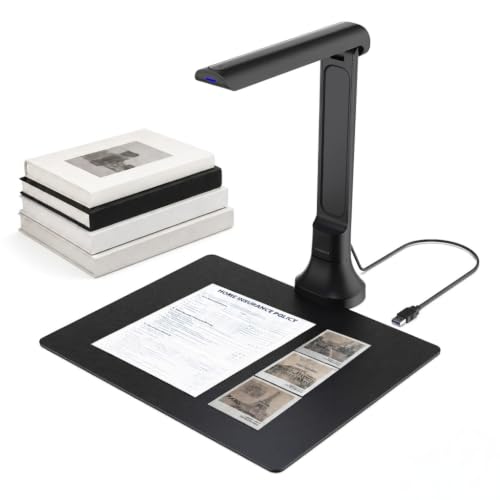
- 16MP autofocus camera handles books and 3D objects
- OCR supports editable and searchable document formats
- Text-to-speech and Gemini features add accessibility tools
Best For: Remote learning, presentations, and read-aloud documents
Best Portable Pick

- Scans pages in about one second
- Compact foldable design weighs about 0.93 pounds
- Supports A4 capture, OCR, and webcam use
Best For: On-the-go A4 documents and occasional book scanning
Best Large-Format Pick

- A2 capture area for oversized books and documents
- 26MP imaging with page-flattening software
- OCR exports to PDF, Word, Excel, EPUB, and text
Best For: Large-format books, maps, newspapers, and manuscripts
Best High-Resolution Option

- 38MP sensor for detailed A3 scans
- Curve flattening avoids unbinding books
- OCR supports 180+ languages plus HDMI output
Best For: High-volume A3 scanning and searchable document workflows
Best Simple Pick

- Foldable 2-pound design for portability
- 24MP resolution with curved-page flattening
- Exports JPG, PDF, searchable PDF, Word, and Excel
Best For: Portable book scanning and space-conscious setups
Best Professional Book Scanner – CZUR ET24 Pro
For demanding document cameras for book scanning, the CZUR ET24 Pro combines a 24MP camera, A3 capture area, and page-flattening technology. It is designed for digitizing books, magazines, artwork, receipts, and other materials while supporting OCR and HDMI connectivity.
Best For: Users who need high-resolution book scanning, large-format capture, and extensive OCR support.
Pros:
- 24MP camera captures up to 5696 × 4272 resolution at 320 DPI.
- Flattening technology helps correct curved book pages, including thicker books.
- Supports A3-size materials, OCR in more than 180 languages, HDMI, and Linux on supported Ubuntu versions.
- Three-light illumination and a real-time preview screen help with positioning and reflections.
Cons:
- Very glossy papers are not recommended.
- Thai and Hebrew OCR are unsupported, while Arabic support is limited by operating system.
- Its 4.5 kg build is less portable than compact scanners.
The ET24 Pro is the strongest choice here for serious book digitization, particularly when page curvature, A3 materials, and editable OCR output matter more than portability.
Best 4K Presentation Camera – INSWAN INS-2 UHD
The INSWAN INS-2 is a versatile option among document cameras for book scanning when live presentation quality is also important. Its 13MP Sony sensor records 4K video, while the adjustable arm accommodates A3 documents, artwork, and two-page spreads.
Best For: Educators, art instructors, and presenters who need clear large-format imaging for classrooms or exhibitions.
Pros:
- 4K video capture at 3840 × 2160 and 30 frames per second.
- Flexible multi-joint arm supports documents up to A3 size.
- Includes autofocus modes, built-in LED lighting, brightness control, and an anti-glare sheet.
- Documate software adds OCR, scanning, annotation, recording, and whiteboard tools.
Cons:
- Its 13MP still resolution is lower than the CZUR ET24 Pro’s 24MP camera.
- iPad use requires iPadOS 17 or later and a USB-C port.
- Its emphasis on live presentation may be less suited to specialized curved-page flattening.
The INS-2 is a practical hybrid for users who want book and artwork capture alongside polished 4K teaching or presentation workflows.
Best Portable Book Scanner – CZUR Shine Ultra
The CZUR Shine Ultra is a compact choice for document cameras for book scanning, combining a 13MP camera with roughly one-second-per-page scanning. Its foldable, height-adjustable design supports A3 and A4 materials and includes software for OCR and remote teaching.
Best For: Users who want a lightweight scanner for thinner books, flat documents, and occasional remote presentations.
Pros:
- Scans pages in about one second and handles materials up to A3 size.
- Patented technology helps flatten curved pages in thinner books.
- Offers OCR in more than 180 languages, auto-cropping, smart paging, and color modes.
- Foldable, height-adjustable design weighs about 4 pounds and includes a foot pedal.
Cons:
- Flattening technology is intended for thinner books; CZUR recommends ET-series models for thicker books.
- Not compatible with Android or iOS.
- Thai, Hebrew, and Arabic OCR are unsupported.
The Shine Ultra balances portability and scanning speed well, making it suitable for home offices, classrooms, and users digitizing thinner books without needing the ET24 Pro’s higher resolution.
Best Plug-and-Play Camera – IPEVO V4K USB Document Camera
The IPEVO V4K is a straightforward option among document cameras for book scanning when live viewing and easy setup are priorities. Its 8MP Sony CMOS sensor captures up to 3264 × 2448 pixels, and the autofocus system is designed for quickly switching between pages and other materials.
Best For: Teachers, remote presenters, and users who need a lightweight USB camera for books, documents, and live demonstrations.
Pros:
- 8MP sensor provides ultra-high-definition still capture up to 3264 × 2448 pixels.
- Autofocus and high frame rates support smooth live demonstrations.
- Compatible with Mac, Windows, and Chromebook systems and many software applications.
- Multi-jointed stand supports a maximum shooting area of 13.46 × 10.04 inches.
Cons:
- Its capture area is smaller than the A3 support offered by the other listed models.
- It has no optical or digital zoom.
- It does not list dedicated book-page flattening or built-in OCR features.
The V4K is best viewed as an affordable, flexible live document camera rather than a specialized book-digitization scanner, especially for users who value broad compatibility and quick focusing.
Best Overall – CZUR Aura Pro Book & Document Scanner
For shoppers comparing document cameras for book scanning, the CZUR Aura Pro stands out as a dedicated book and document scanner with A3 and A4 capture, fast two-second-per-page scanning, and built-in page-flattening technology for curved books.
Best For: Home libraries, book digitization, and users who want broad OCR and file-format support.
Pros:
- Three laser lines help flatten curved book pages for clearer captures.
- Scans pages in about two seconds and exports JPG, Word, PDF, and searchable PDF files.
- OCR supports more than 180 languages, with Windows and Mac compatibility.
- Includes glare-free lighting with four color-temperature settings.
Cons:
- Thai, Hebrew, and Arabic are not supported by the stated OCR system.
- Its larger desktop design is less portable than foldable models.
The Aura Pro is a strong all-around choice when accurate book-page reproduction matters more than portability. Its lighting, curved-page correction, and multi-format OCR make it especially practical for building a searchable digital library.
Best for Accessibility – VIISAN DB8401 16MP Document Camera
The VIISAN DB8401 combines a 16MP autofocus document camera with book-scanning tools, OCR, text-to-speech, and optional Gemini-powered features. It is a flexible pick among document cameras for book scanning when live sharing and accessibility are important.
Best For: Remote learning, video conferencing, language learners, and users who benefit from read-aloud documents.
Pros:
- 16MP autofocus camera captures books, papers, photos, and 3D objects.
- OCR can create editable Word, Excel, PDF, and searchable text files.
- Text-to-speech can read scanned content aloud.
- Foldable, 350-gram design works with Windows and macOS without drivers.
Cons:
- Gemini features require the VisualCam Lite Web UI and Chrome.
- The supplied notes do not specify a maximum book or page size.
This model is more than a basic scanner: it can serve as a webcam for live lessons and meetings while also handling book and document capture. Choose it if portability, autofocus, and read-aloud functionality are priorities.
Best Portable Pick – CZUR Lens800 Pro A4 Scanner
The CZUR Lens800 Pro is a compact USB document scanner designed for quick A4 captures. For anyone seeking portable document cameras for book scanning, its foldable body, one-second-per-page speed, and no-feed design make it convenient for documents, forms, and selected book pages.
Best For: Mobile scanning of A4 documents, business cards, forms, contracts, and letters.
Pros:
- Captures a page in about one second and can target multiple items such as business cards.
- Foldable 0.93-pound design is easy to carry.
- OCR converts scans into Word, Excel, PDF, and editable PDF files.
- One USB connection supplies power and data, and the unit can also work as a webcam.
Cons:
- Capture size is limited to A4.
- Not recommended for very glossy paper.
- The supplied OCR notes exclude Thai, Hebrew, and Arabic.
The Lens800 Pro is a practical travel-friendly option for A4 materials and occasional book scanning. Its contact-free capture avoids feeding or touching documents, though users handling larger books or glossy pages may prefer a more specialized model.
Best Large-Format Pick – VIISAN S21 A2 Book Scanner
For book scanning projects involving oversized materials, the VIISAN S21 stands out among document cameras for book scanning. Its A2 capture area accommodates large journals, newspapers, manuscripts, maps, and books, while its software helps flatten curved pages and separate facing pages.
Best For: Large-format books, maps, newspapers, manuscripts, and users who need OCR export options.
Pros:
- A2 capture size supports documents up to 594 x 420 mm.
- 26MP resolution with software-enhanced output up to 600 DPI.
- Auto-flattening, fingerprint removal, edge repair, and double-page splitting.
- OCR can export files to PDF, Word, Excel, EPUB, and text formats.
Cons:
- Bundled OfficeCam software does not support ARM-based devices.
- Glossy or highly reflective pages are not recommended, and the built-in LEDs are not intended for bright light.
- Requires a USB connection to a compatible computer.
The S21 is a particularly capable choice when standard A3 coverage is not enough. Confirm that your Windows or Mac computer uses a supported x86 or x64 architecture before buying.
Best High-Resolution Option – CZUR ET MAX Book Scanner
The CZUR ET MAX combines a 38MP sensor with book-focused curve flattening, making it a strong option among document cameras for book scanning. It is designed for detailed A3 scans, quick page capture, OCR conversion, and even direct HDMI projection.
Best For: High-volume A3 book scanning, detailed image capture, OCR workflows, and live demonstrations.
Pros:
- 38MP CMOS sensor captures images at 7168 x 5376 resolution.
- Patented technology flattens curved book pages without unbinding them.
- OCR supports editable and searchable Word, Excel, and PDF files in more than 180 languages.
- Supports Windows, macOS, Linux Ubuntu 20.04-24.04, and HDMI output.
Cons:
- Not recommended for glossy or highly reflective materials.
- Thai and Hebrew OCR are not supported; Arabic support has operating-system limitations.
- Linux compatibility is limited to Ubuntu versions 20.04 through 24.04.
With its high-resolution sensor and 1.5-second practiced scan speed, the ET MAX is well suited to substantial scanning projects. Its language and operating-system limitations are worth checking before purchase.
Best Simple Pick – CZUR Shine Ultra Pro Scanner
The CZUR Shine Ultra Pro is a compact choice for document cameras for book scanning when portability matters. Its 90-degree foldable, height-adjustable design weighs only 2 pounds, while the software can flatten curved book pages and create several useful digital formats.
Best For: Portable book scanning, home offices, students, and users who need flexible document exports.
Pros:
- Lightweight 2-pound design with a foldable, height-adjustable structure.
- 24MP resolution captures up to 5696 x 4272 images.
- Software flattens curved book surfaces after pixel transformation.
- Creates JPG, PDF, searchable PDF, Word, and Excel files.
Cons:
- Requires a USB connection and compatible Windows or macOS computer.
- Its listed capture resolution is lower than the 26MP and 38MP alternatives in this roundup.
- The supplied notes identify it as a document scanner rather than an A2 large-format model.
The Shine Ultra Pro is a practical fit for scanning on the move or in space-limited work areas. Choose it when a lighter, foldable design is more important than maximum capture size or resolution.
How We Picked the Best Document Cameras for Book Scanning
We focused on the features that most affect real-world scanning: resolution, capture area, page-flattening performance, software support, connectivity, and ease of setup. The selection includes models for home users, educators, libraries, offices, and anyone digitizing books without cutting or damaging their bindings.
Resolution matters, but it is not the only measure of quality. A well-designed stand, consistent lighting, autofocus, and correction software can produce more usable pages than a higher-megapixel camera with poor positioning. We also considered compatibility with Windows, macOS, ChromeOS, and common OCR workflows where stated by the manufacturer.
Quick Comparison
| Best For | Features to Prioritize |
|---|---|
| Everyday home scanning | Simple software, autofocus, USB connectivity, and A3 or A4 coverage |
| High-detail book archiving | 24MP or higher resolution, stable lighting, and page-curvature correction |
| Oversized books and documents | Large-format capture, a wide stand, and auto-flattening tools |
| Portable scanning | Foldable hardware, compact storage, and fast setup |
| Teaching and presentations | Low-latency video, broad operating-system support, and a built-in microphone or light |
Key Buying Factors for Document Cameras for Book Scanning
Resolution and Image Processing
Higher resolution preserves small print, illustrations, and marginal notes, especially when you plan to crop or enlarge pages. Look for software that can correct distortion, improve contrast, and export searchable files rather than relying on megapixels alone.
Capture Size and Book Handling
A4 coverage suits most paperbacks and standard documents, while A3 support is more useful for textbooks, open books, maps, and magazines. Large-format models are better for oversized material but generally require more desk space.
Page Flattening and Lighting
Book pages naturally curve near the spine. Finger-removal tools, laser guides, and automatic flattening can reduce editing time and improve readability. Built-in LEDs are useful in variable lighting, but avoid glare on glossy pages.
OCR, File Formats, and Connectivity
If you need searchable text, confirm that the included software supports OCR for your language and preferred export format, such as PDF, Word, or JPEG. USB models are usually straightforward, while wireless or specialized systems may offer more flexible placement.
Who Should Buy Which Document Cameras for Book Scanning?
Choose a compact portable scanner if you need to move between classrooms, offices, or home workspaces. A midrange 8MP to 16MP document camera is often sufficient for notes, receipts, and routine book pages. Buyers creating detailed digital archives should consider a 24MP or higher model with strong curvature correction and reliable lighting.
For oversized books, art books, newspapers, or bound documents, prioritize A3 or A2 capture and auto-flattening over portability. If live demonstrations are equally important as scanning, select a model with responsive video, broad computer compatibility, and a built-in microphone or LED. Before buying, verify the stand footprint, included software, operating-system support, and whether OCR or advanced correction features require a paid upgrade.