Optical disc duplicators make it easier to produce multiple CD, DVD, or Blu-ray copies without tying up a computer. The models in this roundup range from compact one-to-one towers to higher-capacity systems designed for larger batches.
Use the comparison below to match target capacity, supported media, copying speed, and automation features with your actual production needs.
Best 10 Optical Disc Duplicators Picks for 2026
Best Single-Disc M-Disc Tower

- Standalone CD, DVD, and M-Disc copying
- Up to 24x DVD and 52x CD-R writing
- Lifetime support plus one-year warranty
Best For: Archival and individual disc copying without a computer
Best for Five-Copy Runs

- Burns up to five copies per cycle
- Standalone LCD-controlled operation
- Includes verify, compare, and test functions
Best For: Small-batch CD and DVD duplication
Best M-Disc Multi-Copy Tower

- Copies to three discs per cycle
- Supports M-Disc archival media
- Standalone operation with copy-protection support
Best For: Small-batch archival and DVD distribution projects
Best Flash-to-Disc Option
Multi-Source 4-Target Duplicator

- Copies flash media to up to four discs
- Supports USB, SD, CF, MS, and MMC
- Handles disc-to-disc and multi-session transfers
Best For: Multimedia transfers from flash media to optical discs
Best Overall Standalone Pick
Vinpower Digital 1-to-1 DVD/CD Duplicator

- Standalone operation with no PC required
- Up to 24x DVD and 52x CD-R writing
- Supports common CD formats and M-Disc DVDs
Best For: One-to-one duplication for personal, gaming, and business use
Best for Small Batch Copying
BestDuplicator 1-to-5 DVD Tower

- Copies to five target discs
- Supports common DVD and CD blank media
- Includes Nero software and extended support
Best For: Small-batch personal DVD and CD duplication
Best Value 1-to-5 M-Disc Tower
PlexCopier SATA DVD Duplicator

- Five-target standalone duplication
- Up to 24x DVD and 52x CD-R writing
- Supports M-Disc and compatible DVD copy protection
Best For: Business-oriented batch duplication with archival-media support
High-Capacity Blu-ray Tower
1-to-5 Blu-ray Disc Duplicator
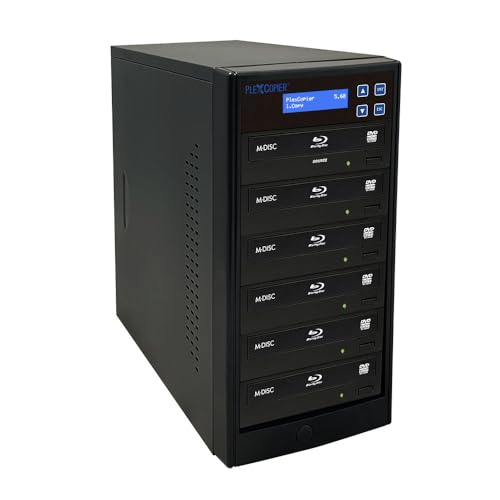
- Supports Blu-ray, BDXL, M-Disc, DVD, and CD media
- Creates up to five target copies at once
- Compatible with Windows and macOS
Best For: Higher-volume Blu-ray and mixed-media duplication
Business DVD Production Tower

- Works standalone without a PC
- Supports up to seven CD or DVD copies
- Handles M-Disc and compatible copy-protected DVD Video media
Best For: High-volume standalone CD and DVD production
Flexible Blu-ray Workhorse
1-to-3 Blu-ray Disc Duplicator

- Duplicates Blu-ray, DVD, and CD media
- Runs standalone without a PC
- Supports BDXL, M-Disc, and compatible DVD copy protection
Best For: Moderate-volume mixed Blu-ray, DVD, and CD duplication
Best Single-Disc M-Disc Tower – 24X 1-to-1 DVD Duplicator
PlexCopier 24X 1 to 1 CD DVD M-Disc Supported Duplicator Copier Tower with Free Copy Protection
Check Price On AmazonThis standalone optical disc duplicator is designed for users who need one-to-one CD, DVD, or M-Disc copying without a computer. It supports up to 24x DVD and 52x CD-R writing, while its OptoDisc media feature can create copy-protected DVD video copies from an original master.
Best For: Businesses and individuals making individual DVD, CD, or archival M-Disc copies without a PC.
Pros:
- Standalone operation requires no computer.
- Supports M-Disc DVD media for long-term archival recording.
- Offers up to 24x DVD and 52x CD-R write speeds.
- Includes lifetime technical support and a one-year parts-and-labor warranty.
Cons:
- Copies only one target disc per cycle.
- Will not copy encrypted discs.
- Copy-protection creation requires compatible OptoDisc MID media.
Choose this model when archival support, standalone simplicity, and single-disc copying matter more than production volume. Its one-target design is less suited to repeated batch duplication.
Best for Five-Copy Runs – 1-to-5 SATA DVD Duplicator
For higher-volume optical disc duplication, this standalone SATA tower can burn up to five copies in one cycle without requiring a computer. Its LCD interface supports copy, test, verify, and compare functions, with compatibility for common CD, DVD, rewritable, and dual-layer media.
Best For: Users who regularly need up to five CD or DVD copies per duplication cycle.
Pros:
- Produces up to five copies per burn cycle.
- Works without a computer through a user-friendly LCD interface.
- Supports DVD+/-R, DVD+/-RW, dual-layer DVD, CD-R, and CD-RW media.
- Includes test, verify, compare, and automatic source-analysis functions.
Cons:
- Heavy tower design weighs 26 pounds.
- Will not copy encrypted discs.
- Provides a one-year warranty rather than the longer support coverage of some alternatives.
This is a practical choice for small duplication jobs where five simultaneous targets improve efficiency. Its broad media compatibility and verification tools add useful control for routine business or data-copying work.
Best M-Disc Multi-Copy Tower – 24X 1-to-3 DVD Duplicator
PlexCopier 24X 1 to 3 CD DVD M-Disc Supported Duplicator Copier Tower with Free Copy Protection
Check Price On AmazonThis optical disc duplicator balances standalone convenience with three-target output. It can copy CDs and DVDs without a PC, supports M-Disc DVD recording for archival projects, and can create copy-protected DVD video copies using compatible OptoDisc media.
Best For: Users who need several copies per cycle along with M-Disc archiving or compatible DVD copy-protection features.
Pros:
- Creates up to three copies at once without a computer.
- Supports M-Disc DVD recording for archival use.
- Offers up to 24x DVD and 52x CD-R write speeds.
- Supports copy-protection creation with OptoDisc MID media.
Cons:
- Has fewer target drives than five-copy duplicators.
- Will not copy encrypted discs.
- Its listed warranty is one year.
Consider this tower when three simultaneous copies are enough and archival flexibility is important. It provides a useful middle ground between a one-target unit and larger production-oriented optical disc duplicators.
Best Flash-to-Disc Option – Multi-Source 4-Target Duplicator
Unlike conventional optical disc duplicators, this standalone Systor unit can copy from USB, SD, microSD, CF, MS, or MMC flash media to blank CDs or DVDs. It also supports disc-to-disc copying and multi-session transfers, making it useful when source files come from several types of removable media.
Best For: Multimedia users transferring flash-card or USB content to multiple optical discs.
Pros:
- Copies one USB drive or flash card to up to four optical discs.
- Supports USB, SD, microSD, CF, MS, and MMC source media.
- Can copy CD-to-CD and DVD-to-DVD without a computer.
- Multi-session technology combines data from multiple flash cards onto one disc.
Cons:
- Its 4-target design is specialized around flash-media and optical-disc workflows.
- Listed connectivity details include USB 1.1, which may limit transfer speed.
- The supplied notes specify a one-year manufacturer warranty.
This is the strongest fit for photographers, media users, and organizations that need to move content from removable flash media to discs. Choose a traditional duplicator instead if your workflow is limited to optical-disc masters.
Best Overall Standalone Pick – Vinpower Digital 1-to-1 DVD/CD Duplicator
Vinpower Digital Standard 1 to 1 Target 24x DVD CD Disc Duplicator Tower SATA Optical Drives - Black
Check Price On AmazonFor buyers comparing optical disc duplicators, the Vinpower Digital Standard 1-to-1 model is a straightforward standalone tower that copies one source disc to one target without requiring a PC. It supports DVD writing up to 24x and CD-R writing up to 52x, while also handling common CD formats and M-Disc DVD media.
Best For: Personal, gaming, and business users who need simple one-to-one DVD and CD duplication.
Pros:
- Standalone operation requires no computer.
- Supports up to 24x DVD and 52x CD-R write speeds.
- Recognizes common CD formats, including CD-TEXT, ISRC, and over-burned CDs.
- Supports M-Disc DVD media and free copy-protected DVD Video copies with compatible OptoDisc MID media.
Cons:
- Only duplicates one target disc at a time.
- Will not copy encrypted discs.
- Copy-protection functionality depends on compatible OptoDisc MID media.
Its one-to-one design is slower for larger batches, but it offers useful format support and archival-media compatibility in an easy-to-use standalone package.
Best for Small Batch Copying – BestDuplicator 1-to-5 DVD Tower
This BestDuplicator tower is a practical option among optical disc duplicators when producing several copies at once matters. Its 1-to-5 configuration can copy to five targets, automatically recognizes the source disc format, and supports common DVD and CD blank-media standards.
Best For: Users who need small-batch DVD and CD duplication with a five-target tower and included Nero software.
Pros:
- 1-to-5 target design supports multiple copies in one run.
- Automatically recognizes the source disc format.
- Supports DVD+/-R, DVD+/-RW, DVD+/-R Dual Layer, CD-R, and CD-RW media.
- Includes Nero Multimedia Suite 10 Essentials software, three-year labor coverage, one-year parts coverage, and lifetime technical support.
Cons:
- At 26 pounds, it is relatively heavy for a tower duplicator.
- Listed optical write speed is up to 20x.
- The supplied notes identify it primarily for personal use.
With five target drives and broad blank-media support, this model is better suited to repeated small batches than one-disc-at-a-time duplication.
Best Value 1-to-5 M-Disc Tower – PlexCopier SATA DVD Duplicator
The PlexCopier 1-to-5 tower combines five-target duplication with standalone operation, making it a useful choice for buyers seeking optical disc duplicators for business workflows. It supports up to 24x DVD and 52x CD-R writing, M-Disc DVDs, and free DVD Video copy protection with compatible OptoDisc MID media.
Best For: Business users who want five-target duplication, standalone operation, and M-Disc support.
Pros:
- Standalone design does not require a PC to operate.
- Copies to up to five target discs at once.
- Supports up to 24x DVD and 52x CD-R write speeds.
- Supports M-Disc DVD media and compatible free DVD Video copy protection.
Cons:
- Will not copy encrypted discs.
- Copy-protection support requires compatible OptoDisc MID media.
- The supplied specifications list an optical read speed of 8x.
Its five-target layout offers a meaningful productivity advantage over one-to-one models, while M-Disc support adds an archival option for suitable projects.
High-Capacity Blu-ray Tower – 1-to-5 Blu-ray Disc Duplicator
PlexCopier 1 to 5 Blu-ray BD BDXL M-Disc CD DVD Duplicator Copier Tower with FREE Copy Protection
Check Price On AmazonFor buyers comparing optical disc duplicators, this 1-to-5 PlexCopier tower is designed for Blu-ray, BDXL, M-Disc, DVD, and CD duplication. Its five-target configuration suits users who need to make multiple copies at once, while Windows and macOS compatibility supports PC-based workflows.
Best For: Businesses, organizations, and media workflows that need simultaneous Blu-ray, DVD, or CD duplication.
Pros:
- Duplicates Blu-ray, BDXL, M-Disc, DVD, and CD media.
- Supports up to five target copies per duplication cycle.
- Works with Windows and macOS systems.
Cons:
- At 17 pounds, it is a substantial tower-style unit.
- The supplied notes do not specify standalone operation.
This model is a practical choice when Blu-ray support and higher-volume five-disc output matter more than a compact setup. Confirm your optical-drive and computer compatibility before purchasing.
Business DVD Production Tower – 1-to-7 DVD Duplicator
Among optical disc duplicators, this standalone 1-to-7 PlexCopier tower emphasizes high-volume CD and DVD production without requiring a PC. It supports M-Disc DVD media, offers up to 24x DVD and 52x CD-R writing, and can create copy-protected DVD Video copies with compatible OptoDisc MID media.
Best For: Businesses and organizations producing multiple DVD or CD copies independently of a computer.
Pros:
- Operates as a standalone duplicator with no PC required.
- Supports up to seven target copies per cycle.
- Supports M-Disc DVD media and up to 24x DVD and 52x CD-R writing.
- Offers free copy-protected DVD Video creation with compatible OptoDisc MID media.
Cons:
- It does not copy encrypted discs.
- This model is focused on CD and DVD rather than Blu-ray media.
- Its 22-pound tower design may not suit space-constrained setups.
This is the strongest fit for straightforward, high-output DVD and CD duplication, especially where standalone operation is important. Its copy-protection feature depends on the specified compatible media.
Flexible Blu-ray Workhorse – 1-to-3 Blu-ray Disc Duplicator
PlexCopier 1 to 3 Blu-ray BD BDXL M-Disc CD DVD Duplicator Copier Tower with Free Copy Protection
Check Price On AmazonThis 1-to-3 PlexCopier tower is one of the more flexible optical disc duplicators for mixed media, handling Blu-ray, DVD, CD, BDXL, and M-Disc formats. It operates standalone, supports up to three target copies, and provides stated write speeds of up to 16x for single-layer BD-R, 24x for DVD, and 52x for CD-R.
Best For: Users who need standalone duplication across Blu-ray, DVD, and CD formats without the capacity of a larger tower.
Pros:
- Duplicates Blu-ray, DVD, and CD discs.
- Operates standalone with no PC required.
- Supports BDXL and M-Disc media.
- Can create copy-protected DVD Video copies with compatible OptoDisc MID media.
Cons:
- It supports only three target copies per cycle.
- It will not copy encrypted discs.
- The listed read speed is up to 8x for the optical storage system.
This model offers a balanced middle ground for mixed-format duplication: broader media support than a DVD-only tower, but a smaller output capacity than five- or seven-target systems. It is well suited to moderate-volume work where Blu-ray capability is essential.
How We Picked These Optical Disc Duplicators
We selected these 10 Optical Disc Duplicators to cover the most important use cases, from occasional CD and DVD duplication to larger production runs and Blu-ray distribution. We considered the number of target drives, supported formats, rated write speeds, standalone operation, M-Disc or BDXL compatibility, and included workflow or copy-protection features.
Because specifications can vary by blank-media type and source content, treat advertised speeds as maximum ratings rather than guaranteed production rates. Confirm the seller’s current drive configuration, warranty, and included software before ordering.
Quick Comparison
| Best For | Recommended Configuration | Why It Matters |
|---|---|---|
| Occasional copying | 1-to-1 or 1-to-3 | Lower cost and simpler operation |
| Small-batch DVD production | 1-to-5 | Creates more copies per cycle |
| Higher-volume DVD work | 1-to-7 | Improves throughput when batches are frequent |
| Blu-ray distribution | BD or BDXL-supported model | Handles higher-capacity optical media |
| Mixed removable-media workflows | Flash-drive or card-capable system | Copies from additional source formats |
Key Buying Factors for Optical Disc Duplicators
Target Count and Throughput
The target count indicates how many blank discs can be written at once. A 1-to-1 unit suits occasional duplication, while 1-to-5 and 1-to-7 towers are better for events, training materials, archival batches, or commercial fulfillment. More targets can increase productivity, but they also require more desk space and a larger supply of compatible blank media.
Media Compatibility
Check whether you need CD, DVD, Blu-ray, BDXL, or M-Disc support. A DVD-only duplicator cannot create Blu-ray copies, and support for a format does not guarantee compatibility with every disc brand or recording layer. If long-term archival media is important, verify M-Disc support for both the source and target workflow.
Standalone Controls and Copy Protection
Standalone operation is useful when you want to duplicate discs without installing authoring software on a computer. Look for clear menus, source verification, disc-to-disc copying, and options for handling read errors. Included copy-protection tools may be valuable for authorized distribution, but confirm that your intended content and use comply with applicable laws.
Drive Configuration and Maintenance
SATA optical drives are common and can simplify replacement or servicing. Consider ventilation, noise, access to consumable drives, and the availability of replacement parts. A faster rated drive is not always better if your blank media, source disc, or content format becomes the bottleneck.
Who Should Buy Which Optical Disc Duplicators?
Choose a 1-to-1 or 1-to-3 CD/DVD tower if you need a straightforward unit for home, office, education, or occasional client projects. A 1-to-5 model is a practical middle ground for regular small-batch production. Move to a 1-to-7 DVD duplicator when reducing cycle time matters more than compact size.
For video distributors, filmmakers, software publishers, and organizations delivering high-capacity content, choose a Blu-ray or BDXL-capable model. If your workflow starts with USB flash drives or memory cards as well as discs, a multi-format duplicator can reduce the need for separate equipment. In every case, match the tower to your actual media format and monthly volume rather than choosing solely by maximum speed.