The best microcontroller kits for students make electronics easier to understand by combining programmable boards with sensors, displays, motors, and guided projects. The right kit can turn abstract code into hands-on experiments.
This roundup compares 10 beginner-friendly options built around Arduino, Raspberry Pi Pico, and ESP32 platforms, with choices for classroom learning, STEM exploration, and independent projects.
Best 10 Microcontroller Kits for Students Picks for 2026
Best All-Around Beginner Kit
UNO R3 Project Super Starter Kit

- 22+ guided Arduino projects
- Includes sensors, displays, and motors
- Solderless setup for beginners
Best For: Introductory STEM learning and family builds
Best for IoT Learning
Raspberry Pi Pico W Ultimate Starter Kit

- 450+ components and 117 projects
- Wi-Fi and Bluetooth enabled
- Supports three programming languages
Best For: Wireless projects and expanding programming skills
Best for Advanced Arduino Projects

- 54 digital I/O pins and 16 analog inputs
- 35+ guided electronics projects
- 200+ components for complex builds
Best For: Older students and multi-sensor Arduino projects
Best Structured Pico Introduction
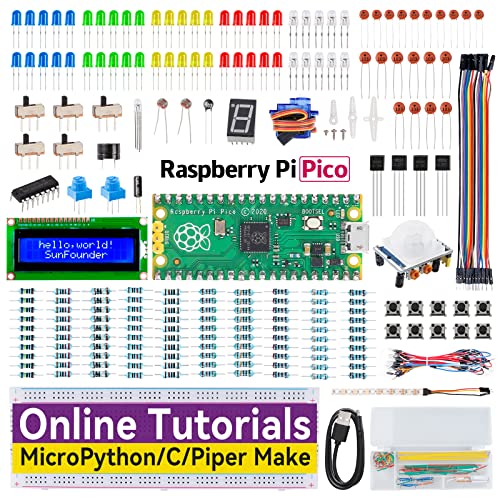
- 40 guided projects with online lessons
- Supports MicroPython, C/C++, and Piper Make
- 283 components and pre-soldered Pico
Best For: Step-by-step Pico learning across multiple languages
Best for Deep-Dive Projects

- ESP32 camera board with Wi-Fi and Bluetooth
- 122 guided projects and a 795-page tutorial
- 240 components plus 1GB memory card
Best For: Students progressing toward camera, wireless, and multi-language projects
Best for Connected Learning
ELEGOO ESP-32 Super Starter Kit

- ESP-32 board with Wi-Fi and Bluetooth
- 35+ module and component types
- 30+ guided Arduino IDE projects
Best For: Students learning IoT through guided Arduino-compatible projects
Best for STEM Fundamentals

- RP2040 platform for e-learning and embedded projects
- Supports MicroPython, C/C++, and Piper Make
- Includes display, servo, sensor, and RGB LED
Best For: Beginners and school labs teaching core electronics and programming
Most Complete Arduino Starter

- 30+ guided Arduino projects
- 200+ components across 63 types
- Solderless, organized beginner setup
Best For: Students wanting broad Arduino project coverage and room to advance
Wireless Beginner Pick

- ESP32 with Wi-Fi and Bluetooth
- OLED, sensors, relays, and breadboard included
- Tutorial provides lessons and code
Best For: Beginners exploring introductory ESP32 and wireless projects
Structured STEM Learning
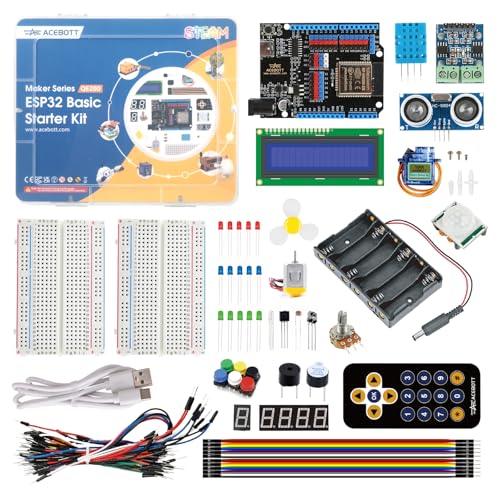
- 40+ step-by-step tutorials
- 96 labeled components included
- Graphical coding, Arduino IDE, and Python
Best For: Learners progressing from visual coding to ESP32 IoT development
Best All-Around Beginner Kit – UNO R3 Project Super Starter Kit
For students seeking approachable microcontroller kits for students, this UNO R3 set offers a practical introduction to wiring, Arduino IDE programming, sensors, displays, and motors. Its 22+ guided lessons and solderless setup make it easy to begin with structured experiments before moving into original projects.
Best For: Beginners, homeschool learners, family builds, coding clubs, and introductory STEM classrooms.
Pros:
- Includes 22+ guided projects covering LEDs, sensors, displays, and motors.
- Broad component selection includes an LCD, ultrasonic sensor, DHT11, joystick, servo, and stepper motor.
- Solderless breadboard and pre-soldered LCD reduce setup barriers for new builders.
Cons:
- The tutorial and included code must be downloaded separately.
- The breadboard power module should not be used with input above 9V.
- Younger learners may need experienced adult supervision.
This is a well-organized choice for learning core Arduino concepts without soldering. It is especially appealing when project variety and beginner-focused guidance matter more than wireless connectivity.
Best for IoT Learning – Raspberry Pi Pico W Ultimate Starter Kit
This Raspberry Pi Pico W package stands out among microcontroller kits for students who want to explore connected projects and multiple programming languages. With 450+ components, 117 projects, Wi-Fi and Bluetooth support, and video instruction, it provides a particularly expansive learning path.
Best For: Students aged 8 and up who want IoT, wireless, MicroPython, C/C++, and Piper Make projects.
Pros:
- Includes more than 450 components and 117 projects.
- Pico W adds Wi-Fi and Bluetooth connectivity for IoT experiments.
- Supports MicroPython, C/C++, and Piper Make, with 27 video tutorials.
Cons:
- The large component count may feel overwhelming for complete beginners.
- Project guidance and technical help rely on online resources and community support.
- It is centered on Raspberry Pi Pico W rather than an included Arduino UNO board.
Choose this kit when wireless experimentation and long-term project variety are priorities. Its combination of hardware, video lessons, and language options can support students as their skills develop.
Best for Advanced Arduino Projects – Mega 2560 Starter Kit
Students ready for larger Arduino builds may prefer this MEGA 2560 kit over smaller microcontroller kits for students. Its 54 digital I/O pins, 16 analog inputs, four hardware serial ports, and 35+ guided projects provide room to combine numerous sensors, controls, displays, and motors.
Best For: Older students, coding clubs, robotics learners, and makers building complex Arduino prototypes.
Pros:
- MEGA 2560 provides substantially more I/O and memory for larger projects.
- Includes 35+ lessons involving RFID, clocks, motion, environmental sensing, and motor control.
- More than 200 components include RFID, RTC, PIR, ultrasonic, keypad, and display modules.
Cons:
- Its extensive component selection may be more than a first-time learner needs.
- The manufacturer recommends it for ages 13 and up.
- The kit focuses on Arduino projects rather than wireless connectivity.
This is the strongest fit for students who have moved beyond simple LED and button exercises. The expanded pin count and project selection make it better suited to multi-part systems and more ambitious prototypes.
Best Structured Pico Introduction – Raspberry Pi Pico Starter Kit
This Raspberry Pi Pico kit offers a balanced entry point for microcontroller kits for students, combining 283 components with 40 guided projects. Online lessons explain circuit principles and provide example code in MicroPython, C/C++, and Piper Make, so learners can choose a beginner-friendly starting point and progress gradually.
Best For: Raspberry Pi Pico beginners, Arduino learners, and students who want guided multi-language lessons.
Pros:
- Includes 40 projects with diagrams, explanations, and example code.
- Offers MicroPython, C/C++, and Piper Make learning paths.
- Includes a pre-soldered Pico plus LCD, RGB strip, sensors, motors, relay, and Bluetooth module.
Cons:
- It has fewer projects and components than the Pico W Ultimate kit.
- The included Pico is the standard model, not the Pico W wireless version.
- Online tutorials are important for following the intended learning sequence.
For students who want a structured but manageable Pico curriculum, this kit provides a useful middle ground. Its three programming options and broad component mix support both visual-first learning and later Arduino-compatible coding.
Best for Deep-Dive Projects – Freenove ESP32 Camera Kit
For students who want a broad, project-driven introduction to connected electronics, this Freenove kit is one of the most comprehensive microcontroller kits for students. Its ESP32 camera board combines Wi-Fi, Bluetooth, a camera, and a memory-card slot with support for MicroPython, C, and Processing.
Best For: Students ready to progress from beginner circuits to camera, wireless, and software-focused projects.
Pros:
- Includes 122 guided projects ranging from simple to complex.
- Supports MicroPython, C, and Processing for varied learning paths.
- Includes 240 components, a camera, 1GB memory card, and card reader.
- Provides a detailed 795-page online or downloadable tutorial.
Cons:
- The extensive project library and component selection may feel overwhelming to absolute beginners.
- The tutorial is digital rather than printed.
- Processing projects require a computer for graphical interfaces.
This is a strong choice when students need a large parts collection and a structured curriculum that can support continued exploration. It is especially appealing for learners interested in wireless devices, cameras, and multiple programming languages.
Best for Connected Learning – ELEGOO ESP-32 Super Starter Kit
This ELEGOO kit is a practical entry point for students exploring IoT and Arduino-compatible development. The ESP-32 board offers dual-core processing, Wi-Fi, Bluetooth, and Arduino IDE compatibility, while the included modules support hands-on experiments with displays, sensors, motors, and input devices.
Best For: Beginners and intermediate students who want guided Arduino IDE projects with a focus on connected devices.
Pros:
- Includes more than 35 types of modules and electronic components.
- Supports over 30 guided projects with code and circuit diagrams.
- Combines Wi-Fi and Bluetooth for IoT-oriented experimentation.
- Includes beginner-friendly instruction and technical support resources.
Cons:
- Its project count and component range are smaller than those of more expansive kits.
- The kit is centered on Arduino IDE rather than offering several listed programming languages.
- Students may need to organize the many included modules before starting projects.
For students who want a clear path into smart-home controls, weather stations, and remote devices, this kit balances approachable instruction with useful wireless capabilities. Its Arduino IDE compatibility also makes it a straightforward choice for classroom or self-guided learning.
Best for STEM Fundamentals – LAFVIN Raspberry Pi Pico Kit
The LAFVIN Raspberry Pi Pico kit gives students a focused way to learn programming and basic electronics through familiar classroom components. Built around the RP2040 platform, it supports MicroPython, C/C++, and Piper Make graphical programming, making it a flexible option among microcontroller kits for students.
Best For: Beginners, school labs, and STEM learners practicing displays, sensing, input, and actuator control.
Pros:
- Supports MicroPython, C/C++, and Piper Make graphical programming.
- Includes an LCD1602 display, SG90 servo, motion-sensing module, and WS2812 RGB LED strip.
- Targets e-learning, programming instruction, and embedded project development.
- Provides project tutorials and sample code for circuit and programming practice.
Cons:
- It has a more focused component selection than larger starter kits.
- The kit is designed around the Raspberry Pi Pico platform.
- The supplied warranty is six months.
This kit is well suited to structured STEM instruction because its parts cover core concepts without emphasizing advanced wireless features. Students can build confidence with visual programming before moving to MicroPython or C/C++.
Most Complete Arduino Starter – UNO R3 Project Kit
For students seeking microcontroller kits for students with broad hands-on coverage, this ELEGOO UNO R3 set offers a practical path from simple LED circuits to displays, sensors, RFID, motors, and environmental monitoring. Its guided projects, solderless setup, and organized components make it approachable for classrooms, coding clubs, and home learning.
Best For: Students who want a large Arduino-compatible component set and a structured progression from beginner circuits to more advanced electronics projects.
Pros:
- Includes 30+ guided projects and a PDF tutorial with example code.
- Provides 200+ components across 63 types, including sensors, displays, motors, RFID, and relay modules.
- Solderless breadboard, pre-soldered modules, storage case, and parts box simplify setup.
- Supports Arduino IDE programming and project customization.
Cons:
- The extensive component selection may feel overwhelming to complete beginners.
- The included power supply should not be used above 9V.
This is the strongest all-around option for learners who want variety and room to grow. It is especially useful when a student’s projects may expand beyond basic inputs and outputs into motion, timing, displays, and motor control.
Wireless Beginner Pick – ESP32 Basic Starter Kit
This LAFVIN set is a straightforward choice among microcontroller kits for students who want to begin with an ESP32 and explore wireless electronics. Wi-Fi and Bluetooth support add an introduction to connected projects, while the breadboard, OLED, sensors, switches, and tutorial provide the essentials for guided experimentation.
Best For: Beginners learning introductory electronics and programming with an ESP32 board, Arduino IDE compatibility, and basic wireless capabilities.
Pros:
- ESP32 board includes Wi-Fi and Bluetooth connectivity.
- Includes an OLED display, DHT11, PIR sensor, obstacle avoidance module, relays, LEDs, and breadboard.
- Tutorial includes lessons and code for assembling the starter projects.
- Supports Arduino IDE and includes a micro USB cable.
Cons:
- The included project selection is less extensive than larger kits with dozens of guided builds.
- Component organization details are more limited in the supplied notes.
Choose this kit when wireless connectivity matters more than having the largest possible component assortment. It offers a focused starting point for students moving from basic circuits toward simple IoT-style experiments.
Structured STEM Learning – ACEBOTT ESP32 Electronics Kit
For students who need a guided route through microcontroller kits for students, the ACEBOTT ESP32 kit combines 40+ tutorials with 96 components and three programming approaches. Learners can begin with graphical coding, progress to Arduino IDE, and explore Python while building sensor, motor, RGB LED, and IoT projects.
Best For: Students and beginner programmers who want a structured curriculum that can progress from visual coding to Arduino IDE and Python-based ESP32 projects.
Pros:
- Includes 40+ step-by-step lessons with a stated learning progression.
- Offers graphical coding, Arduino IDE, and Python programming methods.
- ESP32 board provides Wi-Fi and Bluetooth for IoT and wireless-control projects.
- Includes 96 components with individually labeled, anti-static packaged parts.
Cons:
- The broader programming options may require more learning than a single-language starter kit.
- Its advanced IoT focus may be more than students seeking only basic circuits need.
This is a compelling choice for learners who value curriculum structure and a longer development path. Its combination of labeled parts, multiple coding methods, and wireless ESP32 capabilities supports progression from first circuits to more ambitious connected projects.
How We Picked the Best Microcontroller Kits for Students
We focused on kits that provide a useful combination of hardware, documentation, and learning support. Each selection includes a programmable development board and components that allow students to build more than one basic circuit. We also considered tutorial quality, project variety, software compatibility, expansion potential, and the likelihood that a beginner can start without buying many extra parts.
The lineup includes familiar Arduino UNO and Mega boards, compact Raspberry Pi Pico kits, and connected ESP32 platforms. Because “complete” kits vary widely, we evaluated whether the included parts support meaningful progression from simple LED and button exercises to displays, motors, sensors, wireless projects, or camera applications.
Quick Comparison
| Platform | Best suited for | Typical strengths |
|---|---|---|
| Arduino UNO | First-time learners | Simple wiring, extensive beginner resources, broad accessory support |
| Arduino Mega | Larger projects | More pins and room for multiple connected components |
| Raspberry Pi Pico | Python-focused learning | MicroPython support, compact design, approachable project progression |
| ESP32 | Wireless and IoT projects | Wi-Fi, Bluetooth, faster hardware, and connected applications |
Key Buying Factors for Microcontroller Kits for Students
Board and Programming Language
Choose a platform that matches the student’s goals. Arduino kits are often the least intimidating starting point, while Raspberry Pi Pico kits are appealing for students who want to learn MicroPython. ESP32 kits are better suited to IoT, wireless control, and connected sensor projects, but their broader capabilities can add complexity.
Included Components
Look for a balanced assortment rather than a large part count alone. A useful kit should include a breadboard, jumper wires, resistors, LEDs, buttons, and common sensors. Displays, servos, buzzers, motor components, and RGB LEDs create more varied challenges and help students move beyond introductory circuits.
Tutorials and Project Structure
Clear wiring diagrams, code examples, and troubleshooting guidance matter as much as the hardware. Beginners benefit from numbered projects that gradually introduce concepts. Check whether tutorials are available online or as downloadable files and whether they use the student’s preferred language or development environment.
Expansion and Safety
Confirm that replacement parts and compatible modules are easy to find. Students should also have adult supervision when using power supplies, motors, soldering tools, or unfamiliar components. Breadboard-based kits are generally a practical choice for early experimentation because they avoid permanent connections.
Who Should Buy Which Microcontroller Kits for Students?
Choose an Arduino UNO kit for a student starting from zero or learning basic circuits and C/C++-style programming. An Arduino Mega kit makes more sense when projects require many inputs, outputs, or connected modules. Raspberry Pi Pico kits are strong choices for Python learners and structured STEM lessons.
Choose an ESP32 kit for students interested in Wi-Fi, Bluetooth, smart-home concepts, IoT dashboards, or camera projects. A smaller component set may be preferable for younger beginners, while a large “ultimate” kit is better for students who want a broad project library and room to experiment.