The best microcontroller kits for beginners make it easier to move from blinking an LED to building practical projects with sensors, displays, motors, and wireless connectivity. This roundup compares 10 kits built around Arduino, Raspberry Pi Pico, and ESP32-compatible boards.
Whether you want structured lessons, the largest component selection, or a low-cost way to explore coding and electronics, the right kit should match your experience, preferred programming language, and project goals.
Best 10 Microcontroller Kits for Beginners Picks for 2026
Best All-Around Arduino Kit
UNO R3 Project Super Starter Kit

- 22+ guided Arduino projects
- Sensors, motors, displays, and controls
- Solderless beginner-friendly setup
Best For: First-time Arduino learners and family STEM projects
Best for IoT Learning
Raspberry Pi Pico W Ultimate Starter Kit

- 117 projects and 27 video lessons
- 450+ components for broad experimentation
- Wi-Fi, Bluetooth, and three languages
Best For: Beginners exploring IoT and Pico W programming
Best for Advanced Arduino Builds

- 35+ guided electronics projects
- 54 digital pins and 16 analog inputs
- 200+ components including RFID and RTC
Best For: Older learners building larger Arduino projects
Best Guided Pico Introduction
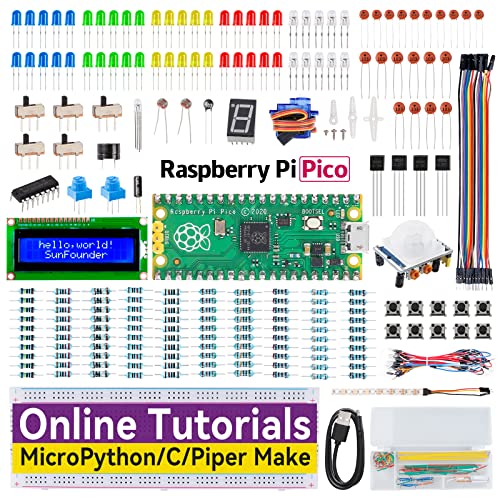
- 40 step-by-step electronics projects
- 283 components with pre-soldered Pico
- MicroPython, C/C++, and Piper Make
Best For: Beginners wanting a structured Raspberry Pi Pico curriculum
Best All-Around Arduino Starter
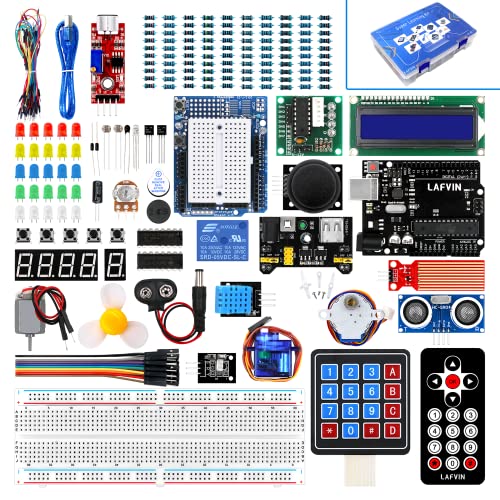
- 20+ guided lessons with code and libraries
- Motors, LCDs, sensors, and display modules
- Arduino IDE compatible across major operating systems
Best For: Beginners learning Arduino through varied electronics projects
Best Guided Wi-Fi Learning Kit
SunFounder UNO R4 WiFi Explorer

- Original Arduino UNO R4 WiFi board included
- 300+ components and 50+ hands-on projects
- 100+ video lessons with basic and IoT instruction
Best For: Structured Arduino learning from beginner circuits to IoT
Best Raspberry Pi Pico Starter

- Raspberry Pi Pico with RP2040 microcontroller
- Supports MicroPython, C/C++, and Piper Make
- Includes display, servo, RGB LED, sensor, and buzzer modules
Best For: STEM beginners exploring Pico programming and electronics
Connected Learning Pick
ELEGOO ESP-32 Super Starter Kit

- ESP32 with dual-core processing, Wi-Fi, and Bluetooth 4.2
- 35+ modules and components for varied experiments
- 30+ guided projects with code and circuit diagrams
Best For: Beginners progressing from basic circuits to IoT projects
Two-Board Value Pick
Raspberry Pico & UNO R3 Learning Kit

- Includes Raspberry Pi Pico and UNO R3-compatible boards
- 75+ components with breadboard and storage box
- 34 HD video projects with code and diagrams
Best For: Beginners wanting two platforms and no-solder setup
Simple ESP32 Starter
LAFVIN ESP32 Basic Starter Kit

- ESP32 board supports Wi-Fi, Bluetooth, and Arduino IDE
- Includes OLED, DHT11, PIR, LEDs, relays, and breadboard
- Tutorial provides code and introductory assembly lessons
Best For: First ESP32 sensor and circuit experiments
Best All-Around Arduino Kit – UNO R3 Project Super Starter Kit
The ELEGOO UNO R3 Project Super Starter Kit is a practical entry point for anyone comparing microcontroller kits for beginners. Its 22+ guided lessons cover LEDs, sensors, displays, buttons, motors, and other core Arduino concepts, while the solderless breadboard and pre-soldered LCD help reduce setup friction.
Best For: Families, homeschool projects, coding clubs, and first-time Arduino learners who want varied hands-on exercises.
Pros:
- Includes 22+ guided projects with example code and downloadable tutorials.
- Broad component selection includes temperature, humidity, ultrasonic, IR, joystick, motor, and display modules.
- Solderless setup and a pre-soldered LCD make early wiring easier.
Cons:
- The included UNO R3 has limited memory compared with larger Arduino boards.
- The power module should not be supplied with more than 9V.
This is a well-rounded starter choice for learning fundamental inputs, outputs, timing, sensing, and motor control before moving into custom Arduino builds.
Best for IoT Learning – Raspberry Pi Pico W Ultimate Starter Kit
The SunFounder Raspberry Pi Pico W Ultimate Starter Kit stands out among microcontroller kits for beginners who want to explore wireless projects and multiple programming languages. With more than 450 components, 117 projects, Wi-Fi and Bluetooth connectivity, and video instruction, it offers a broad learning path around the Pico W.
Best For: Learners aged 8 and up who want a large IoT-focused kit with MicroPython, C/C++, and Piper Make options.
Pros:
- Includes 117 projects and 27 expert-led video tutorials.
- Provides more than 450 components, including sensors, actuators, LEDs, and LCDs.
- Supports MicroPython, C/C++, and Piper Make.
Cons:
- The unusually large component count may feel overwhelming at the start.
- Its project focus centers on Raspberry Pi Pico W rather than a traditional UNO board.
For beginners who want to progress from basic electronics into connected experiments, the Pico W platform and extensive online instruction make this a particularly expansive option.
Best for Advanced Arduino Builds – Mega 2560 Project Starter Kit
The ELEGOO Mega 2560 R3 Project Kit is a strong choice for learners who need more room to grow than an entry-level Arduino board provides. Among microcontroller kits for beginners, it offers 35+ guided projects, more than 200 components, 54 digital I/O pins, 16 analog inputs, and four hardware serial ports for larger experiments.
Best For: Older students, coding clubs, and makers planning projects with multiple sensors, displays, motors, or RFID controls.
Pros:
- Includes 35+ lessons covering RFID, clocks, motion, environmental sensing, and motor control.
- The Mega 2560 provides substantially more I/O and flash memory for complex builds.
- Includes useful modules such as RFID, RTC, PIR, ultrasonic, keypad, joystick, and motor components.
Cons:
- The larger component set can require more organization and careful wiring.
- The listed recommended age is 13 years and up.
This kit makes sense when a beginner wants a structured introduction but does not want to outgrow the controller quickly. Its expanded I/O is especially useful for combining several inputs and outputs.
Best Guided Pico Introduction – Raspberry Pi Pico Starter Kit
The SunFounder Raspberry Pi Pico Starter Kit offers a structured way to learn electronics and programming without committing to a single language. It combines 283 components with 40 online projects, circuit explanations, and example code, making it a flexible option among microcontroller kits for beginners.
Best For: Raspberry Pi and Arduino beginners who want step-by-step lessons in MicroPython, C/C++, or Piper Make.
Pros:
- Includes 40 projects with diagrams, operating-principle explanations, and example code.
- Offers three programming paths: MicroPython, C/C++, and Piper Make.
- Includes a pre-soldered Pico and varied parts such as an I2C LCD, RGB LED strip, servo, PIR sensor, motors, and sensors.
Cons:
- The kit is based on the Raspberry Pi Pico rather than a wireless Pico W.
- The range of 283 parts may take time to catalog and learn.
This is a good middle-ground kit for learners who want more than basic LED exercises but prefer a defined 40-project curriculum over a much larger ultimate kit.
Best All-Around Arduino Starter – LAFVIN Super Starter Kit
For learners looking for microcontroller kits for beginners, the LAFVIN Project Super Starter Kit offers a broad Arduino-compatible component selection and a tutorial manual with more than 20 lessons. It supports projects involving displays, motors, sensors, buttons, and other basic electronics.
Best For: Beginners who want a traditional Arduino learning path with guided lessons and varied hardware projects.
Pros:
- Includes a tutorial manual with more than 20 lessons, code, libraries, and datasheets.
- Includes servo, stepper, and DC motors along with LCD and seven-segment display options.
- The LCD 1602 module includes a preinstalled pin header, so it does not require soldering.
Cons:
- The supplied notes do not specify the exact number of components or projects.
- Its wireless compatibility is listed as infrared rather than built-in Wi-Fi or Bluetooth.
This is a practical choice if you want one Arduino-compatible kit that covers both programming fundamentals and hands-on electronics experiments without requiring a separate component assortment.
Best Guided Wi-Fi Learning Kit – SunFounder UNO R4 WiFi Explorer
Among microcontroller kits for beginners, the SunFounder Elite Explorer Kit stands out for its original Arduino UNO R4 WiFi board, large component assortment, and structured video-based curriculum. It combines basic electronics exercises with IoT-focused projects using built-in Wi-Fi and Bluetooth.
Best For: Students, educators, and new makers who want a highly guided Arduino course that progresses from basic circuits to connected projects.
Pros:
- Includes 300+ components and 50+ projects spanning basic, fun, and IoT activities.
- Provides more than 100 free video lessons, step-by-step tutorials, and open-source code.
- The original UNO R4 WiFi offers a 32-bit processor, more memory, and built-in Wi-Fi and Bluetooth.
- Includes technical support resources and troubleshooting forums.
Cons:
- The breadth of projects and components may feel extensive for someone seeking only simple starter exercises.
- Its most advanced connected-project features depend on learning Arduino C++ and IoT tools.
With its unusually complete lesson plan and connected board, this kit is a strong long-term starting point for learners who want more than basic LED and button experiments.
Best Raspberry Pi Pico Starter – LAFVIN Pico Basic Starter Kit
For beginners comparing microcontroller kits for beginners beyond the Arduino ecosystem, the LAFVIN Basic Starter Kit uses a Raspberry Pi Pico with the RP2040 microcontroller. It supports MicroPython, C/C++, and Piper Make, while its included modules introduce displays, sensing, lighting, sound, and motor control.
Best For: STEM learners and beginners who want to explore Raspberry Pi Pico projects with multiple programming options.
Pros:
- Supports MicroPython, C/C++, and Piper Make graphical programming.
- Includes an LCD1602, SG90 servo, WS2812 RGB LED, buzzer, buttons, and human-body sensing module.
- Project tutorials and sample code cover wiring, program downloads, and experiment verification.
- Suitable for school lab teaching and hands-on STEM practice.
Cons:
- This kit is designed for Raspberry Pi Pico rather than Arduino boards.
- The supplied notes do not state the total number of lessons or projects.
- The listed warranty is six months.
This kit makes sense for learners who want a flexible Pico-based platform and the option to move from block-style programming toward MicroPython or C/C++ as their skills develop.
Connected Learning Pick – ELEGOO ESP-32 Super Starter Kit
For beginners looking at microcontroller kits for beginners with room to grow, this ELEGOO set combines an ESP32 development board with Wi-Fi, Bluetooth 4.2, and more than 35 modules and components. Its Arduino IDE compatibility and guided online projects make it a practical entry point for connected electronics.
Best For: Beginners who want to learn Arduino-compatible programming while progressing toward IoT, smart-home, and wireless projects.
Pros:
- ESP32 board includes dual-core processing, Wi-Fi, and Bluetooth 4.2.
- Includes sensors, displays, motors, input devices, and other components for varied projects.
- Offers 30+ guided projects with code, circuit diagrams, and step-by-step instructions.
- Includes USB-C connectivity, a CP2102 chip, and stated one-year manufacturer warranty.
Cons:
- The ESP32’s broader feature set may feel more complex than a basic beginner board.
- The kit’s project focus depends on accessing its online tutorial materials.
This is the strongest choice here for learners who want a structured introduction that can continue into wireless and IoT experimentation. The combination of extensive components, tutorials, and technical support gives it useful long-term flexibility.
Two-Board Value Pick – Raspberry Pico & UNO R3 Learning Kit
This two-board option stands out among microcontroller kits for beginners because it pairs a Raspberry Pi Pico with an UNO R3-compatible board. With 75+ components, a breadboard, and 34 video-guided projects, it gives new learners two platforms to explore through the Arduino IDE.
Best For: Students, families, and beginners who want broad introductory coverage without buying separate Pico and UNO R3 kits.
Pros:
- Includes both Raspberry Pi Pico and UNO R3-compatible development boards.
- Provides 75+ components and a breadboard in a compartmentalized storage box.
- Includes 34 HD video lessons: 10 Pico projects and 24 UNO R3 projects.
- Pre-soldered, breadboard-ready modules require no soldering tools to begin.
Cons:
- The stated 30-day warranty is shorter than the warranty listed for the ELEGOO kit.
- Its wireless compatibility is listed as IrDA, so it is not presented as a Wi-Fi or Bluetooth-focused kit.
Choose this kit if variety and guided instruction matter more than built-in wireless connectivity. Having two board families lets beginners compare platforms and follow a larger collection of lessons from one organized package.
Simple ESP32 Starter – LAFVIN ESP32 Basic Starter Kit
For beginners seeking a more focused introduction to microcontroller kits for beginners, the LAFVIN Basic Starter Kit centers on an ESP32 Wi-Fi and Bluetooth development board. It includes a breadboard, OLED display, sensors, LEDs, resistors, switches, and a tutorial with code and lessons for foundational experiments.
Best For: First-time learners who want to practice basic ESP32 programming and sensor-controlled circuits without a large multi-platform bundle.
Pros:
- ESP32 platform supports Wi-Fi and Bluetooth and works with the Arduino IDE.
- Includes an 830 tie-point breadboard, OLED display, DHT11, PIR sensor, and photosensitive resistor.
- Provides LEDs, RGB LEDs, buttons, buzzer, potentiometer, relays, resistors, and jumper wires.
- Tutorial includes code and lessons for assembling and learning the kit.
Cons:
- It is described as a basic kit, with less stated project breadth than the ELEGOO package.
- The supplied notes direct users to download the tutorial after receiving the product.
- The listed warranty description is one year, without the more specific manufacturer wording provided for ELEGOO.
This is a sensible pick for learners who want the core ESP32 experience and a practical selection of common sensors and output devices. Its focused component list can make early circuit-building feel less overwhelming than a larger all-in-one kit.
How We Picked the Best Microcontroller Kits for Beginners
We focused on kits that combine a beginner-friendly development board with useful electronic components and accessible learning materials. Our comparison considers tutorial quality, project variety, programming support, included hardware, board compatibility, expansion potential, and value. We also included several platform types so shoppers can choose between the familiar Arduino ecosystem, compact Raspberry Pi Pico boards, and wireless-capable ESP32 hardware.
Component counts can be helpful, but they are not the only measure of value. A well-organized tutorial and clearly documented projects may be more useful than a box filled with duplicate parts.
Quick Comparison
| Best for | Recommended platform | What to prioritize |
|---|---|---|
| First electronics projects | Arduino Uno-compatible | Clear tutorials, breadboard, LEDs, sensors, and motors |
| Portable and low-cost projects | Raspberry Pi Pico | MicroPython support, compact components, and guided projects |
| Wi-Fi or IoT builds | ESP32 or Arduino Uno R4 WiFi | Wireless connectivity, GPIO access, and online documentation |
| Large, complex builds | Arduino Mega-compatible | Extra pins, memory, and a broad component assortment |
Key Buying Factors for Microcontroller Kits for Beginners
Board and Programming Ecosystem
Arduino Uno-compatible boards are a strong starting point because tutorials, libraries, and community examples are plentiful. Raspberry Pi Pico kits are attractive for learners who prefer MicroPython or want to experiment with a small, efficient board. ESP32 kits are better suited to connected projects, while Uno R4 WiFi-style boards combine Arduino workflows with modern wireless features.
Tutorials and Project Structure
Look for step-by-step instructions, wiring diagrams, sample code, and projects that gradually introduce new concepts. A kit with dozens of documented projects can help maintain momentum, but verify whether tutorials are online, downloadable, or dependent on a particular board revision.
Components and Expansion
Useful starter parts include a breadboard, jumper wires, resistors, LEDs, buttons, sensors, a display, a buzzer, and at least one motor or servo. More advanced kits may add OLED screens, RGB LEDs, wireless modules, or relay components. Check whether the package includes a power supply or requires separate batteries and cables.
Compatibility and Support
Confirm that the board works with your computer’s operating system and preferred IDE. Also check USB-chip details, especially on compatible boards, because drivers may be required. Beginner-friendly documentation should explain installation, board selection, and common connection errors.
Who Should Buy Which Microcontroller Kits for Beginners?
Choose an Arduino Uno starter kit if you want the smoothest introduction to basic circuits and embedded programming. Pick a Raspberry Pi Pico kit if MicroPython, compact builds, or structured STEM lessons appeal to you. Choose an ESP32 kit for Wi-Fi, Bluetooth, sensors, and IoT experiments. A Mega-based kit is the better fit for projects needing many simultaneous connections, while a dual-platform kit offers broader experimentation for learners who have not settled on one ecosystem.