Choosing among plotter printers for beginners can be confusing because the category includes both wide-format inkjet printers and precision cutting machines. The right option depends on whether you need printed plans and posters, cut vinyl and paper, or a machine that supports both creative and practical projects.
Our roundup compares ten accessible options by size, workflow, connectivity, included support, and intended use, helping first-time buyers choose a capable machine without paying for features they will not use.
Best 10 Plotter Printers for Beginners Picks for 2026
Best Large-Format Starter
HP DesignJet T210 24-Inch Plotter

- Handles rolls up to 24 inches wide
- Includes HP Click workflow software
- Supports CAD, posters, maps, and patterns
Best For: Beginners who need versatile wide-format printing
Best for Creative Beginners
Cricut Explore 5 Essential Bundle

- Cuts 100+ materials
- Includes supplies for up to 65 projects
- Bluetooth and guided Design Space setup
Best For: Beginners making stickers, apparel, cards, and decals
Best Supported Plotter
HP DesignJet T210 with 2-Year Care Pack
- Includes two years of onsite support
- Prints rolls up to 24 inches wide
- Designed for CAD, blueprints, and posters
Best For: Beginners who want large-format printing with added support
Best Craft Starter Kit
Cricut Explore 5 Rainbow Bundle

- Cuts 100+ materials with precision
- Includes vinyl, HTV, cardstock, and printable vinyl
- Supports Smart Material cuts up to 12 feet
Best For: Beginners creating craft projects, decals, and apparel
Best All-in-One Choice

- 24-inch roll printing with support through A1
- Flatbed scanning, copying, and enlargements
- USB, Wi-Fi, Ethernet, and cloud workflows
Best For: Beginners needing wide-format printing plus scanning and copying
Best Compact Craft Starter

- Portable 3.9-pound cutting machine
- Works with 50-plus materials
- Bluetooth app control with 30 included images
Best For: Beginners making cards, labels, decals, and vinyl crafts
Best for Technical Drawings

- Prints rolls up to 36 inches wide
- Automatic sheet/roll switching and cutter
- HP Click software with file checking and auto-nesting
Best For: Beginners printing CAD drawings, maps, posters, and plans
Best Beginner-Friendly Compact Pick
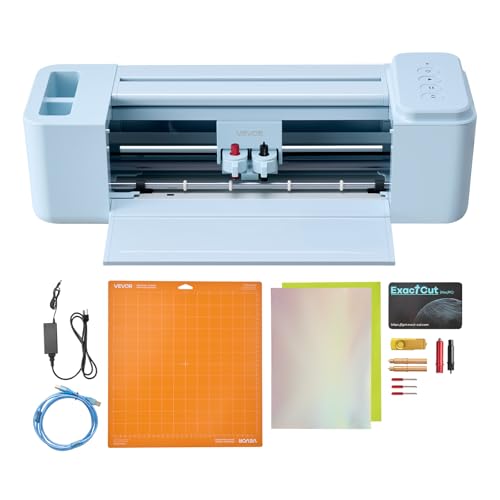
- Includes design software and 20,000+ design resources
- Cuts, writes, and scores multiple craft materials
- Supports Mac, Windows, Android, and iOS
Best For: Compact beginner crafting and everyday DIY projects
Best Large Manual-Input Value

- Cuts media up to 34.3 inches wide
- Adjustable 20–500g pressure and 20–800mm/s speed
- Includes USB/COMPIM connectivity and SVG/PDF support
Best For: Wide-format signs, labels, and heat-transfer projects
Best Accessory-Rich Large-Format Pick
34-Inch Bluetooth VEVOR Plotter

- Offers Android Bluetooth plus Windows USB/COM control
- Includes stand, five vinyl rolls, blades, and tools
- Provides adjustable speed, force, and 34-inch media capacity
Best For: Large-format Windows or Android crafting with included supplies
Best Large-Format Starter – HP DesignJet T210 24-Inch Plotter
HP DesignJet T210 Large Format 24-inch Plotter Printer, for Easy CAD & Poster Prints (8AG32D)
Check Price On AmazonFor beginners shopping for plotter printers for beginners, the HP DesignJet T210 offers a practical entry into large-format CAD, poster, map, and pattern printing. Its HP Click software, automatic cutter, and support for both rolls and sheets help simplify everyday workflows.
Best For: Beginners printing technical drawings, posters, maps, sewing patterns, and other wide-format color documents.
Pros:
- Prints on media rolls up to 24 inches wide.
- Supports roll feed, sheet feed, and automatic horizontal cutting.
- HP Click provides PDF error checking, auto-nesting, and drag-and-drop printing.
- Works through Wi-Fi, Ethernet, USB, and the HP Smart app.
Cons:
- The optional automatic sheet feeder is required for sheets up to 13 by 19 inches.
- It uses HP 712 ink cartridges and an HP 713 printhead.
- At 47.4 pounds and 40 inches wide, it requires substantial setup space.
The T210 is a strong beginner-friendly choice when wide-format capability matters more than compactness. Its guided software and flexible media handling reduce the learning curve for first-time plotter users.
Best for Creative Beginners – Cricut Explore 5 Essential Bundle
Although it is a cutting machine rather than a conventional printer, the Cricut Explore 5 is relevant to plotter printers for beginners who want to make stickers, decals, apparel, cards, and other craft projects. Its Bluetooth setup and guided Design Space software make it approachable for new users.
Best For: Beginners creating personalized stickers, decals, cards, apparel, and small craft projects.
Pros:
- Cuts more than 100 materials, including vinyl, iron-on, cardstock, and printable materials.
- Can write, draw, foil, score, and cut with compatible tools.
- Includes materials intended for up to 65 projects.
- Bluetooth connectivity and step-by-step Design Space flows simplify setup.
Cons:
- It is a cutting machine, not a standalone wide-format printer.
- Full-color stickers require a separate home inkjet printer for printing designs.
- The Deep Cutting Tool for thicker materials is sold separately.
The Explore 5 makes the most sense for craft-focused beginners rather than users producing CAD drawings or large posters. The included supplies and guided software provide a low-friction way to start making finished projects.
Best Supported Plotter – HP DesignJet T210 with 2-Year Care Pack
For beginners who want extra service coverage, this HP DesignJet T210 package combines 24-inch large-format printing with a two-year HP Care Pack and onsite support. It is designed to make CAD drawings, blueprints, posters, maps, and sewing patterns easier to produce.
Best For: First-time large-format users who value onsite support for technical drawings, posters, signage, and professional patterns.
Pros:
- Includes a two-year HP Care Pack with onsite support.
- Prints on media rolls up to 24 inches wide and supports optional sheet feeding up to 13 by 19 inches.
- Automatic cutting and multi-size printing reduce manual handling.
- HP Click offers error checking, auto-nesting, and simple file submission.
Cons:
- The optional automatic sheet feeder is not included.
- It is a large 40-inch-wide, 59.9-pound printer.
- It requires HP 712 cartridges and an HP 713 printhead.
This version is especially appealing to beginners who prefer a support-backed purchase. The familiar T210 workflow handles common wide-format tasks, while the extended coverage adds reassurance during setup and use.
Best Craft Starter Kit – Cricut Explore 5 Rainbow Bundle
The Cricut Explore 5 Rainbow Sampler bundle is a beginner-friendly alternative for shoppers researching plotter printers for beginners with a focus on cutting and crafting. It includes the machine, popular materials, project content, and Bluetooth-enabled Design Space access for getting started quickly.
Best For: New crafters making labels, stickers, greeting cards, apparel, wall decals, and personalized gifts.
Pros:
- Cuts more than 100 materials, including vinyl, HTV, cardstock, felt, and printable materials.
- Supports matless Smart Material cuts up to 12 feet long.
- Includes Smart Vinyl, Smart Iron-On, printable vinyl, cardstock, and insert cards.
- Provides guided tutorials, templates, and access to project content in Design Space.
Cons:
- It does not replace a conventional printer for large-format documents.
- Color printing for stickers requires a separate inkjet printer.
- The machine has a 12-inch cutting width, so it is aimed at craft projects rather than 24-inch prints.
Choose this bundle if your idea of a beginner plotter centers on cutting designs instead of printing technical documents. Its included materials and approachable software make it a convenient starting point for home crafting and small creative projects.
Best All-in-One Choice – Canon imagePROGRAF TC-21M
For beginners comparing plotter printers for beginners, the Canon imagePROGRAF TC-21M is a practical large-format multifunction option. It combines printing, copying, and scanning with a 24-inch maximum roll width, USB printing, cloud connectivity, and a tilting touchscreen.
Best For: Beginners who want one machine for wide-format printing, enlargements, scanning, and basic copying.
Pros:
- Prints roll media up to 24 inches wide and supports sizes through A1.
- Flatbed scanning enables direct enlargements and copying from smaller originals.
- USB flash drive, Wi-Fi, Ethernet, and cloud printing provide flexible workflows.
- Automatic sheet feeding holds up to 100 letter-size sheets or 50 11-by-17-inch sheets.
Cons:
- Simplex printing does not support automatic duplexing.
- At 38 inches wide, it requires substantial workspace.
- Its listed color speed is 8 pages per minute, so it is better suited to moderate workloads than high-volume production.
The TC-21M is especially approachable when scanning and copying matter as much as wide-format output. Its broad connectivity and automatic sheet feeder reduce setup friction, while the 24-inch format leaves room to grow beyond everyday documents.
Best Compact Craft Starter – Cricut Joy Machine
Although it is a cutting machine rather than a conventional inkjet plotter, the Cricut Joy is a beginner-friendly option for craft projects. Its compact design, guided app setup, Bluetooth connectivity, and included digital content make it easy to start creating cards, labels, decals, and other personalized items.
Best For: Beginners focused on cutting vinyl, cardstock, labels, and iron-on materials for small craft projects.
Pros:
- Compact 3.9-pound design is easy to move and store.
- Cuts more than 50 materials, including cardstock, vinyl decal, and iron-on.
- Supports matless Smart Material for super-long cuts.
- Design Space works with iOS, Android, Windows, and Mac devices over Bluetooth.
Cons:
- It cuts and draws rather than producing conventional printed plotter output.
- The active surface is designed for projects up to 12 inches by 48 inches, limiting project scale.
- It relies on the Design Space app and compatible mobile or computer devices.
The Cricut Joy makes sense for creative beginners who use “plotter” broadly to include digital cutting machines. It is simple and portable, but shoppers seeking architectural drawings, posters, or wide-format inkjet prints should choose a dedicated large-format printer instead.
Best for Technical Drawings – HP DesignJet T650 36-inch
For beginners seeking plotter printers for beginners in architectural, engineering, or construction workflows, the HP DesignJet T650 offers a straightforward wide-format setup. It handles rolls up to 36 inches, sheets up to 13 by 19 inches, and common technical file formats through HP Click software.
Best For: New users who need precise line drawings, CAD documents, maps, posters, and other large-format color prints.
Pros:
- Supports 36-inch media rolls and includes sheet feeding for up to 13-by-19-inch pages.
- Automatic sheet/roll switching and a horizontal cutter simplify mixed-size jobs.
- HP Click provides PDF error checking, alerts, auto-nesting, and drag-and-drop printing.
- Includes a 2-year onsite support plan plus Ethernet, USB, and Wi-Fi connectivity.
Cons:
- Its 52-inch width and 37-inch height demand considerable dedicated space.
- It is print-only and does not provide scanning or copying functions.
- Optimal use requires HP 712 ink cartridges and an HP 713 printhead.
The T650 is a strong step-up choice for beginners who expect to print technical files or large posters regularly. Its automated media handling and HP Click workflow reduce manual steps, while the included onsite support adds reassurance for a sizable investment.
Best Beginner-Friendly Compact Pick – 12-Inch VEVOR Vinyl Cutter
For beginners comparing plotter printers for beginners, this 12-inch VEVOR cutter offers a relatively approachable setup with included design software, broad device compatibility, and support for common craft materials. It can cut, write, and score, making it useful for learning several project types without recurring software costs.
Best For: Beginners making stickers, cards, decals, apparel projects, and home decor in a compact workspace.
Pros:
- Includes design software with more than 20,000 built-in design resources and no recurring payments.
- Supports cutting, writing/drawing, and scoring for versatile craft projects.
- Works with PNG, JPG, SVG, and TIF files and connects through USB, Bluetooth, or USB drive access.
- Handles vinyl, heat transfer paper, cardstock, foil, and specialty paper.
Cons:
- The 12-inch active surface is more limited than larger-format cutters.
- At 18.1 pounds, it may not be ideal for frequent moving.
- The supplied details do not specify cutting-force or speed ranges.
This is a practical starting point for beginners who prioritize creative flexibility and device compatibility over oversized projects. Its compact format is better suited to everyday crafts than large signage.
Best Large Manual-Input Value – 34-Inch VEVOR Vinyl Plotter
Among plotter printers for beginners, this 34-inch VEVOR model stands out for its generous cutting capacity and adjustable controls. Its LCD panel, USB/COMPIM connectivity, and included software make it a capable option for users learning sign-making, labels, heat-transfer work, and other larger-format projects.
Best For: Beginners who need wide-format vinyl cutting for signs, labels, decorations, or heat-transfer applications.
Pros:
- Handles media up to 34.3 inches wide, with a maximum cutting width of 30.7 inches.
- Offers adjustable cutting pressure from 20–500g and speed from 20–800mm per second.
- Uses double spring pinch rollers and a roughened steel roller for steadier feeding.
- Supports USB and COMPIM connections plus SVG and PDF imports.
Cons:
- Compatibility is listed for Windows computers rather than Mac, Android, or iOS devices.
- Its large dimensions require substantial workspace.
- The manual-control format may involve more setup and adjustment for first-time users.
This model makes sense when a beginner wants room to grow into larger vinyl projects. The adjustable speed and force controls are useful learning tools, but its footprint and Windows-focused connectivity deserve consideration before buying.
Best Accessory-Rich Large-Format Pick – 34-Inch Bluetooth VEVOR Plotter
For beginners seeking plotter printers for beginners with room for larger projects, this 34-inch VEVOR cutter combines Bluetooth mobile control, computer connectivity, a floor stand, and a broad accessory bundle. Its illuminated control panel and adjustable cutting settings provide practical flexibility for learning sign-making and decorative applications.
Best For: Windows and Android users who want a mobile-capable, large-format cutter with supplies included.
Pros:
- Supports Bluetooth control from Android devices as well as USB or COM connections to Windows computers.
- Provides a 34-inch cutting area with adjustable 10–500g force and 10–800mm/s speed.
- Includes a floor stand with casters and five rolls of vinyl in assorted colors.
- Steel roller shaft is designed to maintain accuracy over feeds up to 400 inches.
Cons:
- Compatibility is specified for Windows and Android, not Mac or iOS.
- At 44 pounds and over 41 inches wide, it needs considerable space.
- The manual operation and SignMaster setup may be more involved than a compact craft cutter.
This is a strong choice for beginners who expect to make larger signs, wall decorations, or heat-transfer designs and want a stand and starter materials included. Its size and platform limits make it less suitable for small-space or Apple-centered workflows.
How We Picked These Plotter Printers for Beginners
We selected products that cover the main beginner use cases: CAD drawings, architectural plans, posters, signage, decals, paper crafts, and small-business personalization. We considered the learning curve, media compatibility, cutting or printing capabilities, available design tools, connectivity, footprint, included accessories, and warranty or service support.
The list includes large-format printers from HP and Canon as well as electronic cutting plotters from Cricut and VEVOR. These are not interchangeable categories, so identifying the type of work you want to do is the most important first step.
Quick Comparison
| Best For | Product Type | Typical Strength |
|---|---|---|
| CAD plans and technical drawings | Large-format inkjet printer | Accurate wide prints |
| Posters and presentation graphics | Large-format inkjet printer | Color output and sheet length |
| Paper crafts and custom designs | Desktop cutting machine | Simple guided workflows |
| Vinyl decals and signage | Vinyl cutting plotter | Long material cuts |
| Mixed home or studio projects | Multifunction or bundled cutter | Versatility and included supplies |
Key Buying Factors for Plotter Printers for Beginners
Printing or Cutting?
A large-format printer lays down ink on paper and is best for blueprints, maps, posters, and rendered drawings. A cutting plotter uses a blade to cut vinyl, cardstock, adhesive material, or similar media. If you need both printed graphics and cut shapes, check whether you need two machines rather than assuming one device performs both jobs.
Size and Media Capacity
Measure your workspace, including room for rolls, trays, cables, and finished material. Twenty-four-inch models suit many home offices and small studios, while 36-inch equipment is better for larger plans and signage but needs substantially more space. Cutting machines also vary in maximum width and supported material length.
Software and Connectivity
Beginners benefit from clear design software, templates, Bluetooth or USB connectivity, and compatibility with their preferred computer or mobile device. Confirm operating-system support before buying, especially for Bluetooth-enabled cutters and machines advertised for multiple platforms.
Running Costs and Support
Compare ink, blades, mats, vinyl, paper, and replacement parts—not just the purchase price. Included bundles can lower the initial cost, while an extended onsite care plan may be valuable for a large-format printer that is difficult to transport or troubleshoot.
Who Should Buy Which Plotter Printers for Beginners?
Choose an HP DesignJet or Canon imagePROGRAF model if your priority is printing CAD files, construction plans, posters, or other wide documents. A 24-inch printer is generally the more manageable starting point; step up to a 36-inch model when your projects regularly require wider output.
Choose a Cricut machine if you want a guided, approachable workflow for paper crafts, labels, apparel details, and small decorative projects. Choose a VEVOR cutter when you need wider vinyl capacity, longer cuts, or a more production-oriented setup and are comfortable spending more time learning settings and material calibration.
Before ordering, verify the maximum material width, software requirements, included accessories, warranty terms, and available replacement supplies. Those details usually matter more to first-time users than headline speed or the number of built-in designs.