Finding the right laptop for school means balancing price, portability, battery life, performance, and software compatibility. The best choice depends on whether you mainly use web apps, Microsoft 365, creative tools, or Apple services.
We compared 10 student-focused laptops across ChromeOS, Windows, and macOS to help you match your budget and workload with a practical computer for classes, assignments, research, and everyday productivity.
Best 10 Laptops for Students Picks for 2026
Best Premium Student Laptop

- M5 chip with 16GB memory and 512GB SSD
- Up to 18 hours of battery life
- 2.71-pound design with Liquid Retina display
Best For: Students wanting premium performance and portability
Best Windows Student Laptop

- Intel Core 3 processor with 8GB RAM
- 512GB SSD and 15.6-inch Full HD display
- Full-size keyboard with numeric keypad
Best For: Students who want a practical Windows laptop with a larger screen
Best Value Mac for Students

- A18 Pro chip with Apple Intelligence support
- Up to 16 hours of battery life
- 2.71-pound recycled aluminum design
Best For: Students wanting a portable Mac for everyday coursework
Best Budget Chromebook for Students

- Chrome OS with Chrome and Android app support
- Intel Celeron N4120, 4GB RAM, and 64GB eMMC
- USB-A, USB-C, HDMI, and anti-glare display
Best For: Students with web-based coursework and basic computing needs
Best All-Around Value

- 12GB RAM and 256GB SSD
- Includes one year of Office 365
- FHD IPS display with broad connectivity
Best For: Everyday schoolwork, online classes, and presentations
Best Lightweight Windows Option

- Slim 0.71-inch, 3.24-pound design
- Full HD IPS display
- Windows 11 with Microsoft 365 support
Best For: Portable basic school and office tasks
Best for Cloud-Based Coursework
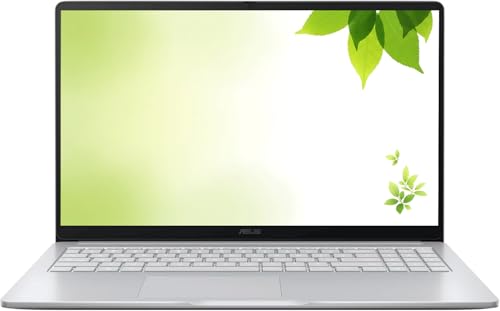
- Chrome OS for web-focused work
- 15-inch Full HD IPS display
- HDMI and 802.11ac Wi-Fi
Best For: Browser-based classes, streaming, and light tasks
Best Windows Value
HP 14-inch N150 Student Laptop

- Four-core Intel N150 processor and 8GB RAM
- One-year Microsoft 365 subscription included
- Lightweight design with Wi-Fi 6 and up to 11-hour battery
Best For: College students needing portable Windows productivity
Best Chromebook Pick
Lenovo 14-inch FHD Touchscreen Chromebook

- Full HD IPS touchscreen with touch navigation
- Octa-core MediaTek processor and Chrome OS
- 2.86-pound build with Wi-Fi 6 and webcam privacy shutter
Best For: Browser-based coursework, Google Classroom, and online learning
Best Storage Bundle
HP 14-inch N150 Windows 11 Pro Laptop

- Windows 11 Pro with lifetime Microsoft Office included
- 500GB external drive and useful accessories bundled
- Wi-Fi 6, anti-glare display, and 720p webcam
Best For: Students wanting a bundled Windows study setup with extra storage
Best Premium Student Laptop – Apple MacBook Air 13-inch M5
For students who want a lightweight laptop that can handle demanding coursework, creative projects, and multitasking, the 2026 MacBook Air with the M5 chip is a strong premium option. It combines 16GB of unified memory, a 512GB SSD, a sharp 13.6-inch Liquid Retina display, and up to 18 hours of battery life in a 2.71-pound design.
Best For: College students needing strong performance, long battery life, and a portable macOS laptop for classes and creative workflows.
Pros:
- M5 performance, 16GB unified memory, and a 512GB SSD support demanding multitasking.
- Up to 18 hours of battery life can cover a full day of classes.
- Liquid Retina display, 12MP Center Stage camera, and Wi-Fi 7 enhance schoolwork and video calls.
- MacOS and iPhone integration, Touch ID, and built-in security features add convenience.
Cons:
- Premium features and specifications may be more than budget-focused students need.
- The 13.6-inch screen may feel compact for students who prefer a larger workspace.
The MacBook Air is an especially capable choice for students balancing coursework with content creation or other demanding applications. Its lightweight build and long battery life make it easy to carry between classes, while the generous memory and storage provide useful room to grow.
Best Windows Student Laptop – Dell 15.6-Inch FHD Laptop
The Dell 15 is a practical Windows choice for students who want a larger screen, a full-size keyboard, and straightforward everyday performance. Its Intel Core 3 processor, 8GB of RAM, 512GB SSD, and 15.6-inch 1080p display are suited to schoolwork, browsing, entertainment, and common productivity tasks.
Best For: Students who prefer Windows, a roomy 15.6-inch display, and a keyboard with a separate numeric keypad.
Pros:
- 512GB SSD provides useful storage for documents, applications, and media.
- Full HD matte display includes a 120Hz refresh rate and anti-glare coating.
- Roomy keyboard, separate numeric keypad, and ergonomic lifted hinges support comfortable typing.
- Three USB ports, HDMI, Wi-Fi 6, and Bluetooth 5.3 offer flexible connectivity.
Cons:
- At 4.2 pounds, it is less portable than the smaller laptops in this roundup.
- Integrated Intel UHD Graphics are intended for everyday use rather than demanding graphics work.
- It does not include a fingerprint reader.
The Dell 15 emphasizes practicality over ultra-portability. Its larger display and comfortable, number-pad-equipped keyboard can be useful for writing, spreadsheets, and general coursework, while the SSD and Windows 11 Home keep it familiar for many school environments.
Best Value Mac for Students – Apple MacBook Neo 13-inch
The 2026 MacBook Neo offers a compact way for students to enter the Mac ecosystem without stepping up to the MacBook Air. Its A18 Pro chip, 8GB unified memory, 256GB SSD, and 13-inch Liquid Retina display are designed for everyday assignments, video calls, Apple Intelligence features, and general entertainment.
Best For: Students seeking a portable Mac for everyday coursework, note-taking, presentations, and video calls.
Pros:
- A18 Pro chip supports everyday schoolwork and Apple Intelligence features.
- Up to 16 hours of battery life suits long days away from an outlet.
- Lightweight 2.71-pound aluminum design is easy to carry around campus.
- 1080p camera, dual microphones, and side-firing speakers support online classes and presentations.
Cons:
- 8GB of unified memory and 256GB of storage provide less headroom than the MacBook Air configuration.
- The 13-inch display offers less workspace than a larger laptop.
MacBook Neo is a sensible fit for students whose main needs are web-based coursework, documents, presentations, and communication. Its compact design and long claimed battery life make it campus-friendly, while the lower memory and storage capacity are worth considering before purchase.
Best Budget Chromebook for Students – HP 14-Inch Chromebook
Students who mainly use browser-based tools and Google or Android apps may find this HP Chromebook a practical budget option. It pairs an Intel Celeron N4120 processor with 4GB of RAM, 64GB of eMMC storage, a 14-inch anti-glare HD display, and Chrome OS in an ultra-portable 3.4-pound design.
Best For: Students needing an affordable Chromebook for web browsing, online assignments, video calls, and basic schoolwork.
Pros:
- Chrome OS provides a simple, secure platform with access to Chrome and Android apps.
- Four-core Celeron processor is designed for basic multitasking and browser use.
- Includes USB-A, USB-C, HDMI, and headphone connectivity.
- Anti-glare display, webcam privacy feature, and claimed 14-hour battery life support student use.
Cons:
- 4GB of RAM and 64GB of eMMC storage are limited for demanding multitasking or large files.
- The 14-inch display has a modest 1366-by-768 HD resolution.
- Chrome OS may not support the full desktop software some courses require.
This HP is best viewed as a focused schoolwork machine rather than a high-performance laptop. It can be a good match for students whose classes rely on web apps, documents, and video conferencing, but software requirements and storage needs should be checked first.
Best All-Around Value – 15.6-inch FHD Student Laptop
For students who want a practical Windows computer for coursework, this 15.6-inch model combines a Full HD IPS display, 12GB of RAM, a 256GB SSD, and a one-year Microsoft 365 subscription. Its included AI assistant may also help with drafting, summaries, and notes.
Best For: Students handling web browsing, online classes, documents, streaming, and presentations.
Pros:
- Includes one year of Office 365 with Word, Excel, and PowerPoint.
- 12GB RAM and a 256GB SSD support everyday multitasking and fast file access.
- 15.6-inch 1920×1080 IPS display offers crisp text and wide viewing angles.
- USB-C, Mini HDMI, USB 3.2, microSD, and headphone connectivity provide useful flexibility.
Cons:
- Battery life is rated for up to six hours.
- Intel Celeron J4105 is intended for everyday tasks rather than demanding workloads.
- At 3.7 pounds, it is less portable than smaller student laptops.
This is a well-equipped choice for students who prioritize screen space, included productivity software, and generous memory over maximum performance or all-day battery life.
Best Lightweight Windows Option – HP 14-inch Essential Laptop
Students looking for a compact Windows laptop may appreciate this HP Essential model. It has a 14-inch 1920×1080 IPS display, a slim 0.71-inch profile, a 3.24-pound chassis, Windows 11, and Microsoft 365 support.
Best For: Students who value easy portability for basic school, office, and online tasks.
Pros:
- Slim, lightweight design is convenient for commuting between home and school.
- Full HD IPS display provides a detailed viewing area in a compact format.
- Intel N150 processor and PCIe SSD are suited to general productivity use.
- Includes HDMI, three USB ports, a microSD slot, and a one-year manufacturer warranty.
Cons:
- 4GB of RAM is limited and cannot be expanded according to the supplied specifications.
- The listed 128GB SSD leaves less local storage than some alternatives.
- The supplied notes identify business use rather than demanding creative or gaming workloads.
The HP is a sensible portability-first pick for students with straightforward computing needs, though its fixed 4GB memory makes it less suitable for heavy multitasking.
Best for Cloud-Based Coursework – ASUS 15-inch Chromebook
This renewed ASUS Chromebook is a straightforward option for students whose coursework fits Chrome OS and web-based applications. It pairs a 15-inch Full HD IPS display with 4GB of DDR4 memory, 128GB of storage, HDMI, and 802.11ac Wi-Fi.
Best For: Students using browser-based school tools, streaming, and lightweight everyday computing.
Pros:
- Chrome OS offers a simple platform for web-focused schoolwork.
- 15-inch 1920×1080 IPS display provides a spacious, detailed workspace.
- Includes HDMI and compatibility with external displays, peripherals, printers, and wireless accessories.
- Intel processor reaches speeds up to 2.8GHz for basic tasks.
Cons:
- 4GB RAM and 128GB storage limit multitasking and local file capacity.
- Chrome OS may not support Windows-only applications.
- As a renewed product, it has a listed 30-day warranty.
Choose this ASUS when a large display and browser-centered workflow matter more than Windows software compatibility or higher memory capacity.
Best Windows Value – HP 14-inch N150 Student Laptop
For students comparing laptops for students, this HP 14-inch model offers a practical Windows setup for coursework, documents, video calls, and everyday browsing. Its lightweight design, included Microsoft 365 subscription, and Wi-Fi 6 support make it well suited to school and mobile productivity.
Best For: College students who need a portable Windows laptop for Office work, online classes, research, and presentations.
Pros:
- Intel N150 processor with four cores and speeds up to 3.6GHz
- Includes a one-year Microsoft 365 subscription with Word, Excel, and PowerPoint
- Lightweight 3.24-pound design with up to 11 hours of battery life
- Wi-Fi 6, USB-C, HDMI, Bluetooth 5.4, and a 720p webcam
Cons:
- 128GB UFS storage may require careful file management
- 8GB RAM is best suited to everyday productivity rather than demanding workloads
- Windows 11 is provided in S mode
This HP is a sensible student pick when portability and built-in Office access matter more than high-end performance. It covers common academic tasks well while remaining easy to carry between classes.
Best Chromebook Pick – Lenovo 14-inch FHD Touchscreen Chromebook
Students looking for affordable laptops for students may appreciate this Lenovo Chromebook’s simple Chrome OS experience, Full HD touchscreen, and light 2.86-pound build. It is designed for browser-based schoolwork, Google Classroom, video meetings, and cloud-focused study.
Best For: Students who primarily use web apps, Google services, online classes, and browser-based assignments.
Pros:
- 14-inch 1920 x 1080 IPS touchscreen with wide viewing angles
- Octa-core MediaTek Kompanio 520 processor
- Lightweight design with Wi-Fi 6 connectivity
- 720p webcam with privacy shutter, dual-array microphones, and backlit keyboard
Cons:
- 4GB RAM and 64GB eMMC storage limit local multitasking and file capacity
- Chrome OS may not support traditional Windows or macOS desktop software
- External displays may require adapters
This Lenovo makes the most sense for a student whose workflow lives in the browser. The sharp touchscreen and compact design are useful for everyday schoolwork, while Chrome OS keeps maintenance and updates straightforward.
Best Storage Bundle – HP 14-inch N150 Windows 11 Pro Laptop
For students who want laptops for students with expanded accessories and storage, this HP combines Windows 11 Pro with an Intel N150 processor and a bundled 500GB external drive. The package is aimed at school productivity, remote classes, presentations, and general home use.
Best For: Students who want Windows 11 Pro, substantial bundled storage, and accessories for a ready-to-use study setup.
Pros:
- Windows 11 Pro with Microsoft Copilot and included lifetime Microsoft Office
- Intel N150 quad-core processor with speeds up to 3.6GHz
- Includes a 500GB portable external drive, wireless mouse, earbuds, HDMI cable, and USB extension cord
- Anti-glare 14-inch display, Wi-Fi 6, and 720p camera for online classes
Cons:
- Only 4GB of DDR5 RAM may constrain heavier multitasking
- Built-in display resolution is 1366 x 768
- Internal storage is 128GB UFS; the larger capacity depends on the external drive
This HP stands out for its bundled extras and Windows 11 Pro software rather than premium display quality. It can be a convenient choice for students who need accessories and extra file space without assembling a setup separately.
How We Picked the Best Laptops for Students
We evaluated these laptops by focusing on the needs most students share: dependable performance for schoolwork, a comfortable display and keyboard, useful battery life, portability, storage, operating-system compatibility, and overall value. We also considered whether each model is best suited to browser-based learning, Microsoft Office, video calls, multitasking, or more demanding creative work.
Specifications can vary by configuration, so verify the exact processor, memory, storage, included software, and warranty before ordering. A low price is appealing, but it may come with compromises such as limited RAM, smaller storage, or reduced upgradeability.
Quick Comparison
| Best For | Recommended Type | Why It Makes Sense |
|---|---|---|
| Premium all-around schoolwork | MacBook Air | Strong performance, portability, battery life, and a high-quality display |
| Apple users on a tighter budget | MacBook Neo | Compact macOS experience with Apple ecosystem integration |
| Microsoft 365 and Windows apps | Windows laptop | Broad software compatibility and familiar productivity tools |
| Web-based classes and basic assignments | Chromebook | Simple setup, low maintenance, and strong value |
| Large-screen study setup | 15.6-inch laptop | More room for documents, spreadsheets, and split-screen work |
Key Buying Factors for Laptops for Students
Performance and Memory
For browsing, documents, presentations, and video calls, an entry-level processor can be sufficient. Choose at least 8GB of RAM when possible, especially if you multitask. Models with 4GB are best reserved for lighter ChromeOS or basic Windows use.
Operating System and Software
Chromebooks work especially well with Google Workspace and browser-based learning platforms, but they may not run traditional desktop applications. Windows is the safer choice for specialized school software and Microsoft programs. macOS is a strong option for students already invested in Apple devices, though some courses require Windows-only applications.
Storage and Connectivity
A 128GB SSD or UFS drive is a practical starting point for documents and applications; 512GB offers more breathing room for media and larger projects. Chromebooks often rely on cloud storage, so check your internet access and offline needs. USB ports, HDMI, Wi-Fi quality, and headphone support can also matter in classrooms and dorms.
Display, Size, and Battery
A 13- or 14-inch laptop is easier to carry, while a 15.6-inch screen is more comfortable for spreadsheets and split-screen work. Look for a Full HD display when available. Battery estimates vary by usage, so prioritize independent testing and your typical workload rather than the advertised maximum alone.
Who Should Buy Which Laptops for Students?
- Choose the MacBook Air if you want the strongest premium all-purpose option for studying, writing, programming, and creative work.
- Choose the MacBook Neo if you prefer macOS and Apple services but want a smaller, potentially more affordable system.
- Choose a Windows model if your classes require Microsoft 365, desktop utilities, specialty software, or broad peripheral support.
- Choose a Chromebook if your work is mostly browser-based and you want a simple, affordable laptop with minimal maintenance.
- Choose a 15.6-inch model if screen space matters more than maximum portability.
Before buying, confirm your school’s software requirements, preferred operating system, minimum specifications, and any required ports. That final compatibility check can be more important than saving a small amount upfront.