The best laser engravers for small business can turn wood, leather, acrylic, coated metal, and other blanks into personalized products efficiently. The right machine depends on your product mix, production volume, available space, and comfort with setup and maintenance.
This roundup compares 10 machines across diode, IR, enclosed, portable, and higher-speed designs. Use the buying guide below to match features such as work area, camera alignment, ventilation, and automation to the way you plan to sell.
Best 10 Laser Engravers for Small Business Picks for 2026
Power Production Pick

- 40W laser with up to 600mm/s speed
- Large bed for signs and batch layouts
- Enclosed Class 1 design with rotary bundle
Best For: Large signs, batch work, and curved-item engraving
Batch Customization Pick

- 200 x 100mm galvo work area
- Built for repeat batches of small items
- Supports LightBurn and LaserGRBL
Best For: Small personalized products and repeat orders
Beginner-Friendly Enclosed Pick

- Pre-assembled with camera auto positioning
- Up to 600mm/s speed and 0.05mm accuracy
- Roller kit supports tumblers and bottles
Best For: Beginners making gifts and curved-item projects
Flexible Craft Business Pick

- 15W engraving and cutting capability
- 400 x 400mm work area
- Offline touchscreen tools and 400+ projects
Best For: Mixed craft products, signs, and personalized collections
Most Versatile Enclosed Pick

- Class 1 enclosed design for indoor crafting
- Dual cameras enable accurate material placement
- Optional modules expand printing and material capabilities
Best For: Home-based makers and small businesses producing personalized gifts and décor
Best Large-Format Value
LONGER Ray5 10W Laser Engraver
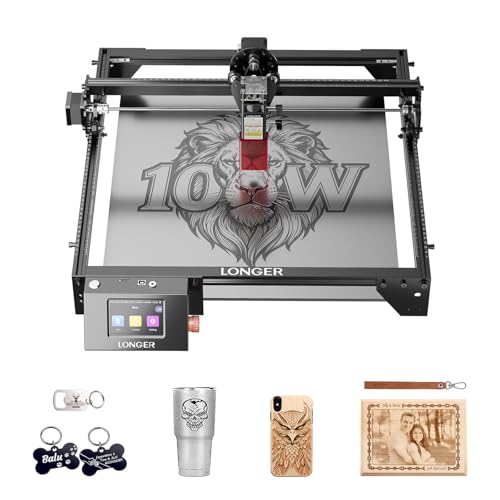
- 400 × 400 mm work area for larger projects
- Up to 24,000 mm/min engraving speed
- Supports LightBurn, LaserGRBL, Wi-Fi, and offline control
Best For: Workshops and small production setups needing room for signs and batch projects
Best for On-Site Personalization

- 15W diode and 5W IR lasers cover varied materials
- 50MP camera supports precise small-item alignment
- Portable enclosed design is built for on-site customization
Best For: Mobile sellers and shops offering fast personalization at events or retail locations
Best Compact Workhorse

- Near-A4 work area in a compact design
- 10W output with 0.01mm precision
- Wireless, offline, LightBurn, and LaserGRBL support
Best For: Small shops making compact personalized products
Best Touchscreen Simplicity

- Built-in 3.5-inch touchscreen and AlgoOS
- Draw, type, upload, or engrave offline
- Class 1 safety features with automatic door pause
Best For: Beginners and mobile-oriented custom-product sellers
Best Ready-to-Start Kit

- Includes enclosure, honeycomb bed, and 13 materials
- 0.01mm precision across 300+ claimed materials
- Compatible with major desktop and mobile software
Best For: Beginners starting small-batch personalized production
Power Production Pick – xTool S1 40W Rotary Bundle
For small businesses handling larger signs, batches of tags, and varied materials, the xTool S1 is a high-output option among laser engravers for small business. Its 40W laser, 600mm/s speed, large bed, and included rotary bundle are suited to both production work and curved items.
Best For: Small businesses producing large signs, batch orders, and rotary projects.
Pros:
- 40W laser can cut up to 18mm cherry wood in a single pass, according to the supplied specifications.
- Large 23.93 x 15.16-inch bed supports sizable layouts and batch work.
- AutoPassthrough supports projects up to 118 inches long.
- Enclosed Class 1 design includes flame sensors, lid-open detection, and an emergency stop.
Cons:
- At 86.8 pounds, it is substantially heavier than the other listed options.
- The feature set and rotary bundle may be more machine than a very small operation needs.
The S1 stands out when throughput, working area, and cutting power matter more than a compact footprint. Its preset-driven XCS software and extensive tutorials also reduce the learning curve for new operators.
Batch Customization Pick – Genmitsu Kintix 10W
The Genmitsu Kintix is designed specifically for repeat orders, making it a focused choice among laser engravers for small business. Its 200 x 100mm X-Y galvo work area lets you arrange multiple small products and process them in one pass.
Best For: Etsy sellers, gift shops, and studios producing dog tags, keychains, and name cards.
Pros:
- Galvo scanning supports batch customization without repositioning each item.
- Works with anodized aluminum, wood, leather, slate, cork, and plastic.
- LightBurn and LaserGRBL compatibility supports established design workflows.
- Motorized focus and red-dot positioning simplify alignment.
Cons:
- The 200 x 100mm work area is intended for smaller products rather than large signs.
- Bare stainless steel requires a separately sold laser marking solution.
- Bare brass, copper, and gold require UV or fiber lasers, according to the supplied notes.
Choose the Kintix when consistent small-item batches are the priority. It is less versatile for large-format work, but its galvo setup and compact 10.83-pound body suit a dedicated customization station.
Beginner-Friendly Enclosed Pick – Creality Falcon A1 10W
The Creality Falcon A1 combines pre-assembled operation with camera-assisted positioning, giving small businesses a straightforward way to start producing personalized goods. It is a practical choice among laser engravers for small business when ease of setup and enclosed operation are important.
Best For: Beginners and small shops making gifts, detailed wood projects, and curved items such as tumblers.
Pros:
- Pre-assembled design is ready to use without an involved setup.
- Built-in camera helps recognize materials and position projects.
- Up to 600mm/s speed and stated 0.05mm engraving accuracy support detailed work.
- Roller kit enables engraving on curved or round objects.
Cons:
- The 460 x 346mm honeycomb panel compatibility is specifically limited, according to the notes.
- Highly reflective materials, including mirror-finished metals and mirrored acrylic, are prohibited.
- The listed 10W model is positioned for lighter cutting than higher-powered machines.
The Falcon A1 is a strong fit for operators who want minimal assembly and guided positioning. Its enclosed Class 1 design, camera, and software compatibility make the workflow approachable, while the material restrictions should be reviewed before buying.
Flexible Craft Business Pick – AlgoLaser MK3 15W
The AlgoLaser MK3 balances engraving, cutting, and offline design tools for makers developing a broader product range. Its 400 x 400mm work area and batch-layout features make it a flexible option among laser engravers for small business.
Best For: Craft businesses creating signs, ornaments, layered projects, gifts, and coordinated product collections.
Pros:
- 15W diode laser supports both engraving and cutting applications.
- 400 x 400mm work area accommodates signs, sets, and multiple components.
- Offline AlgoOS includes touchscreen tools and more than 400 built-in projects.
- Compatible with LightBurn and LaserGRBL for advanced computer-based design.
Cons:
- It arrives 95% pre-assembled, so some setup remains.
- The included AlgoType tool is specified for English letters, numbers, and punctuation.
- Compared with the xTool S1, its 15W output is less suited to especially demanding cuts.
The MK3 is appealing for a small operation that wants one machine for mixed craft work rather than a production-only engraver. Offline controls can simplify quick jobs, while the larger bed and software compatibility leave room to expand.
Most Versatile Enclosed Pick – xTool M2 10W Laser Engraver
For small businesses that need a flexible, beginner-friendly machine, the xTool M2 combines a 10W diode laser, dual-camera positioning, and a fully enclosed Class 1 design. It handles materials including wood, leather, felt, fabric, paper, and cardstock, while optional modules can add color printing or fine engraving on metal and plastic.
Best For: Home-based makers and small businesses creating personalized gifts, décor, paper goods, and other varied craft products.
Pros:
- Dual cameras support accurate “Place & Go” positioning and help reduce material waste.
- Class 1 enclosed design is suited to home crafting and indoor use.
- xTool Studio includes templates and an AI image generator for a gentler learning curve.
- Optional modules expand the machine into color printing and infrared engraving.
Cons:
- The CMYK Inkjet module and RA3 Lite Rotary are sold separately.
- The 10W diode configuration may be less suitable for businesses needing specialized metal marking without the optional 3W IR laser.
The M2 is a strong all-around choice when safety, ease of use, and material variety matter more than maximum production speed. Budget for add-ons if your product line requires color printing, rotary work, or metal-focused engraving.
Best Large-Format Value – LONGER Ray5 10W Laser Engraver
The LONGER Ray5 gives small businesses a roomy 400 × 400 mm work area, useful for signs, décor, gifts, and larger wood projects. Its 10W dual-beam laser, touchscreen, multiple connection options, and compatibility with LaserGRBL and LightBurn make it practical for both expanding makers and more experienced operators.
Best For: Workshops, classrooms, hobby businesses, and small production setups that need a generous work area and the option to control multiple machines.
Pros:
- 400 × 400 mm work area accommodates larger projects and batch-oriented work.
- Engraving speeds are listed up to 24,000 mm/min, with a 0.06 × 0.06 mm laser spot.
- Supports USB, TF card, Wi-Fi, app control, LaserGRBL, LightBurn, and LaserBurn.
- Emergency stop, motion protection, overheat detection, covers, and safety goggles add protective features.
Cons:
- The open-style machine format may require more attention to workspace setup and operator safety than a fully enclosed model.
- Its 9.38-pound weight and listed dimensions may be less convenient for frequent relocation.
- The larger work area may be unnecessary for businesses focused only on small personalized items.
Choose the Ray5 when workspace and throughput flexibility are priorities. Its connectivity and software support also make it a practical platform for a small business that may add operators or machines over time.
Best for On-Site Personalization – xTool F2 Dual Laser Engraver
For small businesses that personalize products at markets, fairs, or retail locations, the xTool F2 pairs a 15W diode laser with a 5W IR laser in a compact enclosed unit. Its 50MP camera, rapid operation, and support for more than 300 materials make it especially capable for metal color marking, small-batch work, and portable customization services.
Best For: Mobile personalization businesses and shops engraving small items, metal products, cards, coasters, and phone cases.
Pros:
- Dual lasers support metal color marking, 3D embossing, and cutting thicker materials.
- 50MP camera provides workspace visualization and alignment accuracy of up to 0.1 mm.
- Listed speeds reach 6000 mm/s, with a card engraving claimed at three seconds.
- Fully enclosed, fully assembled, and lightweight at 4.6 kg for easier on-site use.
Cons:
- The F2 is identified as a Class 4 laser engraver, so its safety requirements deserve careful attention.
- The RA3 and Slide Extension accessories are optional rather than included.
- A purifier is optional, which may matter for frequent indoor operation involving fumes.
The F2 stands out for businesses selling customization as a service rather than only producing items in a fixed workshop. Its dual-laser setup and camera-driven positioning offer strong flexibility, but factor in safety procedures and accessories for your intended workflow.
Best Compact Workhorse – K15 Pro 10W Laser Engraver
For small businesses seeking laser engravers for small business use, the K15 Pro combines a compact A4 work area with a 10W diode laser, fast operation, and offline batch control. Its broad material compatibility and optional upgrades make it suitable for personalized products and repeat orders.
Best For: Small-business makers producing signs, coasters, keychains, pet tags, jewelry blanks, and other compact custom goods.
Pros:
- A near-A4 work area fits common projects while remaining compact enough for a desk or shelf.
- Verified 10.36–10.58W output, 0.01mm precision, and speeds up to 15,000mm/min support detailed production work.
- Works with CutLabX, LightBurn, and LaserGRBL, with wireless and TF-card offline control.
- Includes starter materials, tools, and safety glasses, with a three-minute assembly claim.
Cons:
- The standard 10W diode is not the same as a dedicated bare-metal engraving setup; the optional IR head is needed for that upgrade path.
- Its A4-sized work area may limit larger signs and batches of oversized items.
The K15 Pro is a flexible entry point for a small shop that values portability and repeatable detail. Its optional rotary, air, and IR accessories also provide room to expand as product offerings grow.
Best Touchscreen Simplicity – AlgoLaser Pixi 10W
The AlgoLaser Pixi is one of the more approachable laser engravers for small business owners who want to create without relying on a computer. Its touchscreen, AlgoOS system, and wireless or offline workflows simplify personalized products, signage, and gift production.
Best For: Entrepreneurs, educators, and beginners customizing leather goods, logos, gifts, wood, glass, and acrylic projects.
Pros:
- The 3.5-inch touchscreen supports drawing, typing, uploading designs, and direct engraving.
- AlgoSketch and AlgoType help turn hand-drawn artwork and text into usable designs.
- Supports USB-C, Wi-Fi, smartphone and tablet control, plus offline engraving.
- Its auto-pause door, password lock, fault alerts, and Class 1 rating add multiple safety features.
Cons:
- The supplied details emphasize engraving versatility; cutting capacity and maximum work area are not specified.
- Transparent materials may require colored backers for high-contrast reverse engraving.
- Safety guidance still calls for ventilation, protective goggles, and supervision.
With no assembly required and a touchscreen-led workflow, the Pixi is well suited to small operators who prioritize convenience. It is especially appealing for quick custom work and mobile-friendly production.
Best Ready-to-Start Kit – BlazeX M3 10W Laser Engraver
The BlazeX M3 is a practical choice among laser engravers for small business applications when a bundled setup matters. It pairs a 10W, 0.01mm-precision module with an enclosure, honeycomb bed, materials, and safety-oriented controls for small-batch production.
Best For: Beginners and creators making personalized jewelry, wood and acrylic pieces, leather goods, and small production runs.
Pros:
- Includes a protective enclosure, honeycomb bed, tools, goggles, and 13 engraving materials.
- Claims 0.01mm precision and compatibility with more than 300 materials, including wood, leather, glass, and coated metal.
- Integrated fan, tilt detection, and automatic lid-open shutoff support a quieter, safer workspace.
- Works with LightBurn, LaserGRBL, and CutLabX across Windows, macOS, iOS, and Android.
Cons:
- The 10W module may require multiple passes or accessories for more demanding cutting tasks.
- Rotary, air-assist, and purifier capabilities require optional add-ons.
The M3 offers strong out-of-box value for a new maker because the core work-surface and safety accessories are already included. Its software compatibility and upgrade ecosystem also make it a reasonable platform for expanding a small product line.
How We Picked the Best Laser Engravers for Small Business
We focused on features that directly affect a small commercial operation: usable work area, laser power, cutting and engraving capability, positioning accuracy, speed, software, safety design, and ease of setup. We also considered whether each machine supports repeatable production rather than only occasional hobby projects.
Because business needs vary, this list includes enclosed and open-frame machines, compact models, portable options, and systems with specialized capabilities such as infrared marking, camera alignment, offline controls, or batch customization. Always verify the manufacturer’s current material compatibility, warranty terms, and local ventilation requirements before purchasing.
Quick Comparison
| Best For | Prioritize | Most Important Features |
|---|---|---|
| Personalized gifts and signage | Versatility | Large bed, reliable autofocus, broad material support |
| High-volume small items | Throughput | Fast motion, batch workflow, camera positioning |
| Metal marking | Material range | IR laser capability or confirmed metal compatibility |
| Home-based businesses | Safety and space | Fully enclosed design, filtration or exhaust options |
| Mobile or market vendors | Portability | Compact footprint, touchscreen or offline operation |
Key Buying Factors for Laser Engravers for Small Business
Laser Type and Power
Diode lasers are commonly used for wood, leather, cardboard, and some acrylic products. Higher output generally improves cutting speed and the thickness you can handle, but it does not make every material suitable. For metal products, look for a machine specifically designed for marking metal, such as an IR-equipped system, and confirm the exact finishes it supports.
Work Area and Production Speed
Measure your typical blanks before choosing a machine. A larger bed reduces repositioning for signs and batches, while high advertised speed matters most when paired with efficient setup and repeatable alignment. For frequent orders, camera-assisted placement and batch tools can save more time than raw motion speed alone.
Safety, Ventilation, and Workspace
Enclosed Class 1 designs are often easier to manage in a home studio, but they still require appropriate exhaust or filtration for the materials being processed. Open-frame machines need a controlled workspace, eye protection, fire precautions, and dependable ventilation. Never engrave unknown plastics or materials that may release hazardous fumes.
Software and Workflow
Check operating-system compatibility, supported file formats, camera features, autofocus, offline controls, and whether the software supports repeated jobs. A touchscreen or onboard controller can be valuable at markets or in a workshop where a dedicated computer is inconvenient.
Who Should Buy Which Laser Engravers for Small Business?
Choose a larger, faster machine if you make signs, batches of tags, or repeated wholesale orders. An enclosed model is a strong fit for home-based sellers who prioritize contained operation and easier positioning. Compact or portable machines suit occasional custom work, craft fairs, and businesses with limited bench space.
If your catalog centers on coated metal, jewelry, or detailed marks, select a model with confirmed metal-marking capability instead of assuming a diode laser will handle bare metal. For mixed products, favor versatility, camera alignment, dependable software, and a work area that accommodates your largest regular order. Finally, budget for ventilation, air assistance, spare lenses or nozzles, materials testing, and maintenance—not just the machine itself.