Choosing among photo printers for professionals means balancing color accuracy, print size, media support, and long-term running costs. The best option for a studio or serious creator is not always the biggest printer—it is the one that fits your workflow.
Below, we focus on models that can deliver dependable, high-quality output for portfolios, proofs, fine art, and client work, with a mix of desktop and wide-format choices.
Best 10 Photo Printers for Professionals Picks for 2026
Studio-Grade Large-Format
Canon imagePROGRAF PRO-1100 17” Wireless Photo Printer

- 11 pigment inks plus Chroma Optimizer
- 17 x 22-inch support with borderless printing
- Color calibration and workflow management tools
Best For: Professional photographers and fine-art printing
Compact Pro Quality
Epson SureColor P700 13-Inch Photo Printer
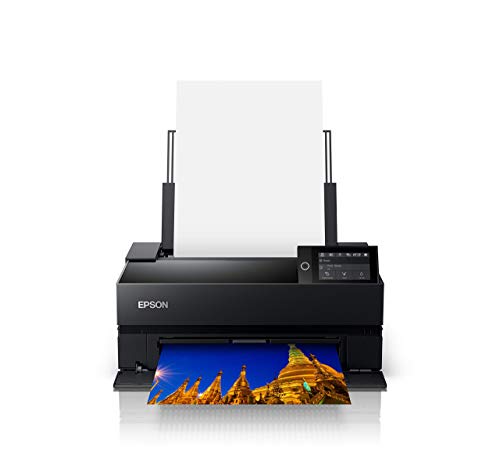
- UltraChrome PRO10 ink with Violet
- No Photo Black/Matte Black switching
- Roll and thick-sheet media support
Best For: Desktop pro printing with rich color and deep blacks
Wide-Format Fine Art
Canon PRO-2100 24-Inch Printer
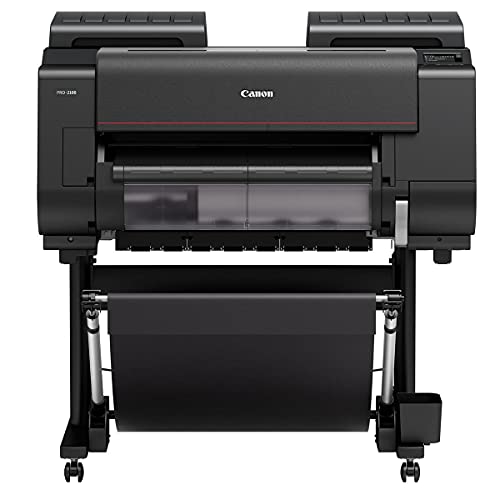
- 24-inch wide-format media support
- Pigment ink set with Chroma Optimizer
- Made for photography, fine art, and design
Best For: Studios needing 24-inch roll printing
Fast Desktop Pro
Canon PIXMA PRO-200S 13” Wireless Photo Printer

- 8-color dye ink for vibrant prints
- Borderless printing up to 13 x 19 inches
- Fast 8 x 10 output and 3-inch LCD
Best For: Photographers needing quick desktop prints and proofs
EcoTank Value Wide-Format

- Cartridge-free 6-color ink system
- Wide-format printing up to 13 x 19 inches
- All-in-one scan and copy support
Best For: Professionals who need lower-cost wide-format photo printing
Gallery-Quality Dye Ink
Canon PIXMA PRO-100 Professional Photo Printer
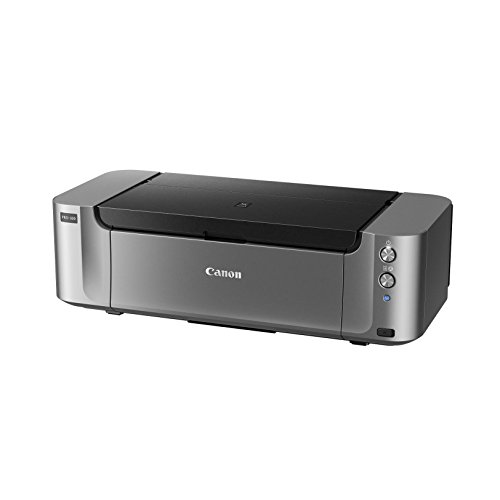
- 8 dye inks with 3 grayscale inks
- Prints up to 13 x 19 inches
- 4800 x 2400 dpi detail
Best For: Photographers focused on color fidelity and black-and-white prints
Studio-Ready Color Printer

- 8-color dye ink for vibrant tonal range
- Borderless prints up to 13x19 inches
- A3+ photo prints in as little as 90 seconds
Best For: Photographers and designers needing compact, high-quality color prints
Large-Format Production Printer

- Prints up to 44 inches wide for large-format work
- 12 pigment-based inks with cost-conscious tank sizes
- Color Density Sensor supports automatic calibration
Best For: Wide-format studios and color-critical production workflows
Compact Pigment Photo Printer

- 9-color pigment ink with Chroma Optimizer
- Matte Black ink boosts black density and dark detail
- 3-inch color LCD simplifies status checks
Best For: Photographers wanting a compact, high-quality pigment printer
Studio-Grade Large-Format – Canon imagePROGRAF PRO-1100 17” Wireless Photo Printer
If you’re comparing photo printers for professionals, the Canon imagePROGRAF PRO-1100 is built for large, gallery-ready output with strong color control and gloss handling. Its 11 pigment-based ink system with Chroma Optimizer is designed to improve gloss uniformity, reduce bronzing, and expand the usable color range for demanding photo work.
Best For: Professional photographers and fine-art creators who need a 17-inch printer for exhibition prints, portfolio pieces, and controlled studio workflows.
Pros:
- 11 pigment-based inks plus Chroma Optimizer for broad gamut and improved gloss consistency
- Supports 17 x 22-inch media and borderless printing for larger-format output
- Built-in workflow tools like Media Configuration, Color Calibration, and Accounting Manager
- Anti-clogging print head, air feeding system, and L-COA PRO processing for reliable precision
Cons:
- Print-only design means no scan or copy functions
- Large physical footprint and 83-pound weight
- Best suited to users who actually need wide-format capabilities
For pros who care about consistency as much as image quality, this model focuses on the details that matter in a print shop or serious studio. It is a strong fit when your work demands both size and refined output control.
Compact Pro Quality – Epson SureColor P700 13-Inch Photo Printer
The Epson SureColor P700 is a strong pick among photo printers for professionals who want desktop convenience without giving up serious print quality. Its UltraChrome PRO10 ink set with Violet is aimed at a wide color gamut, while dedicated Photo Black and Matte Black nozzles eliminate switching when moving between paper types.
Best For: Professional photographers, graphic designers, and exhibition-focused users who need a compact 13-inch printer with rich color and deep blacks.
Pros:
- UltraChrome PRO10 with Violet for vibrant, wide-gamut color
- No Photo/Matte Black switching thanks to dedicated nozzles
- Carbon Black Driver mode for stronger Dmax on glossy papers
- Roll and sheet handling up to 1.5 mm thick, plus wireless and touchscreen control
Cons:
- Maximum media size is 8.5 x 14 inches, so it is not a wide-format unit
- Print speed is relatively slow at 1 page per minute
- Designed exclusively for Epson cartridges
If your priority is high-end image quality in a smaller footprint, the P700 delivers a balanced mix of precision, flexibility, and presentation-ready output. It is especially appealing for photographers who print often but do not need 17- or 24-inch width.
Wide-Format Fine Art – Canon PRO-2100 24-Inch Printer
For photographers and artists comparing photo printers for professionals, the Canon PRO-2100 stands out as a 24-inch wide-format option built for fine art, graphic design, and serious image production. It includes a full pigment ink set with Chroma Optimizer, which is aimed at strong color, gloss control, and high-end print presentation.
Best For: Fine-art photographers, studios, and designers who need 24-inch roll capability and professional-grade wide-format output.
Pros:
- 24-inch maximum media size with roll system support
- Pigment ink set includes Photo Black, Matte Black, and Chroma Optimizer
- Built for professional photography, fine art, and graphic design use cases
- 1-year on-site warranty from Canon through the reseller listing
Cons:
- Large footprint makes it a dedicated workspace machine
- Print-only design with no scan or copy functions
- USB-based connectivity may be limiting for some setups
This is a serious production printer for users who need wider media and a more specialized output workflow. If your work regularly moves beyond desktop sizes, the PRO-2100 gives you the room and ink set to handle it.
Fast Desktop Pro – Canon PIXMA PRO-200S 13” Wireless Photo Printer
The Canon PIXMA PRO-200S is a practical option in photo printers for professionals who want vibrant color output and quicker turnaround in a compact desktop format. Its 8-color dye ink system is designed for high-quality prints, and it supports borderless printing up to 13 x 19 inches with strong speed for common sizes.
Best For: Professional photographers who want a fast 13-inch photo printer for portfolios, proofs, and small-to-medium format prints.
Pros:
- 8-color dye-based ink system for vibrant, high-quality prints
- Borderless output up to 13 x 19 inches
- Fast print times, including an 8 x 10 bordered print in 53 seconds
- 3.0-inch color LCD for checking ink levels and printer status
Cons:
- Maximum media size is listed as A4, so advanced sizing needs careful checking
- Print-only device with no scan or copy functions
- Uses dye ink, which may not suit every archival workflow
This model is a good fit when you want pro-level photo output without moving into bulky wide-format territory. It leans toward speed and vibrant color, making it useful for proofing and everyday studio printing.
EcoTank Value Wide-Format – Epson EcoTank Photo ET-8550
If you want photo printers for professionals that can also handle everyday office tasks, the Epson EcoTank Photo ET-8550 is built around low-cost, cartridge-free printing. Its 6-color Claria ET Premium ink system is aimed at lab-quality photos, sharp text, and creative projects, while the wide-format design supports media up to 13 x 19 inches.
Best For: Photographers and small studios that print large-format photos, proofs, and mixed creative work in-house.
Pros:
- Cartridge-free EcoTank system lowers running costs and reduces cartridge waste.
- 6-color ink set is designed for vibrant color and sharp text.
- Supports wide-format printing up to 13 x 19 inches.
- All-in-one design adds scan and copy functions for a fuller workflow.
Cons:
- Physical size is substantial at 24.5 pounds and a large footprint.
- Print speed is modest for color work at 12 pages per minute.
- Uses a 100-sheet maximum input capacity, so heavy-volume jobs may need more paper refills.
Overall, the ET-8550 stands out when cost per print and wide-format flexibility matter more than speed. It is a strong fit for professionals who want vivid photo output without the recurring expense of cartridges.
Gallery-Quality Dye Ink – Canon PIXMA PRO-100 Professional Photo Printer
Among photo printers for professionals, the Canon PIXMA PRO-100 is aimed squarely at high-end image output. Its 8 dye-based inks include three dedicated grayscale inks, and Canon’s Optimum Image Generating System is designed to place the right ink combination for intended color and tone. It also supports prints up to 13 x 19 inches.
Best For: Photographers who prioritize color accuracy, smooth gradients, and black-and-white print quality.
Pros:
- 8 dye-based inks help deliver smooth gradients and rich color.
- Three grayscale inks are tailored for black-and-white prints.
- Supports professional-quality output on media up to 13 x 19 inches.
- 4800 x 2400 dpi resolution is built for detailed photo printing.
Cons:
- Very slow rated print speeds, at 1 page per minute for color and black and white.
- Weighs 43.4 pounds, so it is not especially easy to move.
- Manual duplexing only, so double-sided jobs are less convenient.
The PRO-100 makes sense when final print quality matters far more than speed. For a professional photo workflow centered on gallery-style output, it remains a specialized and capable choice.
Compact Wide-Format Photo – Epson Expression Photo HD XP-15000
If you need photo printers for professionals but want a smaller desktop footprint, the Epson Expression Photo HD XP-15000 is worth a look. It prints borderless photos up to 13 x 19 inches and uses a 6-color Claria Photo HD ink set with red and gray inks for a wider color gamut and stronger black-and-white output.
Best For: Professionals who want wide-format photo printing in a compact, desktop-friendly body.
Pros:
- Supports borderless printing up to 13 x 19 inches.
- 6-color ink system includes red and gray inks for expanded gamut.
- 50-sheet rear tray handles specialty media like cardstock.
- Compact wide-format design is 30% smaller than its predecessor.
Cons:
- Uses genuine Epson cartridges only, so ink flexibility is limited.
- Output sheet capacity is 20, which is modest for larger jobs.
- Print-only design means no built-in scan or copy features.
The XP-15000 is a strong choice if you want a space-saving printer that still reaches 13 x 19-inch photo output. It is especially appealing for professionals printing photos and specialty media from a desk setup.
Studio-Ready Color Printer – Canon PIXMA PRO-200S Bundle
If you want photo printers for professionals that can deliver rich color and fast turnaround, the Canon PIXMA PRO-200S bundle is built for serious photo and fine-art output. Its 8-color dye ink system is tuned for vibrant tonal range, and it can produce borderless prints up to 13×19 inches, making it a practical fit for high-impact presentation work.
Best For: Photographers and designers who need compact, gallery-worthy color printing with quick output.
Pros:
- 8-color dye ink system delivers rich, vibrant color and strong tonal range.
- Borderless printing up to 13×19 inches supports large photo and art prints.
- A3+ prints can be produced in as little as 90 seconds for faster workflows.
- Professional Print & Layout software and ICC profile support help with screen-accurate color.
Cons:
- Print-only design means it is not meant for copying or scanning tasks.
- Maximum sheet capacity is limited to 1, so high-volume paper handling is not its strength.
- As an inkjet photo printer, it is focused on output quality rather than office versatility.
Overall, the PRO-200S bundle makes sense if your priority is polished color output in a relatively compact studio-friendly footprint. It is especially appealing for creators who value accuracy, speed, and presentation-ready results.
Large-Format Production Printer – Canon imagePROGRAF PRO-4100
For photo printers for professionals that are built around large-format production, the Canon imagePROGRAF PRO-4100 is aimed at high-end output and reliable calibration. It supports prints up to 44 inches wide, uses 12 pigment-based LUCIA PRO ink tanks, and includes a color density sensor for consistent reproduction across serious print workflows.
Best For: Studios and print environments that need wide-format, color-critical output.
Pros:
- Supports large-format printing up to 44 inches wide.
- 12 pigment-based ink tanks are designed for extended use and cost-efficient ink management.
- Color Density Sensor supports automatic calibration and consistent color reproduction.
- L-COA PRO Image Processing Engine helps process large prints efficiently.
Cons:
- Very large and heavy at 345 pounds, so it needs dedicated space.
- Manual duplex and print-only functionality limit general office use.
- Best suited to specialized workflows rather than compact studios.
The PRO-4100 is a strong fit when print size, consistency, and pigment-based output matter more than footprint. It is a serious production machine for professionals working at large scales.
Compact Pigment Photo Printer – Canon imagePROGRAF PRO-310
If you are comparing photo printers for professionals and want a compact model focused on gallery-quality output, the Canon imagePROGRAF PRO-310 is a compelling option. Its 9-color pigment ink system with Chroma Optimizer is built for refined print quality, while features like anti-clogging support and skew correction help keep everyday use practical.
Best For: Professional photographers who want a smaller pigment printer for high-quality photo printing.
Pros:
- 9-color pigment system with Chroma Optimizer is designed for gallery-quality prints.
- Matte Black ink improves black density and dark-area reproduction.
- Anti-clogging system and skew correction add convenience for routine printing.
- 3-inch color LCD makes ink and status checks easy.
Cons:
- Print speed is modest at 2 pages per minute for color and black and white.
- Maximum media size is A4, so it is not built for very large output.
- Print-only design means it does not handle scanning or copying.
In practice, the PRO-310 is a strong choice for photographers who value pigment quality and manageable size over speed. It gives you a professional photo workflow without the footprint of a large-format system.
How We Picked These Photo Printers for Professionals
We prioritized printers known for strong image quality, pigment or high-grade dye systems, wide color gamuts, and practical features that matter in real production use. We also considered maximum print size, media flexibility, wireless connectivity, and whether the printer is better suited to studio proofs, gallery prints, or high-volume jobs.
For Photo Printers for Professionals, reliability and consistency matter as much as peak resolution. That is why we favored models with established pro-grade ink systems, solid paper handling, and support for specialty media.
Quick Comparison
In general, desktop 13-inch models are best for photographers who need excellent quality in a smaller footprint, 17-inch models offer more room for larger prints and proofing, and 24-inch to 44-inch printers are built for studios, labs, and fine art workflows where size and throughput are priorities.
Best for Different Needs
If you want a compact pro setup, look at 13-inch printers. If you regularly print exhibition pieces or panoramic work, a 17-inch model gives more flexibility. For serious production and large-format output, the wider Canon imagePROGRAF options stand out.
Key Buying Factors for Photo Printers for Professionals
Ink type: Pigment inks usually offer better longevity and are preferred for archival and fine art printing, while dye inks can produce vibrant color and strong gloss finishes.
Print width: Choose your maximum width based on the largest work you actually sell or display. Oversizing can raise cost and footprint quickly.
Color accuracy: Look for strong software support, calibration options, and a proven color management workflow if matching client expectations is critical.
Media handling: Thick fine art paper, glossy photo paper, and borderless printing support can all affect your final results.
Running costs: Ink usage, cartridge size, and maintenance should factor into your budget, especially for busy studios.
Who Should Buy Which Photo Printers for Professionals?
Choose a 13-inch printer if you are an advanced hobbyist, wedding photographer, or small studio that values desktop convenience. Step up to 17-inch if you need more size flexibility and better room for proofs or portfolio prints. Go with 24-inch or 44-inch models if you produce gallery work, sell large-format prints, or need efficient throughput for clients.
Among Photo Printers for Professionals, the right choice comes down to your output size, color demands, and how often you print. Match the printer to your workflow, and you will get better results with less waste.